Yidun - NECaptcha
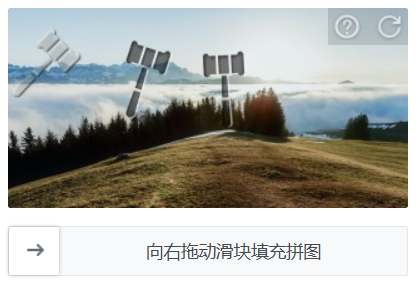
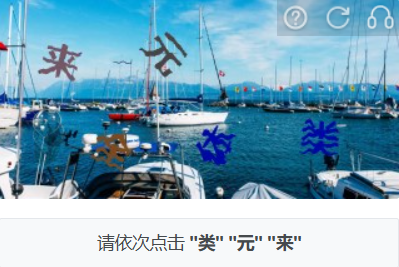
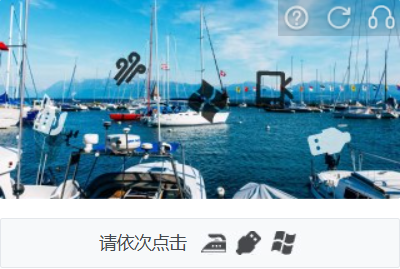
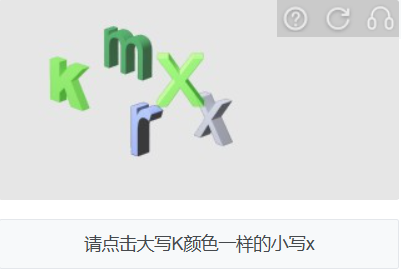
任务示例
- Jigsaw
- Jigsaw (slide_trajectory)
- Picture-click
- Avoid
- Icon-click
- Inference
- Sense
- Space-inference




CapMonster Cloud 默认通过内置代理工作——这些代理已包含在费用内。仅当网站不接受令牌或对内置服务的访问受限时,才需要指定您自己的代理。
如果代理按 IP 授权,请将地址 65.21.190.34 加入白名单。
请求参数
重要:某些参数的值是动态的——它们会在包含 Yidun 的页面每次渲染时发生变化。
请在创建任务之前立即提取这些参数,以避免在求解过程中出现错误。
有关参数提取的示例,请参阅如何获取所有必要的参数。
type<string>requiredYidunTask
websiteURL<string>required验证码页面的完整网址。
websiteKey<string>required页面中找到的 siteKey 参数的值(查看下方示例了解如何获取)。
userAgent<string>optional浏览器的 User-Agent。
请仅传递最新的 Windows 系统 UA,目前推荐使用:userAgentPlaceholder
yidunGetLib<string>optional加载验证码的 JavaScript 文件路径。
重要:请提供完整链接(以 https:// 开头)。
推荐在页面中存在 challenge、hcg 或 hct 字段时使用。
yidunApiServerSubdomain<string>optionalYidun API 服务器的子域名。
重要:必须不同于默认的 c.dun.163.com 或 c-v6.dun.163.com。
仅输入域名,不要包含 https:// 前缀。
当使用自定义服务器(常见于企业版本)时是必填项。
challenge<string>optional当前验证码的唯一标识符。
通常在验证码初始化或展示时通过网络请求传输。
是 Enterprise 验证码的标志。
hcg<string>optional验证码的哈希值,用于构建请求。
通常与 challenge 一起提供。
hct<integer>optional时间戳,用于验证 Enterprise 版本的验证码。
proxyType<string>optionalhttp - 普通 http/https 代理;
https - 如果 http 不工作,可以尝试此选项(部分自定义代理要求);
socks4 - socks4 代理;
socks5 - socks5 代理。
proxyAddress<string>optional代理的 IPv4 或 IPv6 地址。禁止以下情况:
- 使用透明代理(即暴露真实客户端 IP);
- 使用本地代理地址。
proxyPort<integer>optional代理端口。
proxyLogin<string>optional代理用户名。
proxyPassword<string>optional代理密码。
创建任务的方法
- YidunTask(无代理)
- YidunTask(使用代理)
https://api.capmonster.cloud/createTask
请求
{
  "clientKey": "API_KEY",
  "task":
  {
    "type": "YidunTask",
    "websiteURL": "https://www.example.com",
    "websiteKey": "6cw0f0485d5d46auacf9b735d20218a5",
    "userAgent": "userAgentPlaceholder"
  }
}
响应
{
  "errorId":0,
  "taskId":407533077
}
https://api.capmonster.cloud/createTask
请求
{
  "clientKey": "API_KEY",
  "task":
  {
    "type": "YidunTask",
    "websiteURL": "https://www.example.com",
    "websiteKey": "6cw0f0485d5d46auacf9b735d20218a5",
    "userAgent": "userAgentPlaceholder",
    "proxyType":"http",
    "proxyAddress":"8.8.8.8",
    "proxyPort":8080,
    "proxyLogin":"proxyLoginHere",
    "proxyPassword":"proxyPasswordHere"
  }
}
响应
{
  "errorId":0,
  "taskId":407533077
}
获取结果的方法
使用方法 getTaskResult 获取 Yidun 验证码的解决结果。
https://api.capmonster.cloud/getTaskResult
请求
{
  "clientKey": "API_KEY",
  "taskId": 407533077
}
响应
{
  "errorId": 0,
  "errorCode": null,
  "errorDescription": null,
  "solution": {
    "token": "CN31_9AwsPmaYcJameP_09rA0vkVMQsPij...RXTlFJFc3"
  },
  "status": "ready"
}
何时需要传递 yidunGetLib 和 yidunApiServerSubdomain?
如果您在开发者工具的 Network 标签中发现 challenge、hcg 或 hct 字段,则说明该网站使用的是 Enterprise(或 Business)版本的 Yidun,此时需额外传递 yidunGetLib 和 yidunApiServerSubdomain 参数,以便正确解决。
任务示例
{
  "type": "YidunTask",
  "websiteURL": "https://id7.cloud.example.com/IframeLogin.html",
  "websiteKey": "0f123r2a6am56431yg17n8rz6grz0ym6",
  "userAgent": "userAgentPlaceholder",
  "yidunGetLib": "https://example.com/captcha/b/v3//static/load.min.js",
  "yidunApiServerSubdomain": "csc-captcha-example.com",
  "challenge": "abc55382321547556267884cc3ba57c3d8a7c14f541fd9c6a7f1ce3173d3b9a1",
  "hcg": "9a217825f3dcfac3d34e551e93819d610dec931e5e2a2236edf0e1f3f320c191",
  "hct": 1751469954806
}
如何获取所有必要的参数
websiteURL 和 websiteKey
打开开发者工具,启动验证码,在 Network 标签中查找以 get?referer= 或 check?referer= 开头的请求。参数 referer 的值就是 websiteURL。

有时 referer 是 URL 编码的,例如:https%3A%2F%2Fid.example.com%2F。可在浏览器控制台中解码查看:

id 值即为 websiteKey。

Yidun Enterprise 情况下:
websiteURL、websiteKey 和 yidunApiServerSubdomain 可通过查找以 get?referer= 或 check?referer= 开头的请求获得。
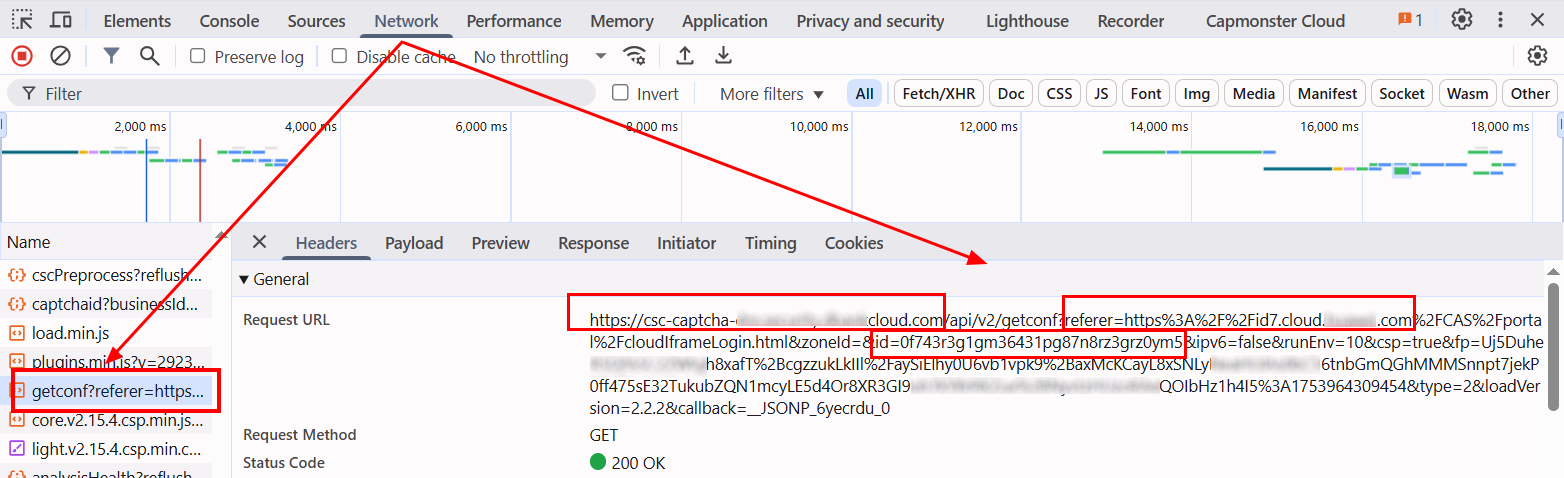
yidunGetLib
负责加载验证码的 JavaScript 文件路径,通常可在网络请求中找到,文件名类似于 load.min.js。

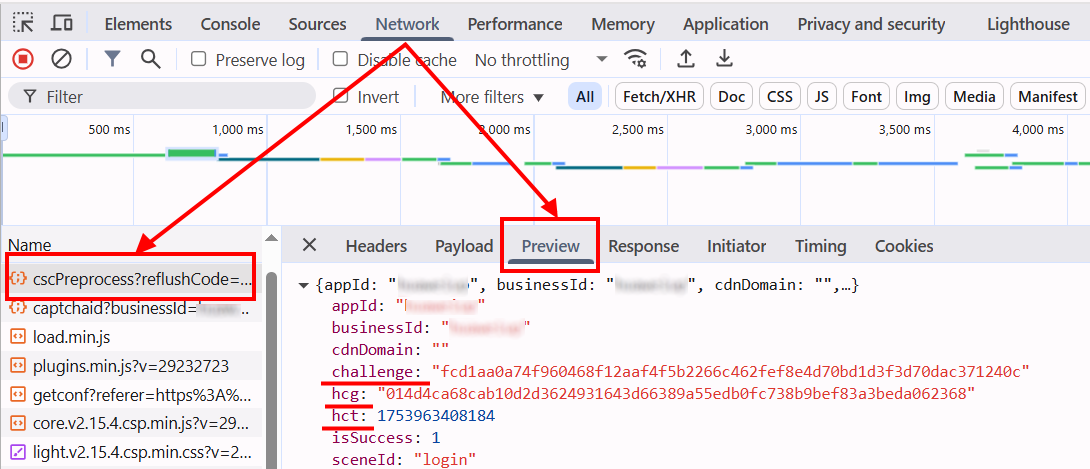
challenge、hcg、hct
这些参数都可在网络请求中找到。相关请求通常以 cscPreprocess?reflushCode= 开头。
使用 SDK 库
- JavaScript
- Python
- C#
显示代码(用于浏览器)
// https://github.com/ZennoLab/capmonstercloud-client-js

import { CapMonsterCloudClientFactory, ClientOptions, YidunRequest } from '@zennolab_com/capmonstercloud-client';

const API_KEY = "YOUR_API_KEY"; // 输入您的 CapMonster Cloud API 密钥

document.addEventListener("DOMContentLoaded", async () => {
    const client = CapMonsterCloudClientFactory.Create(
        new ClientOptions({ clientKey: API_KEY })
    );

    // 基本示例,无需代理
    // CapMonster Cloud 会自动使用它们的代理
    let yidunRequest = new YidunRequest({
        websiteURL: "https://www.example.com",     // 含有验证码的页面 URL
        websiteKey: "6cw0f0485d5d46auacf9b735d20218a5",
        userAgent: "userAgentPlaceholder"
    });

    // 使用您自己的代理的示例
    // 如果想使用自己的代理,请取消注释以下代码块
    /*
    const proxy = {
        proxyType: "http",
        proxyAddress: "123.45.67.89",
        proxyPort: 8080,
        proxyLogin: "username",
        proxyPassword: "password"
    };

    yidunRequest = new YidunRequest({
        websiteURL: "https://www.example.com",
        websiteKey: "6cw0f0485d5d46auacf9b735d20218a5",
        userAgent: "userAgentPlaceholder",
        proxy
    });
    */

    // 如有必要,可以检查余额
    const balance = await client.getBalance();
    console.log("Balance:", balance);

    const result = await client.Solve(yidunRequest);
    console.log("Solution:", result);
});
显示代码 (Node.js)
// https://github.com/ZennoLab/capmonstercloud-client-js

import { CapMonsterCloudClientFactory, ClientOptions, YidunRequest } from '@zennolab_com/capmonstercloud-client';

const API_KEY = "YOUR_API_KEY"; // 输入您的 CapMonster Cloud API 密钥

async function solveYidun() {
    const client = CapMonsterCloudClientFactory.Create(
        new ClientOptions({ clientKey: API_KEY })
    );

    // 基本示例,无需代理
    // CapMonster Cloud 会自动使用它们的代理
    let yidunRequest = new YidunRequest({
        websiteURL: "https://www.example.com",    // 含有验证码的页面 URL
        websiteKey: "6cw0f0485d5d46auacf9b735d20218a5",
        userAgent: "userAgentPlaceholder"
    });

    // 使用您自己的代理的示例
    // 如果想使用自己的代理,请取消注释以下代码块

    /*
    const proxy = {
        proxyType: "http",
        proxyAddress: "123.45.67.89",
        proxyPort: 8080,
        proxyLogin: "username",
        proxyPassword: "password"
    };

    yidunRequest = new YidunRequest({
        websiteURL: "https://www.example.com",  // 含有验证码的页面 URL
        websiteKey: "6cw0f0485d5d46auacf9b735d20218a5",
        userAgent: "userAgentPlaceholder",
        proxy
    });
    */

    // 如有必要,可以检查余额
    const balance = await client.getBalance();
    console.log("Balance:", balance);

    const result = await client.Solve(yidunRequest);
    console.log("Solution:", result);
}

solveYidun().catch(err => console.error("错误:", err));
显示代码
# https://github.com/ZennoLab/capmonstercloud-client-python

import asyncio
from capmonstercloudclient import CapMonsterClient, ClientOptions
from capmonstercloudclient.requests import YidunRequest
# from capmonstercloudclient.requests.baseRequestWithProxy import ProxyInfo  # 如果计划使用代理,请取消注释

API_KEY = "YOUR_API_KEY"  # 输入您的 CapMonster Cloud API 密钥

async def solve_yidun_captcha():
    client_options = ClientOptions(api_key=API_KEY)
    cap_monster_client = CapMonsterClient(options=client_options)

    # 基本示例,无需代理
    # CapMonster Cloud 会自动使用它们的代理
    yidun_request = YidunRequest(
        websiteUrl="https://www.example.com",  # 含有验证码的页面 URL
        websiteKey="6cw0f0485d5d46auacf9b735d20218a5",
        userAgent="userAgentPlaceholder"  # 请使用真实且 актуальный 的 UserAgent
    )

    # 使用您自己的代理的示例
    # 如果想使用自己的代理,请取消注释以下代码块

    # proxy = ProxyInfo(
    #     proxyType="http",
    #     proxyAddress="123.45.67.89",
    #     proxyPort=8080,
    #     proxyLogin="username",
    #     proxyPassword="password"
    # )
    #
    # yidun_request = YidunRequest(
    #     websiteUrl="https://www.example.com",
    #     websiteKey="6cw0f0485d5d46auacf9b735d20218a5",
    #     userAgent="userAgentPlaceholder",
    #     proxy=proxy
    # )

    # 如有必要,可以检查余额
    balance = await cap_monster_client.get_balance()
    print("Balance:", balance)

    result = await cap_monster_client.solve_captcha(yidun_request)
    print("Solution:", result)

asyncio.run(solve_yidun_captcha())
显示代码
// https://github.com/ZennoLab/capmonstercloud-client-dotnet

using System;
using System.Threading.Tasks;
using Zennolab.CapMonsterCloud;
using Zennolab.CapMonsterCloud.Requests;

class Program
{
    static async Task Main(string[] args)
    {
        // 输入您的 CapMonster Cloud API 密钥
        var clientOptions = new ClientOptions
        {
            ClientKey = "YOUR_API_KEY"
        };

        var cmCloudClient = CapMonsterCloudClientFactory.Create(clientOptions);

        // 基本示例,无需代理
        // CapMonster Cloud 会自动使用它们的代理
        var yidunRequest = new YidunTaskRequest
        {
            WebsiteUrl = "https://example.com",   // 含有验证码的页面 URL
            WebsiteKey = "7ce0f0475b5d46acacf9b732a29218d9",
            UserAgent = "userAgentPlaceholder"
        };

        // 使用您自己的代理的示例
        // 如果想使用自己的代理,请取消注释以下代码块

        /*
        var yidunRequest = new YidunTaskRequest
        {
            WebsiteUrl = "https://example.com",
            WebsiteKey = "6ce0f0475b5d46acacf9b732d29218d8",
            UserAgent = "userAgentPlaceholder",

            Proxy = new ProxyContainer(
                "123.45.67.89",
                8080,
                ProxyType.Http,
                "username",
                "password"
            )
        };
        */

        // 如有必要,可以检查余额
        var balance = await cmCloudClient.GetBalanceAsync();
        Console.WriteLine("Balance: " + balance);

        var yidunResult = await cmCloudClient.SolveAsync(yidunRequest);

        Console.WriteLine("Solution: " + yidunResult.Solution.Value);
    }
}