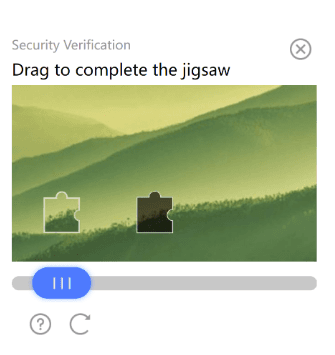
TenDI - Tencent CAPTCHA
CapMonster Cloud 默认通过内置代理工作——这些代理已包含在费用内。仅当网站不接受令牌或对内置服务的访问受限时,才需要指定您自己的代理。
如果代理按 IP 授权,请将地址 65.21.190.34 加入白名单。
请求参数
type<string>requiredCustomTask
class<string>requiredTenDI
websiteURL<string>required解决验证码的主页地址。
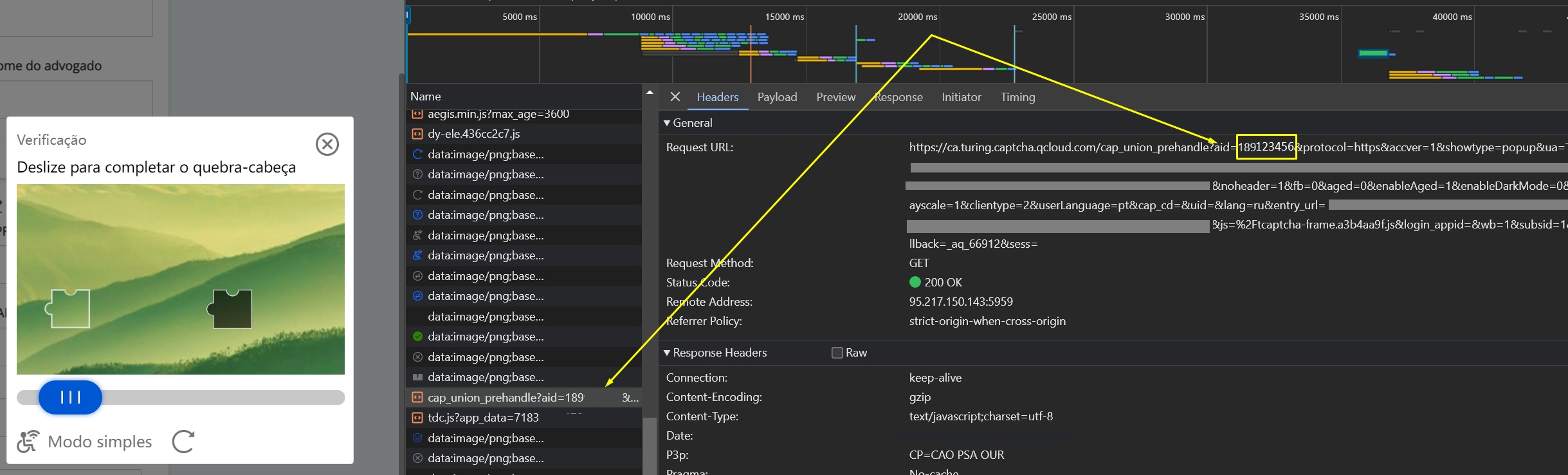
websiteKey<string>requiredcaptchaAppId。例如 "websiteKey": "189123456" - 是您网站的唯一参数。您可以从带有验证码的HTML页面或流量中获取它(参见下面的描述)。
captchaUrl(在 metadata 中)<string>optional验证码脚本的链接。 通常以 TCaptcha.js 或 TCaptcha-global.js 结尾。可以在请求列表中找到(见下方示例)。
userAgent<string>optional浏览器的 User-Agent。
请仅传递当前 Windows 系统下的有效 UA。当前推荐值为:userAgentPlaceholder
proxyType<string>optionalhttp - 普通的 http/https 代理;
https - 仅在 "http" 不起作用时尝试(某些自定义代理服务器要求);
socks4 - socks4 代理;
socks5 - socks5 代理。
proxyAddress<string>optional代理 IP 地址 IPv4/IPv6。不允许:
- 使用透明代理(其中客户端 IP 可见);
- 使用来自本地网络的代理。
proxyPort<integer>optional代理端口。
proxyLogin<string>optional代理登录。
proxyPassword<string>optional代理密码。
创建任务方法
- CustomTask (无代理)
- CustomTask (带代理)
https://api.capmonster.cloud/createTask
请求
{
  "clientKey": "API_KEY",
  "task": {
    "type": "CustomTask",
    "class": "TenDI",
    "websiteURL": "https://example.com",
    "websiteKey": "189123456",
    "userAgent": "userAgentPlaceholder",
    "metadata": {
      "captchaUrl": "https://global.captcha.example.com/TCaptcha-global.js"
    }
  }
}
响应
{
  "errorId": 0,
  "taskId": 407533072
}
https://api.capmonster.cloud/createTask
请求
{
  "clientKey": "API_KEY",
  "task": {
    "type": "CustomTask",
    "class": "TenDI",
    "websiteURL": "https://example.com",
    "websiteKey": "189123456",
    "userAgent": "userAgentPlaceholder",
    "metadata": {
      "captchaUrl": "https://global.captcha.example.com/TCaptcha-global.js"
    },
    "proxyType": "http",
    "proxyAddress": "8.8.8.8",
    "proxyPort": 8080,
    "proxyLogin": "proxyLoginHere",
    "proxyPassword": "proxyPasswordHere"
  }
}
响应
{
  "errorId": 0,
  "taskId": 407533072
}
获取任务结果方法
使用getTaskResult方法获取TenDI的解决方案。
https://api.capmonster.cloud/getTaskResult
要求
{
  "clientKey":"API_KEY",
  "taskId": 407533072
}
回应
{
  "errorId": 0,
  "status": "ready",
  "solution": {
    "data": {
      "randstr": "@EcL",
      "ticket": "tr03lHUhdnuW3neJZu.....7LrIbs*"
    },
    "headers": {
      "User-Agent": "userAgentPlaceholder"
    }
  }
}
如何获取网站密钥(captchaAppId)
打开开发者工具,转到网络标签,激活验证码并查看请求。其中一些将包含您需要的参数值。在这种情况下,websiteKey=aid
如何获取 captchaUrl
打开 开发者工具,切换到 Network 选项卡,激活验证码并检查网络请求。在其中会出现 TCaptcha.js 或 TCaptcha-global.js,您可以在其中找到类似这样的链接:

如何查找任务创建所需的所有参数
自动方法
为了自动化获取所需参数,可以通过 浏览器(普通模式或 headless 模式,例如使用 Playwright)进行提取,或直接从 HTTP 请求中获取。由于动态参数的有效时间较短,建议在获取后尽快使用。
所提供的代码片段仅作为获取必要参数的基础示例。具体实现方式取决于包含验证码的网站、本身的页面结构,以及所使用的 HTML 元素和选择器。
- JavaScript
- Python
- C#
显示代码 (Node.js)
import { chromium } from "playwright";

(async () => {
  const browser = await chromium.launch({ headless: false });
  const page = await browser.newPage();

  // 拦截请求
  page.on("request", (request) => {
    const url = request.url();
    if (
      url.startsWith("https://sg.captcha.qcloud.com/cap_union_prehandle?aid=")
    ) {
      const parsedUrl = new URL(url);
      const aid = parsedUrl.searchParams.get("aid");
      console.log("提取到的 aid:", aid);
    }
  });

  await page.goto("https://www.example.com/", { waitUntil: "load" });

  await page.waitForTimeout(5000);

  await browser.close();
})();
显示代码
import asyncio
from playwright.async_api import async_playwright

async def main():
    async with async_playwright() as p:
        browser = await p.chromium.launch(headless=False)
        page = await browser.new_page()

        # 拦截请求
        page.on("request", lambda request: handle_request(request))

        await page.goto("https://www.example.com/", wait_until="load")

        await asyncio.sleep(5)

        await browser.close()

def handle_request(request):
    url = request.url
    if url.startswith("https://sg.captcha.qcloud.com/cap_union_prehandle?aid="):
        parsed_url = request.url.split('?')[1]
        params = dict(param.split('=') for param in parsed_url.split('&') if '=' in param)
        aid = params.get('aid')
        print("提取到的 aid:", aid)

asyncio.run(main())
显示代码
using System;
using System.Threading.Tasks;
using Microsoft.Playwright;

class Program
{
    public static async Task Main()
    {
        using var playwright = await Playwright.CreateAsync();
        await using var browser = await playwright.Chromium.LaunchAsync(new BrowserTypeLaunchOptions {
           Headless = false });
        var page = await browser.NewPageAsync();

        // 拦截请求
        page.Request += (_, request) =>
        {
            var url = request.Url;
            if (url.StartsWith("https://sg.captcha.qcloud.com/cap_union_prehandle?aid="))
            {
                var uri = new Uri(url);
                var queryParams = System.Web.HttpUtility.ParseQueryString(uri.Query);
                var aid = queryParams.Get("aid");
                Console.WriteLine("提取到的 aid: " + aid);
            }
        };

        await page.GotoAsync("https://www.example.com/", new PageGotoOptions {
         WaitUntil = WaitUntilState.Load });

        await Task.Delay(5000);

        await browser.CloseAsync();
    }
}
使用 SDK 库
- JavaScript
- Python
- C#
显示代码(用于浏览器)
// https://github.com/ZennoLab/capmonstercloud-client-js

import {
  CapMonsterCloudClientFactory,
  ClientOptions,
  TenDIRequest
} from '@zennolab_com/capmonstercloud-client';

const API_KEY = "YOUR_API_KEY"; // 输入您的 CapMonster Cloud API 密钥

document.addEventListener("DOMContentLoaded", async () => {
  const client = CapMonsterCloudClientFactory.Create(
    new ClientOptions({ clientKey: API_KEY })
  );

  // 基本示例,无需代理
  // CapMonster Cloud 会自动使用它们的代理
  let tenDIRequest = new TenDIRequest({
    websiteURL: "https://example.com", // 包含 Tencent(TenDI)验证码的页面 URL
    websiteKey: "183268248"            // TencentCaptcha appid(请替换为有效值)
  });

  // 使用您自己的代理的示例
  // 如果想使用自己的代理,请取消注释以下代码块
  /*
  const proxy = {
    proxyType: "http",
    proxyAddress: "123.45.67.89",
    proxyPort: 8080,
    proxyLogin: "username",
    proxyPassword: "password"
  };

  tenDIRequest = new TenDIRequest({
    websiteURL: "https://example.com",
    websiteKey: "183268248",
    userAgent: "userAgentPlaceholder",
    proxy
  });
  */

  // 如有必要,可以检查余额
  const balance = await client.getBalance();
  console.log("Balance:", balance);

  const result = await client.Solve(tenDIRequest);
  console.log("Solution:", result);
});
显示代码 (Node.js)
// https://github.com/ZennoLab/capmonstercloud-client-js

import {
  CapMonsterCloudClientFactory,
  ClientOptions,
  TenDIRequest
} from '@zennolab_com/capmonstercloud-client';

const API_KEY = "YOUR_API_KEY"; // 输入您的 CapMonster Cloud API 密钥

async function solveTenDI() {
  const client = CapMonsterCloudClientFactory.Create(
    new ClientOptions({ clientKey: API_KEY })
  );

  // 基本示例,无需代理
  // CapMonster Cloud 会自动使用它们的代理
  let tenDIRequest = new TenDIRequest({
    websiteURL: "https://example.com", // 包含验证码的页面 URL
    websiteKey: "183268248"            // 请替换为有效值
  });

  // 使用您自己的代理的示例
  // 如果想使用自己的代理,请取消注释以下代码块

  /*
  const proxy = {
    proxyType: "http",
    proxyAddress: "123.45.67.89",
    proxyPort: 8080,
    proxyLogin: "username",
    proxyPassword: "password"
  };

  tenDIRequest = new TenDIRequest({
    websiteURL: "https://example.com",
    websiteKey: "websiteKey",
    proxy,
    userAgent: "userAgentPlaceholder"
  });
  */

  // 如有必要,可以检查余额
  const balance = await client.getBalance();
  console.log("Balance:", balance);

  const result = await client.Solve(tenDIRequest);
  console.log("Solution:", result);
}

solveTenDI().catch(console.error);
显示代码
# https://github.com/ZennoLab/capmonstercloud-client-python

import asyncio
from capmonstercloudclient import CapMonsterClient, ClientOptions
from capmonstercloudclient.requests import TenDiCustomTaskRequest
# from capmonstercloudclient.requests.baseRequestWithProxy import ProxyInfo  # 如果计划使用代理,请取消注释

API_KEY = "YOUR_API_KEY"  # 输入您的 CapMonster Cloud API 密钥

async def solve_tendi_custom():
    client_options = ClientOptions(api_key=API_KEY)
    cap_monster_client = CapMonsterClient(options=client_options)

    # 基本示例,无需代理
    # CapMonster Cloud 会自动使用它们的代理
    tendi_request = TenDiCustomTaskRequest(
        websiteUrl="https://example.com",  # 包含 Tencent(TenDI)验证码的页面 URL
        websiteKey="189956587",            # TencentCaptcha appid
        userAgent="userAgentPlaceholder"
    )

    # 使用您自己的代理的示例
    # 如果想使用代理,请取消注释以下代码块
    #
    # proxy = ProxyInfo(
    #     proxyType="http",
    #     proxyAddress="123.45.67.89",
    #     proxyPort=8080,
    #     proxyLogin="username",
    #     proxyPassword="password"
    # )
    #
    # tendi_request = TenDiCustomTaskRequest(
    #     websiteUrl="https://example.com",
    #     websiteKey="189956587",
    #     userAgent="userAgentPlaceholder",
    #     proxy=proxy
    # )

    # 如有必要,可以检查余额
    balance = await cap_monster_client.get_balance()
    print("Balance:", balance)

    result = await cap_monster_client.solve_captcha(tendi_request)
    print("Solution:", result)

asyncio.run(solve_tendi_custom())
显示代码
// https://github.com/ZennoLab/capmonstercloud-client-dotnet

using System;
using System.Threading.Tasks;
using Zennolab.CapMonsterCloud;
using Zennolab.CapMonsterCloud.Requests;

class Program
{
    static async Task Main(string[] args)
    {
        // 输入您的 CapMonster Cloud API 密钥
        var clientOptions = new ClientOptions
        {
            ClientKey = "YOUR_API_KEY"
        };

        var cmCloudClient = CapMonsterCloudClientFactory.Create(clientOptions);

        // 如有必要,可以检查余额
        var balance = await cmCloudClient.GetBalanceAsync();
        Console.WriteLine("Balance: " + balance);

        // 基本示例,无需代理
        // CapMonster Cloud 会自动使用它们的代理
        var tenDiRequest = new TenDiCustomTaskRequest
        {
            WebsiteUrl = "https://example.com",   // 包含验证码的页面 URL
            WebsiteKey = "189956587",             // TencentCaptcha appid
            UserAgent = "userAgentPlaceholder"
        };

        // 使用您自己的代理的示例
        // 如果想使用自己的代理,请取消注释以下代码块
        /*
        var tenDiRequest = new TenDiCustomTaskRequest
        {
            WebsiteUrl = "https://example.com",
            WebsiteKey = "189956587",
            UserAgent = "userAgentPlaceholder",

            Proxy = new ProxyContainer(
                "123.45.67.89",
                8080,
                ProxyType.Http,
                "username",
                "password"
            )
        };
        */

        var tenDiResult = await cmCloudClient.SolveAsync(tenDiRequest);

        Console.WriteLine("Solution Data: " + string.Join(", ", tenDiResult.Solution.Data));
        Console.WriteLine("Solution Headers: " + string.Join(", ", tenDiResult.Solution.Headers));
    }
}