reCAPTCHA v3

任务通过我们的自有代理服务器执行。您无需为代理支付额外费用 —— 它们的使用已包含在价格中。
本节介绍了用于解决 Google reCAPTCHA v3 的任务说明。
reCAPTCHA v3 完全在后台运行,不需要用户执行任何操作。系统会分析页面访问者的行为和技术信号,并为每个请求生成风险评分。网站会根据这些数据,通过信任评分来决定是否允许该操作,该评分通常位于 0.1 到 0.9 的范围内。
在创建任务时,建议传递两个参数:pageAction 和 minScore。
请求参数
type<string>requiredRecaptchaV3TaskProxyless
websiteURL<string>required带有 Google ReCaptcha 的网页地址。
websiteKey<string>requiredRecaptcha 网站密钥。
https://www.google.com/recaptcha/api.js?render=THIS_ONE
isEnterprise<boolean>optionalreCAPTCHA 版本。 支持的值:true / false(也可使用 1 / 0,整数类型)。
如果需要以 Enterprise 方式解决 reCAPTCHA,请设置 true —— 在这种情况下,任务将按照与 RecaptchaV3EnterpriseTask 相同的方式处理。
minScore<double>optional从 0.1 到 0.9 的值。
pageAction<string>optional小部件操作值。网站所有者通过此参数定义用户在页面上的活动。默认值: verify
示例:grecaptcha.execute('site_key', {action:'login_test'})。
创建任务方法
https://api.capmonster.cloud/createTask
要求
{
  "clientKey": "API_KEY",
  "task": {
    "type": "RecaptchaV3TaskProxyless",
    "websiteURL": "https://lessons.zennolab.com/captchas/recaptcha/v3.php?level=beta",
    "websiteKey": "6Le0xVgUAAAAAIt20XEB4rVhYOODgTl00d8juDob",
    "isEnterprise": false,
    "minScore": 0.7,
    "pageAction": "myverify"
  }
}
回应
{
  "errorId":0,
  "taskId":407533072
}
获取任务结果方法
在某些网站上,确保 UserAgent 与解决验证码时使用的 UserAgent 相匹配非常重要。因此,如果 CapMonster Cloud 在返回令牌的同时提供了 UserAgent,请始终在提交表单或在目标页面确认解决方案时使用该 UserAgent。
使用 getTaskResult 请求获取 ReCaptcha3 的答案。根据服务负载情况,您将在 10 到 30 秒内收到响应。
https://api.capmonster.cloud/getTaskResult
要求
{
  "clientKey":"API_KEY",
  "taskId": 407533072
}
回应
{
  "errorId": 0,
  "status": "ready",
  "solution": {
    "gRecaptchaResponse": "3AHJ_VuvYIBNBW5yyv0zRYJ75VkOKvhKj9_xGBJKnQimF72rfoq3Iy-DyGHMwLAo6a3"
  }
}
对于某些网站,响应可能如下所示。提交解决方案时,请确保使用响应中提供的 UserAgent,即使它与您当前使用的浏览器或脚本不同。
{
  "errorId": 0,
  "status": "ready",
  "solution": {
    "userAgent": "Mozilla/5.0 (Windows NT 10.0; Win64; x64) AppleWebKit/537.36 (KHTML, like Gecko) Chrome/139.0.0.0 Safari/537.36",
    "gRecaptchaResponse": "0cAFcWeA5Y3...hF8UWA",
    "cookies": {
      "nocookies": "true"
    }
  }
}
| 属性 | 类型 | 描述 |
|---|---|---|
| gRecaptchaResponse | String | 应插入到 Recaptcha3 提交表单中的哈希值 <textarea id="g-recaptcha-response"></textarea>。长度为 500 到 2190 字节。 |
如何查找任务创建所需的所有参数
手动方式
- 请在浏览器中访问您的网站,该网站包含验证码功能。
- 右键点击验证码元素,选择 检查(Inspect)。
websiteKey
公开站点密钥(sitekey),通常可以在包含的脚本中找到:
在Elements中:
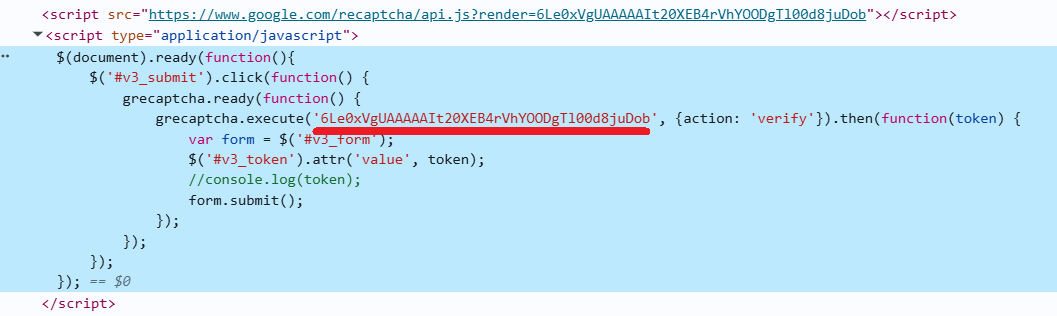
在Network标签页中:

pageAction
传递给*grecaptcha.execute()*的动作名称,例如:
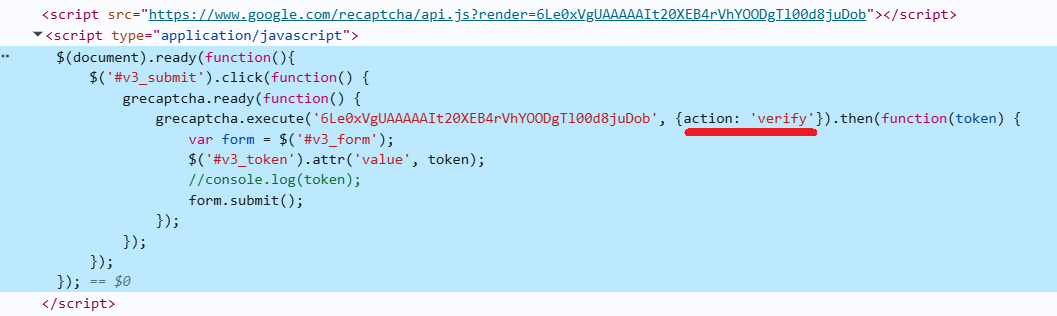
自动方法
为了自动化获取所需参数,可以通过 浏览器(普通模式或 headless 模式,例如使用 Playwright)进行提取,或直接从 HTTP 请求中获取。由于动态参数的有效时间较短,建议在获取后尽快使用。
所提供的代码片段仅作为获取必要参数的基础示例。具体实现方式取决于包含验证码的网站、本身的页面结构,以及所使用的 HTML 元素和选择器。
- JavaScript
- Python
- C#
显示代码(浏览器中)
(() => {
    const originalGrecaptcha = window.grecaptcha;

    if (!originalGrecaptcha || !originalGrecaptcha.execute) {
        console.warn("未找到grecaptcha.execute,请等待加载完成");
        return;
    }

    window.__extractedParams = null;

    window.grecaptcha = {
        ...originalGrecaptcha,
        execute: function(sitekey, config) {
            console.log("已捕获!");
            console.log("sitekey:", sitekey);
            console.log("action:", config?.action);
            window.__extractedParams = {
                sitekey,
                action: config?.action
            };

            return originalGrecaptcha.execute(sitekey, config);
        },
        ready: originalGrecaptcha.ready
    };

    console.log("grecaptcha.execute已被封装。点击按钮-参数将被捕获");
})();
显示代码(Node.js)
import { chromium } from "playwright";

(async () => {
  const browser = await chromium.launch({ headless: false });
  const context = await browser.newContext();
  const page = await context.newPage();

  const jsContents = [];

  page.on("response", async (response) => {
    try {
      const url = response.url();
      const ct = response.headers()["content-type"] || "";
      if (ct.includes("javascript") || url.endsWith(".js")) {
        const text = await response.text();
        jsContents.push(text);
      }
    } catch (e) {}
  });

  const targetUrl = "https://lessons.zennolab.com/captchas/recaptcha/v3.php?level=beta";
  await page.goto(targetUrl, { timeout: 60000 });
  await page.waitForTimeout(3000);

  const inlineScripts = await page.$$eval("script:not([src])", (scripts) =>
    scripts.map((s) => s.textContent)
  );
  jsContents.push(...inlineScripts);

  const executeRegex =
    /grecaptcha\.execute\(\s*['"]
    (?<sitekey>[^'"]+)['"]\s*,\s*\{[^}]*action\s*:\s*['"](?<action>[^'"]+)['"]/i;

  let foundSitekey = null;
  let foundAction = null;

  for (const js of jsContents) {
    const match = js.match(executeRegex);
    if (match && match.groups) {
      foundSitekey = match.groups.sitekey;
      foundAction = match.groups.action;
      break;
    }
  }

  console.log({
    sitekey: foundSitekey,
    action: foundAction,
  });

  await browser.close();
})();
显示代码
import asyncio
import re
from playwright.async_api import async_playwright

async def extract_recaptcha_v3_execute(url):
    async with async_playwright() as p:
        browser = await p.chromium.launch(headless=False)
        context = await browser.new_context()
        page = await context.new_page()

        execute_pattern = re.compile(
            r"grecaptcha\.execute\(\s*['\"]"
            r"(?P<sitekey>[^'\"]+)['\"]\s*,\s*\{[^}]*action\s*:\s*['\"](?P<action>[^'\"]+)['\"]",
            re.IGNORECASE
        )

        found_sitekey = None
        found_action = None
        js_contents = []

        async def handle_response(response):
            try:
                ct = response.headers.get("content-type", "")
                if "javascript" in ct or response.url.endswith(".js"):
                    text = await response.text()
                    js_contents.append(text)
            except:
                pass

        page.on("response", handle_response)

        await page.goto(url, timeout=60000)
        await page.wait_for_timeout(3000)

        inline_scripts = await page.locator("script:not([src])").all_text_contents()
        js_contents += inline_scripts

        for js in js_contents:
            match = execute_pattern.search(js)
            if match:
                found_sitekey = match.group("sitekey")
                found_action = match.group("action")
                break

        await browser.close()

        print({
            "sitekey": found_sitekey,
            "action": found_action
        })

asyncio.run(extract_recaptcha_v3_execute("https://lessons.zennolab.com/captchas/recaptcha/v3.php?level=beta"))
显示代码
using System;
using System.Text.RegularExpressions;
using System.Threading.Tasks;
using Microsoft.Playwright;
using System.Collections.Generic;

class Program
{
    public static async Task Main(string[] args)
    {
        await ExtractRecaptchaV3Execute
        ("https://lessons.zennolab.com/captchas/recaptcha/v3.php?level=beta");
    }

    public static async Task ExtractRecaptchaV3Execute(string url)
    {
        using var playwright = await Playwright.CreateAsync();
        var browser = await playwright.Chromium.LaunchAsync(new BrowserTypeLaunchOptions
        {
            Headless = false
        });

        var context = await browser.NewContextAsync();
        var page = await context.NewPageAsync();

        string foundSitekey = null;
        string foundAction = null;
        var jsContents = new List<string>();

        page.Response += async (_, response) =>
        {
            try
            {
                var ct = response.Headers.ContainsKey("content-type") ?
                response.Headers["content-type"] : "";
                if ((ct != null && ct.Contains("javascript")) || response.Url.EndsWith(".js"))
                {
                    var text = await response.TextAsync();
                    jsContents.Add(text);
                }
            }
            catch { }
        };

        await page.GotoAsync(url, new PageGotoOptions { Timeout = 60000 });
        await page.WaitForTimeoutAsync(3000);

        var inlineScripts = await page.EvalOnSelectorAllAsync<string[]>(
            "script:not([src])",
            "els => els.map(e => e.textContent)"
        );
        jsContents.AddRange(inlineScripts);

        var regex = new Regex(@"grecaptcha\.execute\(\s*['""]"
        + @"(?<sitekey>[^'""]+)['""]\s*,\s*\{[^}]*action\s*:\s*['""](?<action>[^'""]+)['""]",
        RegexOptions.IgnoreCase);

        foreach (var js in jsContents)
        {
            var match = regex.Match(js);
            if (match.Success)
            {
                foundSitekey = match.Groups["sitekey"].Value;
                foundAction = match.Groups["action"].Value;
                break;
            }
        }

        Console.WriteLine($"sitekey: {foundSitekey}");
        Console.WriteLine($"action: {foundAction}");

        await browser.CloseAsync();
    }
}
使用 SDK 库
- JavaScript
- Python
- C#
显示代码(用于浏览器)
// https://github.com/ZennoLab/capmonstercloud-client-js

import {
  CapMonsterCloudClientFactory,
  ClientOptions,
  RecaptchaV3ProxylessRequest
} from '@zennolab_com/capmonstercloud-client';

document.addEventListener('DOMContentLoaded', async () => {

  const cmcClient = CapMonsterCloudClientFactory.Create(
    new ClientOptions({ clientKey: 'YOUR_API_KEY' }) // 输入您的 CapMonster Cloud API 密钥
  );

  // 如有必要,可以检查余额
  const balance = await cmcClient.getBalance();
  console.log('Balance:', balance);

  // 基本示例,无需代理
  // CapMonster Cloud 会自动使用它们的代理
  const recaptchaV3Request = new RecaptchaV3ProxylessRequest({
    websiteURL: 'https://lessons.zennolab.com/captchas/recaptcha/v3.php?level=beta', // 您的验证码页面 URL
    websiteKey: '6Le0xVgUAAAAAIt20XEB4rVhYOODgTl00d8juDob',
    minScore: 0.6,
    pageAction: 'myverify',
  });

  const solution = await cmcClient.Solve(recaptchaV3Request);
  console.log('Solution:', solution);

});
显示代码 (Node.js)
// https://github.com/ZennoLab/capmonstercloud-client-js

import { CapMonsterCloudClientFactory, ClientOptions, RecaptchaV3ProxylessRequest } from '@zennolab_com/capmonstercloud-client';

const API_KEY = "YOUR_API_KEY"; // 输入您的 CapMonster Cloud API 密钥

async function solveRecaptchaV3() {
    const cmcClient = CapMonsterCloudClientFactory.Create(
        new ClientOptions({ clientKey: API_KEY })
    );

    // 如有必要,可以检查余额
    const balance = await cmcClient.getBalance();
    console.log("Balance:", balance);

    // 基本示例,无需代理
    // CapMonster Cloud 会自动使用它们的代理
    const recaptchaV3Request = new RecaptchaV3ProxylessRequest({
        websiteURL: "https://lessons.zennolab.com/captchas/recaptcha/v3.php?level=beta", // 您的验证码页面 URL
        websiteKey: "6Le0xVgUAAAAAIt20XEB4rVhYOODgTl00d8juDob",
        minScore: 0.6,
        pageAction: "myverify",
    });

    const solution = await cmcClient.Solve(recaptchaV3Request);
    console.log("Solution:", solution);
}

solveRecaptchaV3().catch(console.error);
显示代码
# https://github.com/Zennolab/capmonstercloud-client-python

import asyncio
from capmonstercloudclient import CapMonsterClient, ClientOptions
from capmonstercloudclient.requests import RecaptchaV3ProxylessRequest

client_options = ClientOptions(api_key="YOUR_API_KEY")  # 输入您的 CapMonster Cloud API 密钥
cap_monster_client = CapMonsterClient(options=client_options)

# 如有必要,可以检查余额
balance = asyncio.run(cap_monster_client.get_balance())
print("Balance:", balance)

recaptcha_v3_request = RecaptchaV3ProxylessRequest(
    websiteUrl="https://lessons.zennolab.com/captchas/recaptcha/v3.php?level=beta",  # 您的验证码页面 URL
    websiteKey="6Le0xVgUAAAAAIt20XEB4rVhYOODgTl00d8juDob",
    minScore=0.6,
    pageAction="myverify"
)

async def solve_captcha():
    return await cap_monster_client.solve_captcha(recaptcha_v3_request)

responses = asyncio.run(solve_captcha())
print(responses)
显示代码
// https://github.com/ZennoLab/capmonstercloud-client-dotnet

using Zennolab.CapMonsterCloud.Requests;
using Zennolab.CapMonsterCloud;

class Program
{
    static async Task Main(string[] args)
    {
        var clientOptions = new ClientOptions
        {
            ClientKey = "YOUR_API_KEY"  // 输入您的 CapMonster Cloud API 密钥
        };

        var cmCloudClient = CapMonsterCloudClientFactory.Create(clientOptions);

        // 如有必要,可以检查余额
        var balance = await cmCloudClient.GetBalanceAsync();
        Console.WriteLine("Balance: " + balance);

        var recaptchaV3Request = new RecaptchaV3ProxylessRequest
        {
            WebsiteUrl = "https://lessons.zennolab.com/captchas/recaptcha/v3.php?level=beta",  // 您的验证码页面 URL
            WebsiteKey = "6Le0xVgUAAAAAIt20XEB4rVhYOODgTl00d8juDob",
            MinScore = 0.6,
            PageAction = "myverify"
        };

        var recaptchaV3Result = await cmCloudClient.SolveAsync(recaptchaV3Request);

        Console.WriteLine("Solution: " + recaptchaV3Result.Solution.Value);
    }
}