ImageToText

这是常规验证码,即包含文本的图片,需要输入相应的文本。
此任务无需使用代理服务器。
请求参数
重要提示:请在创建任务前立即获取图像的 base64,以避免在解决过程中出现错误(见下方 CAPTCHA 图像 base64 获取示例)。
type<string>requiredImageToTextTask
body<string>required以base64编码的文件主体。确保发送时没有换行符。
capMonsterModule<string>optional识别模块的名称,例如“yandex”。可以通过这里找到模块名称及所有可用模块的列表。
示例: yandex, special 及其他
recognizingThreshold<integer>optional验证码识别阈值,可取值范围为0到100。例如,如果将 recognizingThreshold 设置为90,并且任务以80的置信度解决,则不会收费。在这种情况下,用户会收到 ERROR_CAPTCHA_UNSOLVABLE 的响应。 种设置扣款阈值的替代方法在 该文章 中有描述。
case<boolean>optionaltrue - 如果验证码区分大小写。
numeric<integer>optional1 - 如果验证码仅包含数字。
可能的值: 0, 1
math<boolean>optionalfalse — 未定义;
true — 如果验证码需要数学操作(例如:验证码 2 + 6 = 将返回值 8)。重要提示: 请勿在 captcha_math 模块中使用 math: true 参数。
Base64 是一种数据编码方法,允许将二进制数据表示为文本。以下是使用开发者工具中的控制台获取验证码图像的 base64 格式的示例:
const captchaUrl = 'https://example.com/captcha.jpg';

function loadAndEncodeCaptchaToBase64(url) {
    fetch(url)
        .then(response => response.blob())
        .then(blob => {
            const reader = new FileReader();
            reader.readAsDataURL(blob);

            reader.onloadend = function() {
                const base64Data = reader.result;
                console.log('Base64 编码的验证码:, base64Data);

                          };
        })
        .catch(error => {
            console.error('加载或编码验证码时出错:', error);
        });
}

loadAndEncodeCaptchaToBase64(captchaUrl);
创建任务方法
https://api.capmonster.cloud/createTask
要求
{
  "clientKey": "API_KEY",
  "task": {
    "type": "ImageToTextTask",
    "body": "BASE64_BODY_HERE!"
  }
}
回应
{
  "errorId":0,
  "taskId":407533072
}
获取任务结果方法
使用getTaskResult方法获取验证码的解决方案。根据系统负载,您将在300毫秒到6秒的时间范围内收到答案。
https://api.capmonster.cloud/getTaskResult
要求
{
  "clientKey":"API_KEY",
  "taskId": 407533072
}
回应
{
  "errorId": 0,
  "status": "ready",
  "solution": {
    "text": "answer"
  }
}
| 属性 | 类型 | 描述 |
|---|---|---|
| text | String | 验证码答案 |
如何查找任务创建所需的所有参数
手动方式
- 请在浏览器中访问您的网站,该网站包含验证码功能。
- 右键点击验证码元素,选择 检查(Inspect)。
base64
在 DOM 树中找到所需的元素并将鼠标悬停在其上——base64 编码的图片会直接显示在元素的属性中:

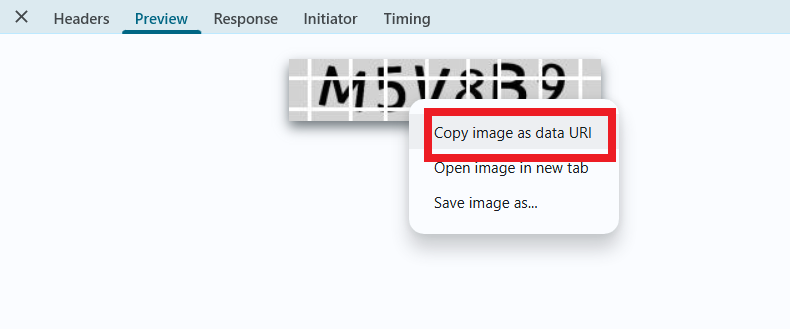
如果图片引用的是外部 URL,而不是包含 base64 编码的数据,你可以在网络请求(Network)中找到它。右键点击相关请求,选择 复制图片为数据 URI。这会将 base64 编码的图片数据复制到剪贴板。
自动方法
为了自动化获取所需参数,可以通过 浏览器(普通模式或 headless 模式,例如使用 Playwright)进行提取,或直接从 HTTP 请求中获取。由于动态参数的有效时间较短,建议在获取后尽快使用。
所提供的代码片段仅作为获取必要参数的基础示例。具体实现方式取决于包含验证码的网站、本身的页面结构,以及所使用的 HTML 元素和选择器。
- JavaScript
- Python
- C#
显示代码(浏览器端)
(async () => {
  const img = document.querySelector('img'); // 示例选择器

  const imageUrl = img.src;

  const response = await fetch(imageUrl);

  if (!response.ok) {
    throw new Error("加载图片失败");
  }

  const buffer = await response.arrayBuffer();

  // 将二进制数据转换为 base64
  const base64Image = btoa(String.fromCharCode(...new Uint8Array(buffer)));

  console.log(base64Image);
})();
显示代码(Node.js)
(async () => {
  const imageUrl = "https://example/img/.jpg"; // 图片 URL

  const response = await fetch(imageUrl);

  if (!response.ok) {
    throw new Error("加载图片失败");
  }

  const buffer = await response.arrayBuffer();

  // 转换数据为 base64
  const base64Image = Buffer.from(buffer).toString("base64");

  console.log(base64Image);
})();
显示代码
import requests
import base64

# 图片 URL
image_url = "https://example/img.jpg"

response = requests.get(image_url)

if response.status_code == 200:
    # 将图片二进制数据转换为 base64
    base64_image = base64.b64encode(response.content).decode('utf-8')

    print(base64_image)
else:
    print("加载图片失败")
显示代码
using System;
using System.Net.Http;
using System.Threading.Tasks;

class Program
{
    static async Task Main(string[] args)
    {
        // 图片 URL
        string imageUrl = "https://example/img.jpg";

        using (HttpClient client = new HttpClient())
        {
            try
            {
                byte[] imageBytes = await client.GetByteArrayAsync(imageUrl);

                // 将图片二进制数据转换为 base64
                string base64Image = Convert.ToBase64String(imageBytes);

                Console.WriteLine(base64Image);
            }
            catch (Exception ex)
            {
                Console.WriteLine("加载图片失败: " + ex.Message);
            }
        }
    }
}
使用 SDK 库
- JavaScript
- Python
- C#
显示代码(用于浏览器)
// https://github.com/ZennoLab/capmonstercloud-client-js

import { CapMonsterCloudClientFactory, ClientOptions, ImageToTextRequest, CapMonsterModules } from '@zennolab_com/capmonstercloud-client';

document.addEventListener('DOMContentLoaded', async () => {
    const cmcClient = CapMonsterCloudClientFactory.Create(
        new ClientOptions({ clientKey: 'YOUR_API_KEY' }) // 输入您的 CapMonster Cloud API 密钥
    );

    // 如有必要,可以检查余额
    const balance = await cmcClient.getBalance();
    console.log("Balance:", balance);

    const imageToTextRequest = new ImageToTextRequest({
        body: 'some base64 body', // 替换为真实值
        CapMonsterModule: CapMonsterModules.YandexWave,
        Case: true,
        numeric: 1,
        recognizingThreshold: 65,
        math: false
    });

    const result = await cmcClient.Solve(imageToTextRequest);
    console.log("Solution:", result);
});
显示代码 (Node.js)
// https://github.com/ZennoLab/capmonstercloud-client-js

import { CapMonsterCloudClientFactory, ClientOptions, ImageToTextRequest, CapMonsterModules } from '@zennolab_com/capmonstercloud-client';

const API_KEY = "YOUR_API_KEY"; // 输入您的 CapMonster Cloud API 密钥

async function solveImageToText() {
    const cmcClient = CapMonsterCloudClientFactory.Create(
        new ClientOptions({ clientKey: API_KEY })
    );

    // 如有必要,可以检查余额
    const balance = await cmcClient.getBalance();
    console.log("Balance:", balance);

    const imageToTextRequest = new ImageToTextRequest({
        body: 'some base64 body', // 替换为真实值
        CapMonsterModule: CapMonsterModules.YandexWave,
        Case: true,
        numeric: 1,
        recognizingThreshold: 65,
        math: false
    });

    const result = await cmcClient.Solve(imageToTextRequest);
    console.log("Solution:", result);
}

solveImageToText().catch(console.error);
显示代码
# https://github.com/ZennoLab/capmonstercloud-client-python

import asyncio
import base64
from capmonstercloudclient import CapMonsterClient, ClientOptions
from capmonstercloudclient.requests import ImageToTextRequest

# 输入您的 CapMonster Cloud API 密钥
client_options = ClientOptions(api_key="YOUR_API_KEY")
cap_monster_client = CapMonsterClient(options=client_options)

# base64 格式的图片
image_base64 = "/9j/4AAQSkZJRgABAQAAAQABAAD/2wBDAAgGBgc...wwzqR4U/yZ//Z"  # 替换为真实值
image_bytes = base64.b64decode(image_base64)

image_to_text_request = ImageToTextRequest(
    image_bytes=image_bytes,
    module_name=None,     # 可以选择模块,例如 YandexWave
    threshold=50,
    case=True,            # 是否区分大小写
    numeric=0,            # 是否只识别数字
    math=False            # 是否是数学验证码
)

async def solve_captcha():
    # 如有必要,可以检查余额
    balance = await cap_monster_client.get_balance()
    print("Balance:", balance)

    solution = await cap_monster_client.solve_captcha(image_to_text_request)
    return solution

responses = asyncio.run(solve_captcha())
print("Solution:", responses)
显示代码
// https://github.com/ZennoLab/capmonstercloud-client-dotnet

using System;
using System.Threading.Tasks;
using Zennolab.CapMonsterCloud.Requests;
using Zennolab.CapMonsterCloud;

class Program
{
    static async Task Main(string[] args)
    {
        var clientOptions = new ClientOptions
        {
            ClientKey = "YOUR_API_KEY" // 输入您的 CapMonster Cloud API 密钥
        };

        var cmCloudClient = CapMonsterCloudClientFactory.Create(clientOptions);

        // 如有必要,可以检查余额
        var balance = await cmCloudClient.GetBalanceAsync();
        Console.WriteLine("Balance: " + balance);

        var imageToTextRequest = new ImageToTextRequest
        {
            Body = "/9j/4AAQSkZJRgABAQAAAQABA...hMjIyMjIyMjIyMjIyMj", // 替换为真实值
            CapMonsterModule = "None",
            RecognizingThreshold = 70,
            CaseSensitive = true,   // 是否区分大小写
            Numeric = false,        // 是否只识别数字
            Math = false            // 是否数学验证码
        };

        var imageToTextResult = await cmCloudClient.SolveAsync(imageToTextRequest);

        Console.WriteLine("Captcha Solved: " + imageToTextResult.Solution.Value);
    }
}