GeeTest
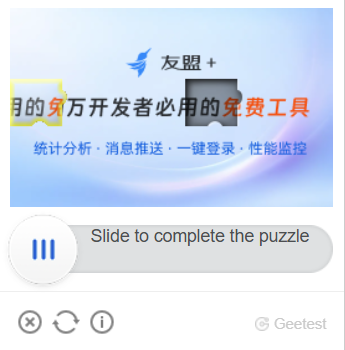

这种类型的任务是通过您的代理解决 GeeTest 验证码的问题。
您的应用程序应发送站点地址、公共域键 (gt)、键 (challenge) 和代理。
解决问题的结果是用于提交表单的三个或五个令牌。
-
CapMonster Cloud 默认通过内置代理工作——这些代理已包含在费用内。仅当网站不接受令牌或对内置服务的访问受限时,才需要指定您自己的代理。
-
暂不支持带有 IP 授权的代理。
对象结构
gt、challenge和geetestApiServerSubdomain参数通常可以在initGeetestJavaScript 函数内找到。- 您还可以在页面的 HTML 代码中找到它们。您可以在页面完全加载后在
<sсript>块中找到它们。
V3

V4 (captcha_id = gt)

GeeTest V3
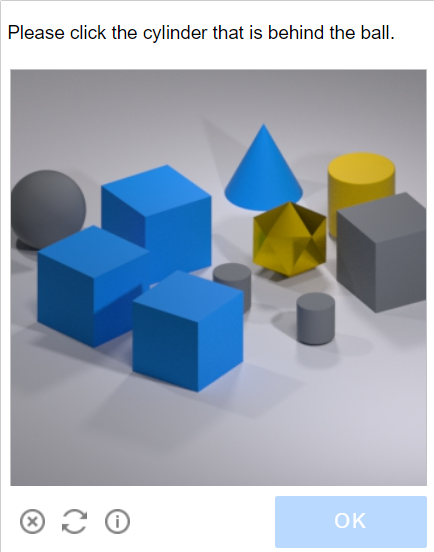
可能的验证码变体。
- Intelligent mode
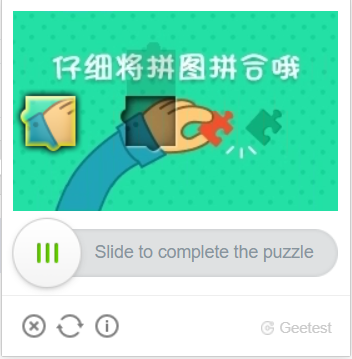
- Slide CAPTCHA
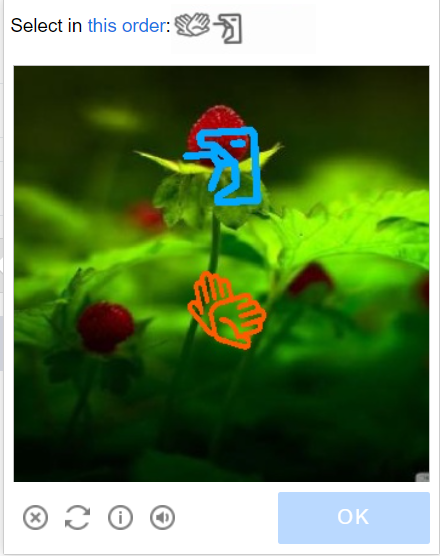
- Icon CAPTCHA
- Space CAPTCHA

请求参数
重要提示:某些参数的值是动态的 — 它们会在每次渲染包含 GeeTest v3 的页面时发生变化。
请在创建任务前立即提取这些参数,以避免在解决过程中出现错误。
自动提取参数的示例请参见章节 如何查找任务创建所需的所有参数。
type<string>requiredGeeTestTask
websiteURL<string>required解决验证码的页面地址。正確的 Url 始終會傳給請求 https://api-na.geetest.com/gettype.php 上的 Referer?舉例來說: 我們在 https://example.com#login,但我們看到驗證碼實際上沒有在那裡初始化,而是在 https://example.com。
gt<string>required该域名的 GeeTest 标识符键 gt。静态值,更新频率较低。
challenge<string>required only for V3 一个动态密钥。
每次调用我们的 API 时,我们需要获取一个新的密钥值。如果验证码已经加载在页面上,则 challenge 值不再有效,您将收到 错误 ERROR_TOKEN_EXPIRED。
对于带有 ERROR_TOKEN_EXPIRED 错误的任务,将会收取费用。 需要检查请求并找到返回此值的请求,并在每次创建识别任务之前执行该请求并解析出挑战值。
version<integer>required only for V43
geetestApiServerSubdomain<string>optionalGeetest API 子域服务器(必须与 api.geetest.com 不同)。
可选参数。某些站点可能需要。
geetestGetLib<string>optional展示验证码脚本的路径。
可选参数。某些站点可能需要。
以字符串形式发送 JSON。
proxyType<string>optionalhttp - 常规的 HTTP/HTTPS 代理;
https - 仅当 "http" 不起作用时尝试此选项(某些自定义代理需要);
socks4 - socks4 代理;
socks5 - socks5 代理。
proxyAddress<string>optional代理IPv4/IPv6地址。禁止使用:
- 透明代理(客户端IP可见);
- 本地机器代理。
proxyPort<integer>optional代理端口。
proxyLogin<string>optional代理服务器登录名。
proxyPassword<string>optional代理服务器密码。
userAgent<string>optional浏览器的 User-Agent。
请仅传递当前 Windows 系统下的有效 UA。当前推荐值为:userAgentPlaceholder
创建任务
- GeeTestTask (without proxy)
- GeeTestTask (using proxy)
https://api.capmonster.cloud/createTask
要求
{
  "clientKey": "YOUR_CAPMONSTER_CLOUD_API_KEY",
  "task": {
    "type": "GeeTestTask",
    "websiteURL": "https://www.geetest.com/en/demo",
    "gt": "022397c99c9f646f6477822485f30404",
    "challenge": "7f044f48bc951ecfbfc03842b5e1fe59",
    "geetestApiServerSubdomain": "api-na.geetest.com"

  }
}
回应
{
  "errorId":0,
  "taskId":407533072
}
https://api.capmonster.cloud/createTask
要求
{
  "clientKey": "YOUR_CAPMONSTER_CLOUD_API_KEY",
  "task": {
    "type": "GeeTestTask",
    "websiteURL": "https://www.geetest.com/en/demo",
    "gt": "022397c99c9f646f6477822485f30404",
    "challenge": "7f044f48bc951ecfbfc03842b5e1fe59",
    "geetestApiServerSubdomain": "api-na.geetest.com",
    "proxyType": "http",
    "proxyAddress": "8.8.8.8",
    "proxyPort": 8080,
    "proxyLogin": "proxyLoginHere",
    "proxyPassword": "proxyPasswordHere",
    "userAgent": "userAgentPlaceholder"
  }
}
回应
{
  "errorId":0,
  "taskId":407533072
}
使用 getTaskResult 方法获取 GeeTest 识别结果。根据系统负载,您将在 10 到 30 秒内收到响应。
Get task result
https://api.capmonster.cloud/getTaskResult
要求
{
  "clientKey":"API_KEY",
  "taskId": 407533072
}
回应
{
  "errorId": 0,
  "status": "ready",
  "solution": {
    "challenge": "0f759dd1ea6c4wc76cedc2991039ca4f23",
    "validate": "6275e26419211d1f526e674d97110e15",
    "seccode": "510cd9735583edcb158601067195a5eb|jordan"
  }
}
| 属性 | 类型 | 描述 |
|---|---|---|
| challenge | String | 在目标网站提交表单时,这三个参数都是必需的。 |
| validate | String | |
| seccode | String |
如何查找任务创建所需的所有参数
手动方式
- 请在浏览器中访问您的网站,该网站包含验证码功能。
- 右键点击验证码元素,选择 检查(Inspect)。
所有参数可以在请求中的 init-params 中找到:

自动方法
为了自动化获取所需参数,可以通过 浏览器(普通模式或 headless 模式,例如使用 Playwright)进行提取,或直接从 HTTP 请求中获取。由于动态参数的有效时间较短,建议在获取后尽快使用。
所提供的代码片段仅作为获取必要参数的基础示例。具体实现方式取决于包含验证码的网站、本身的页面结构,以及所使用的 HTML 元素和选择器。
- JavaScript
- Python
- C#
显示代码(浏览器内)
(function detectGeeTestV3Browser() {
  const t = Date.now();
  const url = `https://example.com/api/v1/captcha/gee-test/init-params?t=${t}`;

  fetch(url)
    .then(res => res.json())
    .then(data => {
      const { gt, challenge } = data;
      if (gt && challenge) {
        console.log("检测到 GeeTest v3:");
        console.log({ gt, challenge });
      } else {
        console.log("未找到 gt/challenge 参数");
      }
    })
    .catch(err => console.error("请求错误:", err));
})();
显示代码(Node.js)
async function detectGeeTestV3() {
  const result = {
    version: null,
    data: {},
  };

  const t = Date.now(); // 获取当前时间戳
  try {
    const response = await fetch(
      `https://example.com/api/v1/captcha/gee-test/init-params?t=${t}`
    );

    if (response.ok) {
      const data = await response.json();
      const challenge = data.challenge;
      const gt = data.gt;

      if (gt && challenge) {
        result.version = "v3";
        result.data = { gt, challenge };
        console.log(result.data);
      } else {
        console.log("错误: 缺少 gt 或 challenge");
      }
    } else {
      console.log("错误: 响应状态无效", response.status);
    }
  } catch (error) {
    console.error("请求失败", error);
  }

  return result;
}

detectGeeTestV3();
显示代码
import requests
import asyncio
import time

async def detect_gee_test_v3():
  result = {
      'version': None,
      'data': {},
  }

  t = int(time.time() * 1000)
  response = requests.get(f'https://example.com/api/v1/captcha/gee-test/init-params?t={t}')

  if response.status_code == 200:
      data = response.json()
      challenge = data.get('challenge')
      gt = data.get('gt')

      if gt and challenge:
          result['version'] = 'v3'
          result['data'] = {'gt': gt, 'challenge': challenge}
          print(result['data'])
      else:
          print('错误')

  return result

asyncio.run(detect_gee_test_v3())
显示代码
using System;
using System.Net.Http;
using System.Threading.Tasks;
using Newtonsoft.Json.Linq;

class Program
{
    static async Task DetectGeeTestV3()
    {
        var result = new
        {
            version = (string)null,
            data = new { gt = (string)null, challenge = (string)null },
        };

        using (var client = new HttpClient())
        {
            long t = DateTimeOffset.Now.ToUnixTimeMilliseconds();
            var url = $"https://example.com/api/v1/captcha/gee-test/init-params?t={t}";

            var response = await client.GetAsync(url);

            if (response.IsSuccessStatusCode)
            {
                var responseContent = await response.Content.ReadAsStringAsync();
                var data = JObject.Parse(responseContent);
                var challenge = data["challenge"]?.ToString();
                var gt = data["gt"]?.ToString();

                if (!string.IsNullOrEmpty(gt) && !string.IsNullOrEmpty(challenge))
                {
                    result = new
                    {
                        version = "v3",
                        data = new { gt = gt, challenge = challenge }
                    };
                    Console.WriteLine($"GT: {gt}, Challenge: {challenge}");
                }
                else
                {
                    Console.WriteLine("错误: 缺少必要参数。");
                }
            }
            else
            {
                Console.WriteLine("错误: 获取响应失败。");
            }
        }
    }

    static async Task Main(string[] args)
    {
        await DetectGeeTestV3();
    }
}
使用 SDK 库
- JavaScript
- Python
- C#
显示代码(用于浏览器)
// https://github.com/ZennoLab/capmonstercloud-client-js

import {
    CapMonsterCloudClientFactory,
    ClientOptions,
    GeeTestRequest
} from '@zennolab_com/capmonstercloud-client';

const API_KEY = "YOUR_API_KEY"; // 输入您的 CapMonster Cloud API 密钥

document.addEventListener('DOMContentLoaded', async () => {
    const client = CapMonsterCloudClientFactory.Create(
        new ClientOptions({ clientKey: API_KEY })
    );

    // 如有必要,可以检查余额
    const balance = await client.getBalance();
    console.log("Balance:", balance);

    // 基本示例,无需代理
    // CapMonster Cloud 会自动使用它们的代理
    let geetestRequest = new GeeTestRequest({
        websiteURL: "https://example.com/geetest.php", // 验证码页面的 URL
        gt: "81dc9bdb52d04dc20036dbd8313ed055",        // 替换为正确的值
        challenge: "d93591bdf7860e1e4ee2fca799911215"  // 替换为正确的值
    });

    // 使用您自己的代理的示例
    // 如果想使用自己的代理,请取消注释以下代码块

    /*
    const proxy = {
        proxyType: "https",
        proxyAddress: "123.45.67.89",
        proxyPort: 8080,
        proxyLogin: "username",
        proxyPassword: "password"
    };

    geetestRequest = new GeeTestRequest({
        websiteURL: "https://example.com/geetest.php",
        gt: "81dc9bdb52d04dc20036dbd8313ed055",
        challenge: "d93591bdf7860e1e4ee2fca799911215",
        proxy,
        userAgent: "userAgentPlaceholder"
    });
    */

    const result = await client.Solve(geetestRequest);
    console.log("Solution:", result);
});
显示代码 (Node.js)
// https://github.com/ZennoLab/capmonstercloud-client-js

import { CapMonsterCloudClientFactory, ClientOptions, GeeTestRequest } from '@zennolab_com/capmonstercloud-client';

const API_KEY = "YOUR_API_KEY"; // 输入您的 CapMonster Cloud API 密钥

async function solveGeeTest() {
    const client = CapMonsterCloudClientFactory.Create(
        new ClientOptions({ clientKey: API_KEY })
    );

    // 如有必要,可以检查余额
    const balance = await client.getBalance();
    console.log("Balance:", balance);

    // 基本示例,无需代理
    // CapMonster Cloud 会自动使用它们的代理
    let geetestRequest = new GeeTestRequest({
        websiteURL: "https://example.com/geetest.php", // 验证码页面的 URL
        gt: "81dc9bdb52d04dc20036dbd8313ed055",       // 替换为正确的值
        challenge: "d93591bdf7860e1e4ee2fca799911215" // 替换为正确的值
    });

    // 使用您自己的代理的示例
    // 如果想使用自己的代理,请取消注释以下代码块

    /*
    const proxy = {
        proxyType: "https",
        proxyAddress: "123.45.67.89",
        proxyPort: 8080,
        proxyLogin: "username",
        proxyPassword: "password"
    };

    geetestRequest = new GeeTestRequest({
        websiteURL: "https://example.com/geetest.php",
        gt: "81dc9bdb52d04dc20036dbd8313ed055",
        challenge: "d93591bdf7860e1e4ee2fca799911215",
        proxy,
        userAgent: "userAgentPlaceholder"
    });
    */

    const result = await client.Solve(geetestRequest);
    console.log("Solution:", result);
}

solveGeeTest().catch(console.error);
显示代码
# https://github.com/ZennoLab/capmonstercloud-client-python

import asyncio
from capmonstercloudclient import CapMonsterClient, ClientOptions
from capmonstercloudclient.requests import GeetestRequest
# from capmonstercloudclient.requests.baseRequestWithProxy import ProxyInfo   # 如果计划使用代理,请取消注释

API_KEY = "YOUR_API_KEY"  # 输入您的 CapMonster Cloud API 密钥

async def solve_geetest():
    client_options = ClientOptions(api_key=API_KEY)
    cap_monster_client = CapMonsterClient(options=client_options)

    # 基本示例,无需代理
    # CapMonster Cloud 会自动使用它们的代理
    geetest_request = GeetestRequest(
        websiteUrl="https://example.com",
        gt="81dc9bdb52d04dc20036dbd8313ed055",
        challenge="d93591bdf7860e1e4ee2fca799911215"
    )

    # 使用您自己的代理的示例
    # 如果想使用自己的代理,请取消注释以下代码块

    # proxy = ProxyInfo(
    #     proxyType="http",
    #     proxyAddress="123.45.67.89",
    #     proxyPort=8080,
    #     proxyLogin="username",
    #     proxyPassword="password"
    # )

    # geetest_request = GeetestRequest(
    #     websiteUrl="https://example.com",
    #     gt="81dc9bdb52d04dc20036dbd8313ed055",
    #     challenge="d93591bdf7860e1e4ee2fca799911215",
    #     proxy=proxy,
    #     userAgent="userAgentPlaceholder"
    # )

    # 如有必要,可以检查余额
    balance = await cap_monster_client.get_balance()
    print("Balance:", balance)

    result = await cap_monster_client.solve_captcha(geetest_request)
    print("Solution:", result)

asyncio.run(solve_geetest())
显示代码
// https://github.com/ZennoLab/capmonstercloud-client-dotnet

using System;
using System.Threading.Tasks;
using Zennolab.CapMonsterCloud;
using Zennolab.CapMonsterCloud.Requests;

class Program
{
    static async Task Main(string[] args)
    {
        // 输入您的 CapMonster Cloud API 密钥
        var clientOptions = new ClientOptions
        {
            ClientKey = "YOUR_API_KEY"
        };

        var cmCloudClient = CapMonsterCloudClientFactory.Create(clientOptions);

        // 如有必要,可以检查余额
        var balance = await cmCloudClient.GetBalanceAsync();
        Console.WriteLine("Balance: " + balance);

        // 基本示例,无需代理
        // CapMonster Cloud 会自动使用它们的代理
        var geetestRequest = new GeeTestRequest
        {
            WebsiteUrl = "https://example.com/demo/geetest", // 页面中验证码的 URL
            Gt = "your_gt_value",                             // 替换为正确的值
            Challenge = "your_challenge_value"               // 替换为正确的值
        };

        // 使用您自己的代理的示例
        // 如果想使用自己的代理,请取消注释以下代码块
        /*
        var geetestRequest = new GeeTestRequest
        {
            WebsiteUrl = "https://example.com/demo/geetest", // 页面中验证码的 URL
            Gt = "your_gt_value",
            Challenge = "your_challenge_value",

            Proxy = new ProxyContainer(
                "123.45.67.89",
                8080,
                ProxyType.Http,
                "username",
                "password"
            )
        };
        */

        var geetestResult = await cmCloudClient.SolveAsync(geetestRequest);

        Console.WriteLine("Solution:");
        Console.WriteLine($"Challenge: {geetestResult.Solution.Challenge}");
        Console.WriteLine($"Validate:  {geetestResult.Solution.Validate}");
        Console.WriteLine($"SecCode:   {geetestResult.Solution.SecCode}");
    }
}
GeeTest V4
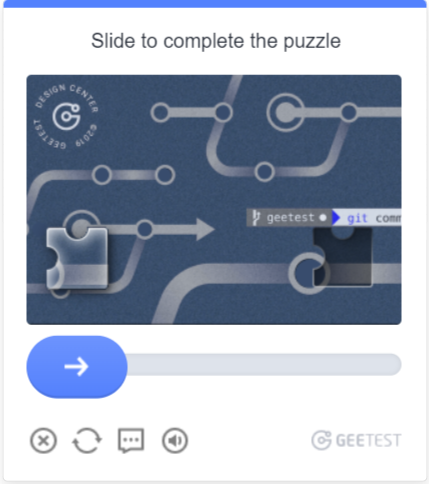
可能的验证码变体
请求参数
type<string>requiredGeeTestTask
websiteURL<string>required解决验证码的页面地址。
gt<string>required该域名的 GeeTest 标识符键 - captcha_id 参数。
version<integer>required only for V44
geetestApiServerSubdomain<string>optionalGeetest API 子域名服务器(必须不同于 api.geetest.com)。
可选参数。某些网站可能需要此参数。
geetestGetLib<string>optional用于在页面上显示验证码的脚本路径。
可选参数。某些网站可能需要此参数。
将 JSON 作为字符串发送。
initParameters<object>optional版本 4 的附加参数,与“riskType”(验证码类型/验证特征)一起使用。
proxyType<string>optionalhttp - 常规的 HTTP/HTTPS 代理;
https - 仅当 "http" 不起作用时尝试此选项(某些自定义代理需要);
socks4 - socks4 代理;
socks5 - socks5 代理。
proxyAddress<string>optionalIPv4/IPv6 代理 IP 地址。不允许使用:
- 使用主机名;
- 使用透明代理(可以看到客户端 IP);
- 使用本地机器上的代理。
proxyPort<integer>optional代理端口。
proxyLogin<string>optional代理服务器登录名。
proxyPassword<string>optional代理服务器密码。
userAgent<string>optional用于识别验证码的浏览器 User-Agent。
Create task method
- GeeTestTask (without proxy)
- GeeTestTask (using proxy)
https://api.capmonster.cloud/createTask
要求
{
  "clientKey": "YOUR_CAPMONSTER_CLOUD_API_KEY",
  "task": {
    "type": "GeeTestTask",
    "websiteURL": "https://gt4.geetest.com/",
    "gt": "54088bb07d2df3c46b79f80300b0abbe",
    "version": 4,
    "initParameters": {
      "riskType": "slide"
    }
  }
}
回应
{
  "errorId":0,
  "taskId":407533072
}
https://api.capmonster.cloud/createTask
要求
{
  "clientKey": "YOUR_CAPMONSTER_CLOUD_API_KEY",
  "task": {
    "type": "GeeTestTask",
    "websiteURL": "https://gt4.geetest.com/",
    "gt": "54088bb07d2df3c46b79f80300b0abbe",
    "version": 4,
    "initParameters": {
      "riskType": "slide"
    },
    "proxyType": "http",
    "proxyAddress": "8.8.8.8",
    "proxyPort": 8080,
    "proxyLogin": "proxyLoginHere",
    "proxyPassword": "proxyPasswordHere",
    "userAgent": "userAgentPlaceholder"
  }
}
回应
{
  "errorId":0,
  "taskId":407533072
}
使用 getTaskResult 方法获取 GeeTest 识别结果。根据系统负载,您将在 10 到 30 秒内收到响应。
获取任务结果方法
https://api.capmonster.cloud/getTaskResult
要求
{
  "clientKey":"API_KEY",
  "taskId": 407533072
}
回应
{
  "errorId": 0,
  "status": "ready",
  "solution": {
    "captcha_id": "f5c2ad5a8a3cf37192d8b9c039950f79",
    "lot_number": "bcb2c6ce2f8e4e9da74f2c1fa63bd713",
    "pass_token": "edc7a17716535a5ae624ef4707cb6e7e478dc557608b068d202682c8297695cf",
    "gen_time": "1683794919",
    "captcha_output": "XwmTZEJCJEnRIJBlvtEAZ662T...[cut]...SQ3fX-MyoYOVDMDXWSRQig56"
  }
}
| 属性 | 类型 | 描述 |
|---|---|---|
| captcha_id | String | 在目标网站提交表单时,这五个参数都是必需的。 input[name=captcha_id] input[name=lot_number] input[name=pass_token] input[name=gen_time] input[name=captcha_output] |
| lot_number | String | |
| pass_token | String | |
| gen_time | String | |
| captcha_output | String |
如何查找任务创建所需的所有参数
手动方式
- 请在浏览器中访问您的网站,该网站包含验证码功能。
- 右键点击验证码元素,选择 检查(Inspect)。
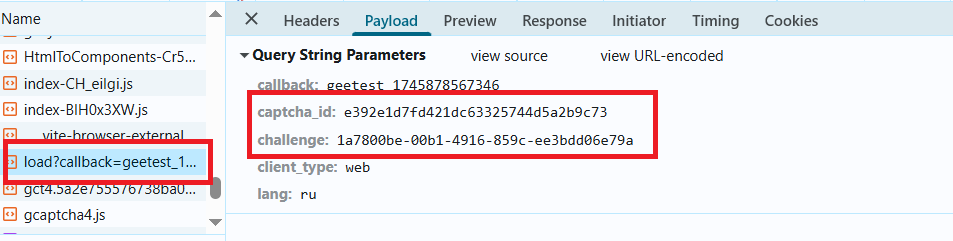
参数可能加载于 load?callback:
自动方法
一种方便的自动化获取所有必要参数的方式。 某些参数每次页面加载时都会重新生成,因此需要通过浏览器(普通或无头模式,如使用Playwright)提取它们。 由于动态参数值的有效期很短,获取后必须立即解决验证码。
提供的代码片段是用于熟悉参数提取的基本示例。具体实现将取决于验证码页面、其结构及使用的HTML元素/选择器。
- JavaScript
- Python
- C#
显示代码(浏览器中运行)
(function() {
  function getQueryParams(url) {
    const params = new URLSearchParams(new URL(url).search);
    const captchaId = params.get('captcha_id');
    const challenge = params.get('challenge');
    const riskType = params.get('risk_type');
    return { captchaId, challenge, riskType };
  }

  const observer = new PerformanceObserver((list) => {
    const entries = list.getEntriesByType('resource');
    entries.forEach((entry) => {
      if (entry.name.includes('https://gcaptcha4.geetest.com/load?')) {
        const { captchaId, challenge, riskType } = getQueryParams(entry.name);
        if (captchaId && challenge) {
          console.log('检测到 GeeTest v4(通过 PerformanceObserver):');
          console.log({ captchaId, challenge, riskType });
        }
      }
    });
  });

  observer.observe({ type: 'resource', buffered: true });
})();
显示代码(Node.js)
import { chromium } from "playwright";

async function detectGeeTestV4(pageUrl) {
  const result = { version: null, data: {} };

  const browser = await chromium.launch({ headless: false });
  const context = await browser.newContext();
  const page = await context.newPage();

  page.on("response", async (response) => {
    const url = response.url();
    if (url.includes("https://gcaptcha4.geetest.com/load?")) {
      const urlParams = new URLSearchParams(url.split("?")[1]);
      const captchaId = urlParams.get("captcha_id");
      const challenge = urlParams.get("challenge");
      const riskType = urlParams.get("risk_type");

      if (captchaId && challenge && !result.version) {
        result.version = "v4";
        result.data = {
          captchaId: captchaId,
          challenge: challenge,
          riskType: riskType,
        };
        console.log("检测到 GeeTest v4:");
        console.log(result.data);
      }
    }
  });

  await page.goto(pageUrl, { waitUntil: "networkidle" });
  await page.waitForTimeout(20000);

  if (!result.version) {
    console.log("错误");
  }

  await browser.close();
  return result;
}

detectGeeTestV4("https://example.com").then((result) => {
  console.log(result);
});
显示代码
import asyncio
from playwright.async_api import async_playwright
from urllib.parse import urlparse, parse_qs

async def detect_geetest_v4(page_url):
    result = {"version": None, "data": {}}

    async with async_playwright() as p:
        browser = await p.chromium.launch(headless=False)
        context = await browser.new_context()
        page = await context.new_page()

        async def on_request(request):
            url = request.url
            if "https://gcaptcha4.geetest.com/load?" in url:
                query = parse_qs(urlparse(url).query)
                captcha_id = query.get("captcha_id", [None])[0]
                challenge = query.get("challenge", [None])[0]
                risk_type = query.get("risk_type", [None])[0]

                if captcha_id and challenge and not result["version"]:
                    result["version"] = "v4"
                    result["data"] = {
                        "captchaId": captcha_id,
                        "challenge": challenge,
                        "riskType": risk_type
                    }
                    print("检测到 GeeTest v4:")
                    print(result["data"])

        context.on("request", on_request)

        await page.goto(page_url, wait_until="networkidle")
        await asyncio.sleep(10)

        if not result["version"]:
            print("错误")

        await browser.close()
        return result

asyncio.run(detect_geetest_v4("https://www.example.com"))
显示代码
using System;
using System.Threading.Tasks;
using Microsoft.Playwright;
using System.Web;

class Program
{
    public static async Task Main(string[] args)
    {
        var result = new
        {
            Version = (string)null,
            Data = new
            {
                CaptchaId = (string)null,
                Challenge = (string)null,
                RiskType = (string)null
            }
        };

        using var playwright = await Playwright.CreateAsync();
        var browser = await playwright.Chromium.LaunchAsync(new BrowserTypeLaunchOptions
        {
            Headless = false
        });

        var context = await browser.NewContextAsync();
        var page = await context.NewPageAsync();

        page.Request += (_, request) =>
        {
            var url = request.Url;

            if (url.Contains("https://gcaptcha4.geetest.com/load?"))
            {
                var uri = new Uri(url);
                var queryParams = HttpUtility.ParseQueryString(uri.Query);
                var captchaId = queryParams.Get("captcha_id");
                var challenge = queryParams.Get("challenge");
                var riskType = queryParams.Get("risk_type");

                if (!string.IsNullOrEmpty(captchaId) && !string.IsNullOrEmpty(challenge))
                {
                    Console.WriteLine("检测到 GeeTest v4:");
                    Console.WriteLine($"CaptchaId: {captchaId}");
                    Console.WriteLine($"Challenge: {challenge}");
                    Console.WriteLine($"RiskType: {riskType}");
                }
            }
        };

        await page.GotoAsync("https://www.example.com/", new PageGotoOptions
        {
            WaitUntil = WaitUntilState.NetworkIdle
        });

        await Task.Delay(10000);

        await browser.CloseAsync();
    }
}
使用 SDK 库
- JavaScript
- Python
- C#
显示代码(用于浏览器)
// https://github.com/ZennoLab/capmonstercloud-client-js

import {
    CapMonsterCloudClientFactory,
    ClientOptions,
    GeeTestRequest
} from '@zennolab_com/capmonstercloud-client';

const API_KEY = "YOUR_API_KEY"; // 输入您的 CapMonster Cloud API 密钥

document.addEventListener('DOMContentLoaded', async () => {
    const client = CapMonsterCloudClientFactory.Create(
        new ClientOptions({ clientKey: API_KEY })
    );

    // 如有必要,可以检查余额
    const balance = await client.getBalance();
    console.log("Balance:", balance);

    // 基本示例,无需代理
    // CapMonster Cloud 会自动使用它们的代理
    let geetestRequest = new GeeTestRequest({
        websiteURL: "https://example.com/geetest.php", // 页面中验证码的 URL
        gt: "81dc9bdb52d04dc20036dbd8313ed055",
        challenge: "d93591bdf7860e1e4ee2fca799911215",
        version: "4",
        initParameters: { riskType: "slide" }
    });

    // 使用您自己的代理的示例
    // 如果想使用自己的代理,请取消注释以下代码块

    /*
    const proxy = {
        proxyType: "https",
        proxyAddress: "123.45.67.89",
        proxyPort: 8080,
        proxyLogin: "username",
        proxyPassword: "password"
    };

    geetestRequest = new GeeTestRequest({
        websiteURL: "https://example.com/geetest.php",
        gt: "81dc9bdb52d04dc20036dbd8313ed055",
        challenge: "d93591bdf7860e1e4ee2fca799911215",
        version: "4",
        initParameters: { riskType: "slide" },
        proxy,
        userAgent: "userAgentPlaceholder"
    });
    */

    const result = await client.Solve(geetestRequest);
    console.log("Solution:", result);
});
显示代码 (Node.js)
// https://github.com/ZennoLab/capmonstercloud-client-js

import { CapMonsterCloudClientFactory, ClientOptions, GeeTestRequest } from '@zennolab_com/capmonstercloud-client';

const API_KEY = "YOUR_API_KEY"; // 输入您的 CapMonster Cloud API 密钥

async function solveGeeTest() {
    const client = CapMonsterCloudClientFactory.Create(
        new ClientOptions({ clientKey: API_KEY })
    );

    // 如有必要,可以检查余额
    const balance = await client.getBalance();
    console.log("Balance:", balance);

    // 基本示例,无需代理
    // CapMonster Cloud 会自动使用它们的代理
    let geetestRequest = new GeeTestRequest({
        websiteURL: "https://example.com/geetest.php", // 页面中验证码的 URL
        gt: "81dc9bdb52d04dc20036dbd8313ed055",
        challenge: "d93591bdf7860e1e4ee2fca799911215",
        version: "4",
        initParameters: { riskType: "slide" }
    });

    // 使用您自己的代理的示例
    // 如果想使用自己的代理,请取消注释以下代码块

    /*
    const proxy = {
        proxyType: "https",
        proxyAddress: "123.45.67.89",
        proxyPort: 8080,
        proxyLogin: "username",
        proxyPassword: "password"
    };

    geetestRequest = new GeeTestRequest({
        websiteURL: "https://example.com/geetest.php",
        gt: "81dc9bdb52d04dc20036dbd8313ed055",
        challenge: "d93591bdf7860e1e4ee2fca799911215",
        version: "4",
        initParameters: { riskType: "slide" },
        proxy,
        userAgent: "userAgentPlaceholder"
    });
    */

    const result = await client.Solve(geetestRequest);
    console.log("Solution:", result);
}

solveGeeTest().catch(console.error);
显示代码
# https://github.com/ZennoLab/capmonstercloud-client-python

import asyncio
from capmonstercloudclient import CapMonsterClient, ClientOptions
from capmonstercloudclient.requests import GeetestRequest
# from capmonstercloudclient.requests.baseRequestWithProxy import ProxyInfo  # 如果您计划使用自己的代理,请取消注释

API_KEY = "YOUR_API_KEY"  # 输入您的 CapMonster Cloud API 密钥

async def solve_geetest_v4():
    client_options = ClientOptions(api_key=API_KEY)
    cap_monster_client = CapMonsterClient(options=client_options)

    # 基本示例,无需代理
    # CapMonster Cloud 会自动使用它们的代理
    geetest_request = GeetestRequest(
        websiteUrl="https://example.com/",
        gt="54088bb07d2df3c46b79f80300b0abbe",
        version=4,
        initParameters={
            "riskType": "slide"
        }
    )

    # 使用您自己的代理的示例
    # 如果想使用自己的代理,请取消注释以下代码块

    # proxy = ProxyInfo(
    #     proxyType="http",
    #     proxyAddress="123.45.67.89",
    #     proxyPort=8080,
    #     proxyLogin="username",
    #     proxyPassword="password"
    # )

    # geetest_request = GeetestRequest(
    #     websiteUrl="https://example.com/",
    #     gt="54088bb07d2df3c46b79f80300b0abbe",
    #     version=4,
    #     initParameters={
    #         "riskType": "slide"
    #     },
    #     proxy=proxy,
    #     userAgent="userAgentPlaceholder"
    # )

    # 如有必要,可以检查余额
    balance = await cap_monster_client.get_balance()
    print("Balance:", balance)

    result = await cap_monster_client.solve_captcha(geetest_request)
    print("Solution:", result)

asyncio.run(solve_geetest_v4())
显示代码
// https://github.com/ZennoLab/capmonstercloud-client-dotnet

using System;
using System.Collections.Generic;
using System.Threading.Tasks;
using Zennolab.CapMonsterCloud;
using Zennolab.CapMonsterCloud.Requests;

class Program
{
    static async Task Main(string[] args)
    {
        // 输入您的 CapMonster Cloud API 密钥
        var clientOptions = new ClientOptions
        {
            ClientKey = "YOUR_API_KEY"
        };

        var cmCloudClient = CapMonsterCloudClientFactory.Create(clientOptions);

        // 如有必要,可以检查余额
        var balance = await cmCloudClient.GetBalanceAsync();
        Console.WriteLine("Balance: " + balance);

        // 基本示例,无需代理
        // CapMonster Cloud 会自动使用它们的代理
        var geetestRequest = new GeeTestRequest
        {
            WebsiteUrl = "https://example.com/", // CAPTCHA 页面 URL
            Gt = "54088bb07d2df3c46b79f80300b0abbe",
            Version = 4,
            InitParameters = new Dictionary<string, string> { { "riskType", "slide" } } // V4 的附加参数
        };

        // 使用您自己的代理的示例
        // 如果想使用自己的代理,请取消注释以下代码块
        /*
        var geetestRequest = new GeeTestRequest
        {
            WebsiteUrl = "https://example.com/",
            Gt = "54088bb07d2df3c46b79f80300b0abbe",
            Version = 4,
            InitParameters = new Dictionary<string, string> { { "riskType", "slide" } },

            Proxy = new ProxyContainer(
                "123.45.67.89",
                8080,
                ProxyType.Http,
                "username",
                "password"
            )
        };
        */

        var geetestResult = await cmCloudClient.SolveAsync(geetestRequest);

        Console.WriteLine("Solution:");
        Console.WriteLine($"CaptchaId:     {geetestResult.Solution.CaptchaId}");
        Console.WriteLine($"LotNumber:     {geetestResult.Solution.LotNumber}");
        Console.WriteLine($"PassToken:     {geetestResult.Solution.PassToken}");
        Console.WriteLine($"GenTime:       {geetestResult.Solution.GenTime}");
        Console.WriteLine($"CaptchaOutput: {geetestResult.Solution.CaptchaOutput}");
    }
}
app.gal**.com 上的 GeeTest 解决方案特点
本节内容 仅适用于 app.gal**.com 网站上的 GeeTest 验证码。这些值不应在其他网站上使用。
何时使用 challenge 字段?
对于 app.gal**.com 网站,需要根据执行的操作指定 challenge 字段的值。如果未指定该字段,则默认使用 AddTypedCredentialItems,但这并不适用于所有场景。
challenge 可选值列表:
app.gal**.com 网站上的操作 | challenge 值 |
|---|---|
| 发送邮箱验证码 | SendEmailCode |
| 确认操作(例如登录) | SendVerifyCode |
| 领取奖励 | ClaimUserTask |
| 打开神秘盒子 | OpenMysteryBox |
| 在 GGShop 购买 | BuyGGShop |
| 准备购买抽奖票 | PrepareBuyGGRaffleTickets |
| 添加凭据 | AddTypedCredentialItems |
| 创建报告工单 | CreateReportTicket |
| 参加活动 | PrepareParticipate |
| 更新凭据数据 | RefreshCredentialValue |
| 同步数据 | SyncCredentialValue |
| 社交登录 | GetSocialAuthUrl |
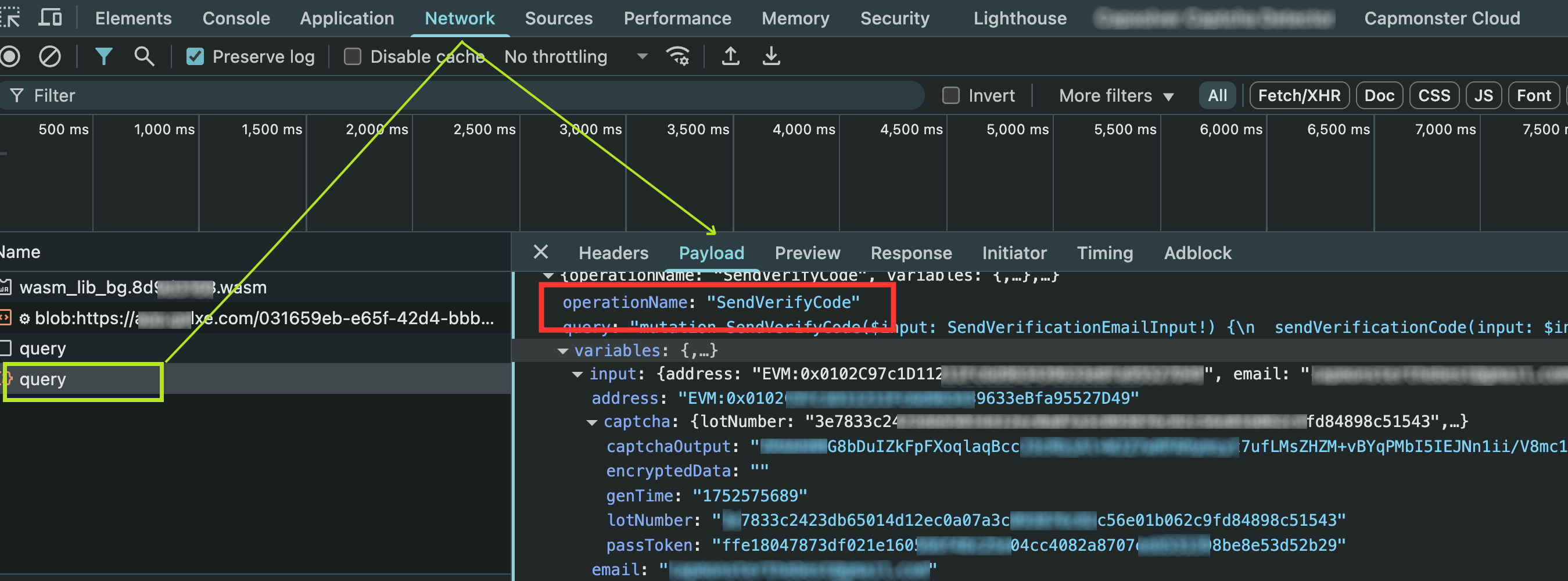
challenge的值必须与 DevTools 的网络请求(Network标签)中看到的operationName一致。
提交任务示例
{
  "type": "GeeTestTaskProxyless",
  "websiteURL": "https://app.gal**.com/accountSetting/social",
  "gt": "244bcb8b9846215df5af4c624a750db4",
  "challenge": "SendVerifyCode"
}
注意:gal**.com 的 GT key 始终为
244bcb8b9846215df5af4c624a750db4。可以将该值保持为默认。
响应示例
{
  "errorId": 0,
  "errorCode": null,
  "errorDescription": null,
  "solution": {
    "lot_number": "e0c84aab60867ad1316f8606d31ab58d2a54d8a4ca8e78b9339abd8ea62967cb",
    "captcha_output": "7DlZW2dul...cbEA5uIbwg==",
    "pass_token": "ce024389a0926e0d1081792c83e0c46f882084e45e95afa0e148fd03aed3ae10",
    "gen_time": "1753158042",
    "encryptedData": ""
  },
  "status": "ready"
}
encryptedData 字段在网站端通常为空,因为客户端逻辑会忽略它。虽然该值通过 WebAssembly 返回,但在实际中并未使用。