FunCaptcha
CapMonster Cloud 默认通过内置代理工作——这些代理已包含在费用内。仅当网站不接受令牌或对内置服务的访问受限时,才需要指定您自己的代理。
如果代理按 IP 授权,请将地址 65.21.190.34 加入白名单。
请求参数
重要提示:某些参数的值是动态的 — 它们会在每次渲染包含 FunCaptcha 的页面时发生变化。
请在创建任务前立即提取这些参数,以避免在解决过程中出现错误。
参数提取示例请参见章节 获取 FunCaptcha 参数 和 使用 data[blob] 自动解决 FunCaptcha。
type<string>requiredFunCaptchaTask
websiteURL<string>required验证码所在页面的 URL。
websitePublicKey<string>requiredFunCaptcha 密钥(值为 public key 或 pk)。
data<string>optional附加参数。如果网站使用 data[blob] 则必填。
重要提示: 不要加载 captcha iframe 来提取 blob。一旦加载验证码,该值即失效。
funcaptchaApiJSSubdomain<string>optionalArkose Labs 子域名(值为 surl)。只有在不同于默认值时才需要指定:client-api.arkoselabs.com。
重要: 仅输入域名,不要包含 https:// 前缀。
userAgent<string>optional浏览器 User-Agent。
仅传递当前 Windows 系统的 UA 示例: userAgentPlaceholder。
cookies<string>optional以如下格式传递额外 Cookie:
cookieName1=value1; cookieName2=value2
proxyType<string>optionalhttp - 常规 http/https 代理;
https - 仅当 "http" 无效时使用(某些自定义代理需要);
socks4 - socks4 代理;
socks5 - socks5 代理。
proxyAddress<string>optional代理的 IPv4/IPv6 地址。禁止以下使用方式:
- 使用透明代理(可暴露客户端 IP);
- 使用本地机器上的代理。
proxyPort<integer>optional代理端口。
proxyLogin<string>optional代理服务器登录用户名。
proxyPassword<string>optional代理服务器登录密码。
创建任务的方法
- FunCaptchaTask(无代理)
- FunCaptchaTask(使用代理)
https://api.capmonster.cloud/createTask
请求
{
  "clientKey": "API_KEY",
  "task": {
    "type": "FunCaptchaTask",
    "websiteURL": "https://www.example.com",
    "websitePublicKey": "EX72CCFB-26EX-40E5-91E6-85EX70BE98ED",
    "funcaptchaApiJSSubdomain": "example-api.arkoselabs.com",
    "data": "{\"blob\":\"nj9UbL+yio7goOlTQ/b64t.ayrrBnP6kPgzlKYCP/kv491lKS...Wot/7gjpyIxs7VYb0+QuRcfQ/t6bzh5pXDkOFSskA/V/ITSVZSAlglIplLcdreZ4PE8skfMU6k1Q\"}",
    "userAgent": "userAgentPlaceholder"
  }
}
响应
{
  "errorId":0,
  "taskId":407533077
}
https://api.capmonster.cloud/createTask
请求
{
  "clientKey": "API_KEY",
  "task": {
    "type": "FunCaptchaTask",
    "websiteURL": "https://www.example.com",
    "websitePublicKey": "EX72CCFB-26EX-40E5-91E6-85EX70BE98ED",
    "funcaptchaApiJSSubdomain": "example-api.arkoselabs.com",
    "data": "{\"blob\":\"nj9UbL+yio7goOlTQ/b64t.ayrrBnP6kPgzlKYCP/kv491lKS...Wot/7gjpyIxs7VYb0+QuRcfQ/t6bzh5pXDkOFSskA/V/ITSVZSAlglIplLcdreZ4PE8skfMU6k1Q\"}",
    "userAgent": "userAgentPlaceholder",
    "proxyType": "http",
    "proxyAddress": "8.8.8.8",
    "proxyPort": 8080,
    "proxyLogin": "proxyLoginHere",
    "proxyPassword": "proxyPasswordHere"
  }
}
响应
{
  "errorId":0,
  "taskId":407533077
}
获取任务结果的方法
使用 getTaskResult 获取 FunCaptcha 解决方案。
https://api.capmonster.cloud/getTaskResult
请求
{
  "clientKey": "API_KEY",
  "taskId": 407533077
}
响应
{
  "errorId": 0,
  "errorCode": null,
  "errorDescription": null,
  "solution": {
    "token": "337187b9f57678923.5060184402|r=us-west-2|lang=en|pk=EX72CCFB-26EX-40E5-91E6-85EX70BE98ED|at=40|ag=101|cdn_url=https%3A%2F%2Fclient-api.arkoselabs.com%2Fcdn%2Ffc|surl=https%3A%2F%2Fclient-api.arkoselabs.com|smurl=https%3A%2F%2Fclient-api.arkoselabs.com%2Fcdn%2Ffc%2Fassets%2Fstyle-manager",
    "userAgent": "userAgentPlaceholder"
  },
  "status": "ready"
}
获取 FunCaptcha 参数
websitePublicKey 和 funcaptchaApiJSSubdomain
打开 DevTools → Elements,找到隐藏输入框 ID 为 verification-token 或 FunCaptcha-Token 的元素。其中包含 pk (websitePublicKey) 和 surl (funcaptchaApiJSSubdomain) 值。
通过控制台获取参数:
const v = document.querySelector("#verification-token, #FunCaptcha-Token").value;
const p = Object.fromEntries(v.split("|").map(x => x.split("=")));
console.log("pk:", p.pk);
console.log("surl:", decodeURIComponent(p.surl));
data (blob)
如果网站使用额外的 blob 参数,可以按以下方式获取:
1. 确定数据来源
blob 参数可能存在于:
- HTML 属性:例如
data-blob或其他data-*属性。

-
JSON API 响应:用户操作(如点击或请求验证码)后返回。
-
JSON 中 URL 的查询参数:有时
blob作为 URL 的一部分传递。
2. 执行请求
- GET 请求到显示验证码的页面, 或
- POST 请求到返回验证码数据的 API。
重要提示: 不要加载 captcha iframe 来提取
blob。一旦验证码加载,参数即失效。
3. 提取参数
- 如果响应是 HTML — 使用正则或 HTML 解析工具定位属性。
- 如果响应是 JSON — 获取对应键的值(例如
data.blob)。 - 如果
blob在 URL 中 — 解析 query 参数以获取值。
您也可以通过 DevTools 的网络请求找到 blob 参数及其值:
-
打开包含验证码的页面,打开 DevTools,并触发验证码显示。 然后打开 Network(网络) 标签,找到类似以下的请求:
https://arkoselabs.example.com/fc/gt2/public_key/176068BF-9607-4799-B53D-366BE98E2B84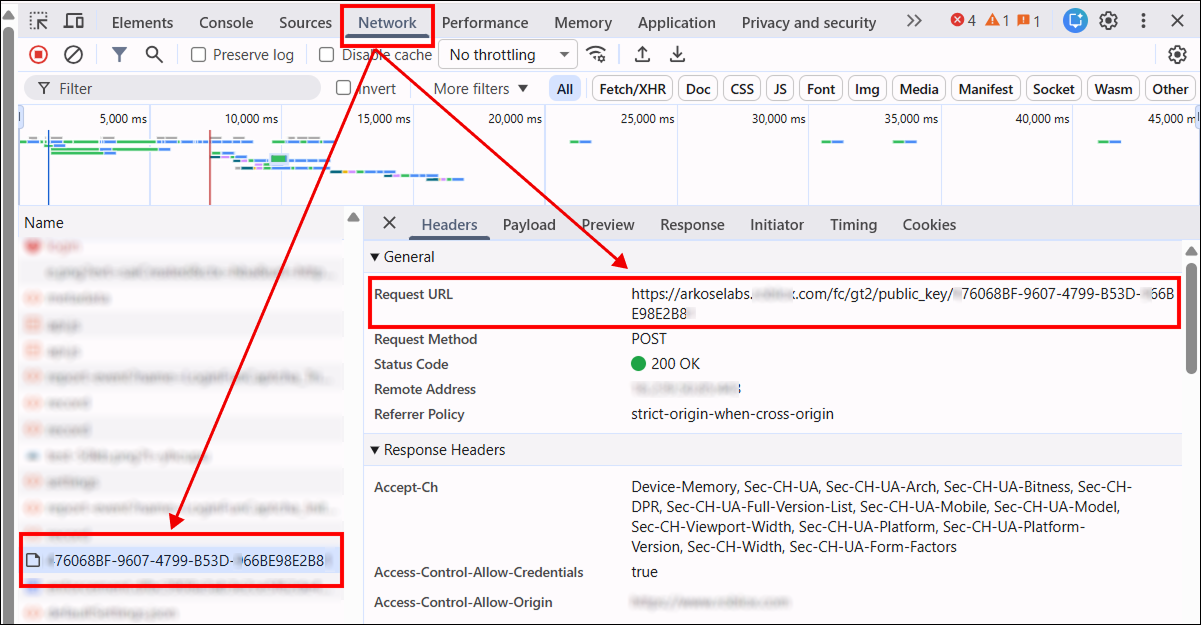
-
阻止验证码 iframe 的加载,以获取有效的
blob。 操作方法:按 Ctrl + Shift + P(在 Chromium 浏览器中),输入 Enable network request blocking(启用网络请求阻止),启用请求阻止,并添加如下模式:/fc/gt2重新加载页面后,iframe 将被阻止。复制
blob参数的值,并在验证码求解请求中使用。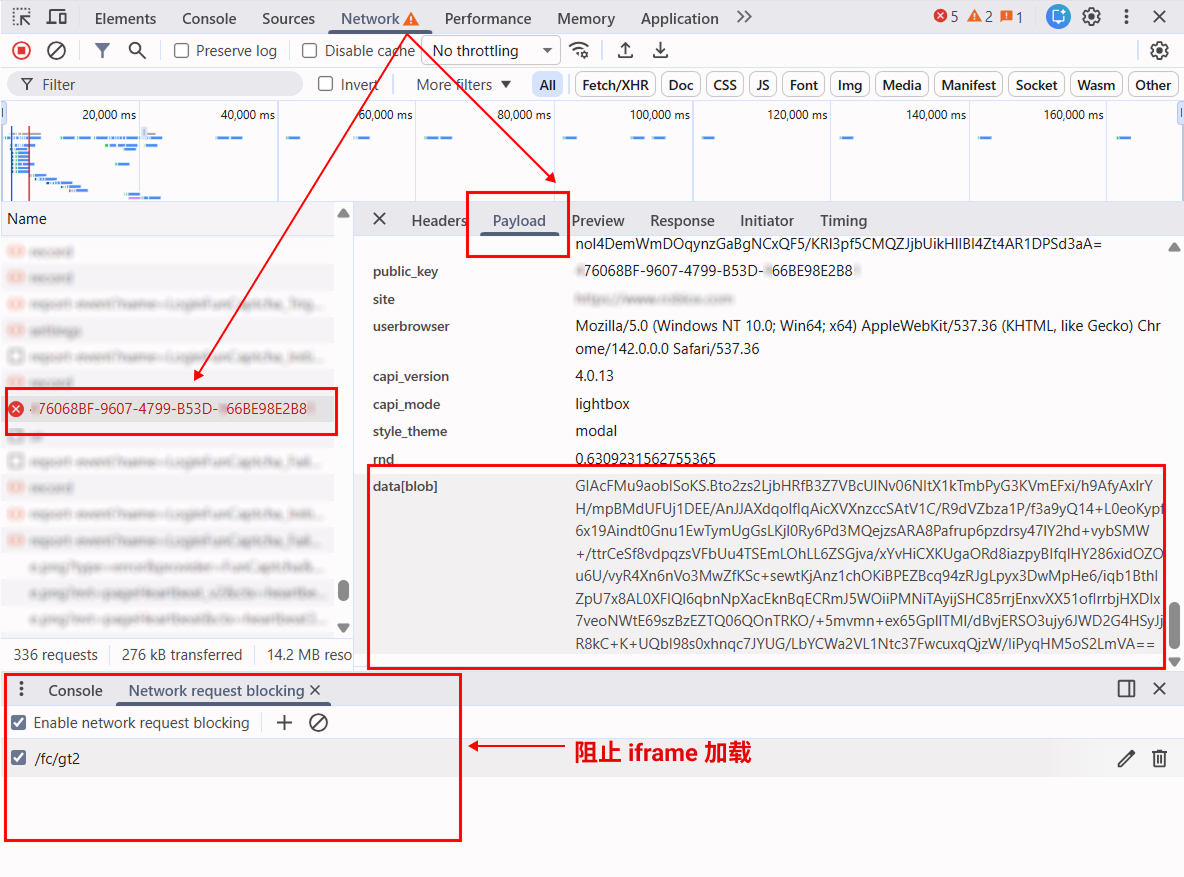
使用 data[blob] 自动解决 FunCaptcha
下面的 JavaScript(Node.js)、Python 和 C# 示例演示了如何使用 Playwright 提取 public_key 和 blob 参数,在 CapMonster Cloud 创建任务,并获取验证码解决方案的 token。
你也可以使用其他自动化或测试工具实现相同的逻辑。
Node.js
// npm install playwright

const { chromium } = require("playwright");

const apiKey = "YOUR_API_KEY"; // CapMonster Cloud API 密钥
const websiteURL = "https://www.example.com/"; // 包含 FunCaptcha 的页面

// 等待 FunCaptcha 请求,检查并提取 public_key 和 blob
async function captureBlobAndPublicKey(page) {
    return new Promise(resolve => {
        page.on("request", req => {
            const url = req.url();

            // 检查请求是否与 FunCaptcha 初始化相关
            if (url.includes("/fc/gt2/public_key/")) {
                const publicKey = url.split("/fc/gt2/public_key/")[1].split("/")[0];
                const post = req.postData();

                // 检查 POST 数据中是否存在 blob 并提取
                if (post && post.includes("data[blob]")) {
                    const params = new URLSearchParams(post);
                    const blob = params.get("data[blob]");

                    console.log("Extracted blob:", blob);
                    console.log("Extracted public_key:", publicKey);

                    resolve({ blob, publicKey });
                }
            }
        });
    });
}

// 在 CapMonster Cloud 创建 FunCaptchaTask 并发送参数
async function createTask(blob, publicKey) {
    const task = {
        type: "FunCaptchaTask",
        websiteURL,
        websitePublicKey: publicKey,
        data: JSON.stringify({ blob }),
        userAgent: "userAgentPlaceholder"
    };

    const res = await fetch("https://api.capmonster.cloud/createTask", {
        method: "POST",
        headers: { "Content-Type": "application/json" },
        body: JSON.stringify({ clientKey: apiKey, task })
    });

    const json = await res.json();

    // 检查 CapMonster Cloud 响应并等待 taskId
    if (!json.taskId) {
        console.error("createTask error:", json);
        process.exit(1);
    }

    console.log("Task created:", json.taskId);
    return json.taskId;
}

// 等待任务解决
async function getTaskResult(taskId) {
    while (true) {
        const res = await fetch("https://api.capmonster.cloud/getTaskResult", {
            method: "POST",
            headers: { "Content-Type": "application/json" },
            body: JSON.stringify({ clientKey: apiKey, taskId })
        });

        const json = await res.json();

        // 检查解决方案是否就绪
        if (json.status === "ready") return json.solution;

        console.log("Processing...");
        await new Promise(r => setTimeout(r, 2500));
    }
}

(async () => {
    const browser = await chromium.launch({ headless: false });
    const page = await browser.newPage();

    // 阻止验证码 iframe
    await page.route("**/fc/gt2/**", route => route.abort());

    console.log("Opening page...");
    await page.goto(websiteURL, { waitUntil: "domcontentloaded" });

    console.log("Capturing public_key + blob...");

    /**
     * 重要!
     * 在此步骤,你需要触发 CAPTCHA。
     * - 点击登录 / 注册
     * - 输入邮箱 / 用户名
     * - 等待 FunCaptcha 出现
     *
     * 示例:
     * await page.click('text="Create account"');
     * await page.waitForTimeout(1000);
     */

    const { blob, publicKey } = await captureBlobAndPublicKey(page);

    // 检查参数是否成功提取
    if (!blob || !publicKey) {
        console.error("Failed to extract blob or public_key");
        await browser.close();
        return;
    }

    console.log("Creating CapMonster task...");
    const taskId = await createTask(blob, publicKey);

    console.log("Waiting for solution...");
    const solution = await getTaskResult(taskId);

    // 获取最终 token
    console.log("CAPTCHA SOLVED");
    console.log("Token:", solution.token);

    await browser.close();
})();
Python
# pip install playwright
# playwright install

import asyncio
import json
import time
import requests
from playwright.async_api import async_playwright

API_KEY = "YOUR_API_KEY"  # CapMonster Cloud API 密钥
WEBSITE_URL = "https://www.example.com/"  # 包含 FunCaptcha 的页面

# 等待 FunCaptcha 请求,拦截并提取 public_key 和 blob
async def capture_blob_and_public_key(page):
    future = asyncio.Future()

    async def on_request(request):
        url = request.url

        # 检查请求是否与 FunCaptcha 初始化相关
        if "/fc/gt2/public_key/" in url:
            public_key = url.split("/fc/gt2/public_key/")[1].split("/")[0]
            post_data = request.post_data

            # 检查 POST 数据中是否存在 blob
            if post_data and "data[blob]" in post_data:
                params = dict(x.split("=") for x in post_data.split("&"))
                blob = params.get("data[blob]")

                print("Extracted blob:", blob)
                print("Extracted public_key:", public_key)

                future.set_result((blob, public_key))

    # 订阅网络请求
    page.on("request", on_request)
    return await future

# 在 CapMonster Cloud 创建 FunCaptchaTask 并发送参数
def create_task(blob, public_key):
    task = {
        "type": "FunCaptchaTask",
        "websiteURL": WEBSITE_URL,
        "websitePublicKey": public_key,
        "data": json.dumps({"blob": blob}),  # 发送 blob
        "userAgent": "userAgentPlaceholder"
    }

    res = requests.post(
        "https://api.capmonster.cloud/createTask",
        json={"clientKey": API_KEY, "task": task},
        headers={"Content-Type": "application/json"}
    )

    data = res.json()

    # 检查任务创建是否成功
    if "taskId" not in data:
        raise Exception(f"createTask error: {data}")

    print("Task created:", data["taskId"])
    return data["taskId"]

# 等待 CapMonster Cloud 任务解决
def get_task_result(task_id):
    while True:
        res = requests.post(
            "https://api.capmonster.cloud/getTaskResult",
            json={"clientKey": API_KEY, "taskId": task_id},
            headers={"Content-Type": "application/json"}
        )

        data = res.json()

        # 检查任务状态
        if data.get("status") == "ready":
            return data["solution"]

        print("Processing...")
        time.sleep(2.5)

async def main():
    async with async_playwright() as p:
        browser = await p.chromium.launch(headless=False)
        page = await browser.new_page()

        # 阻止 FunCaptcha iframe
        await page.route("**/fc/gt2/**", lambda route: route.abort())

        print("Opening page...")
        await page.goto(WEBSITE_URL, wait_until="domcontentloaded")

        print("Capturing public_key + blob...")

        # ------------------------------------------------------------------
        # 重要!
        # 在此步骤,你需要触发 CAPTCHA。
        # - 点击登录 / 注册
        # - 输入邮箱 / 用户名
        # - 等待 FunCaptcha 出现
        #
        # 示例:
        # await page.click("text=Sign up")
        # await page.wait_for_timeout(1000)
        # ------------------------------------------------------------------

        blob, public_key = await capture_blob_and_public_key(page)

        # 检查参数是否成功提取
        if not blob or not public_key:
            print("Failed to extract blob or public_key")
            await browser.close()
            return

        print("Creating CapMonster task...")
        task_id = create_task(blob, public_key)

        print("Waiting for solution...")
        solution = get_task_result(task_id)

        # 最终 FunCaptcha token
        print("CAPTCHA SOLVED")
        print("Token:", solution["token"])

        await browser.close()

# 运行
asyncio.run(main())
C#
// dotnet add package Microsoft.Playwright

using Microsoft.Playwright;
using System.Text;
using System.Text.Json;
using System.Net.Http;
using System.Threading.Tasks;

class Program
{
    private static readonly string ApiKey = "YOUR_API_KEY";   // CapMonster Cloud API 密钥
    private static readonly string WebsiteURL = "https://www.example.com/"; // 包含 FunCaptcha 的页面
    private static readonly HttpClient http = new HttpClient();

    // 等待 FunCaptcha 网络请求,查找 public_key + blob
    static TaskCompletionSource<(string blob, string publicKey)> blobTcs;

    static async Task Main()
    {
        blobTcs = new TaskCompletionSource<(string, string)>();

        using var playwright = await Playwright.CreateAsync();
        var browser = await playwright.Chromium.LaunchAsync(new BrowserTypeLaunchOptions
        {
            Headless = false
        });

        var page = await browser.NewPageAsync();

        // 阻止 FunCaptcha iframe
        await page.RouteAsync("**/fc/gt2/**", route => route.AbortAsync());

        // 订阅网络请求
        page.Request += OnRequest;

        Console.WriteLine("Opening page...");
        await page.GotoAsync(WebsiteURL, new PageGotoOptions
        {
            WaitUntil = WaitUntilState.DOMContentLoaded
        });

        Console.WriteLine("Capturing public_key + blob...");

        // ---------------------------------------------------------------
        // 重要!
        // 在此步骤,你需要触发 CAPTCHA。
        // - 点击登录 / 注册
        // - 输入账号信息
        // - 等待 FunCaptcha 出现
        //
        // 示例:
        // await page.ClickAsync("text=Sign up");
        // await page.WaitForTimeoutAsync(1500);
        // ---------------------------------------------------------------

        var (blob, publicKey) = await blobTcs.Task;

        if (blob == null || publicKey == null)
        {
            Console.WriteLine("Failed to extract blob or public_key");
            await browser.CloseAsync();
            return;
        }

        Console.WriteLine("Creating CapMonster task...");
        var taskId = await CreateTask(blob, publicKey);

        Console.WriteLine("Waiting for solution...");
        var solution = await GetTaskResult(taskId);

        Console.WriteLine("CAPTCHA SOLVED");
        Console.WriteLine("Token: " + solution);

        await browser.CloseAsync();
    }

    // 网络请求处理程序 — 查找 public_key + blob
    private static async void OnRequest(object sender, IRequest request)
    {
        string url = request.Url;

        // 检查请求是否与 FunCaptcha 相关
        if (url.Contains("/fc/gt2/public_key/"))
        {
            string publicKey = url.Split("/fc/gt2/public_key/")[1].Split("/")[0];
            string postData = request.PostData;

            // 检查 POST 数据中是否存在 blob
            if (!string.IsNullOrEmpty(postData) && postData.Contains("data[blob]"))
            {
                var parts = postData.Split('&');
                string blob = null;

                foreach (var part in parts)
                {
                    if (part.StartsWith("data[blob]="))
                        blob = part.Substring("data[blob]=".Length);
                }

                Console.WriteLine("Extracted blob: " + blob);
                Console.WriteLine("Extracted public_key: " + publicKey);

                blobTcs.TrySetResult((blob, publicKey));
            }
        }
    }

    // 在 CapMonster Cloud 创建 FunCaptchaTask
    private static async Task<int> CreateTask(string blob, string publicKey)
    {
        var task = new
        {
            type = "FunCaptchaTask",
            websiteURL = WebsiteURL,
            websitePublicKey = publicKey,
            data = JsonSerializer.Serialize(new { blob }),
            userAgent = "userAgentPlaceholder"
        };

        var payload = new
        {
            clientKey = ApiKey,
            task
        };

        var content = new StringContent(JsonSerializer.Serialize(payload), Encoding.UTF8, "application/json");
        var res = await http.PostAsync("https://api.capmonster.cloud/createTask", content);
        var json = JsonDocument.Parse(await res.Content.ReadAsStringAsync());

        if (!json.RootElement.TryGetProperty("taskId", out var taskIdProp))
        {
            throw new Exception("createTask error: " + json.RootElement.ToString());
        }

        int taskId = taskIdProp.GetInt32();
        Console.WriteLine("Task created: " + taskId);

        return taskId;
    }

    // 等待 CapMonster Cloud 任务解决
    private static async Task<string> GetTaskResult(int taskId)
    {
        while (true)
        {
            var payload = new
            {
                clientKey = ApiKey,
                taskId
            };

            var content = new StringContent(JsonSerializer.Serialize(payload), Encoding.UTF8, "application/json");
            var res = await http.PostAsync("https://api.capmonster.cloud/getTaskResult", content);
            var json = JsonDocument.Parse(await res.Content.ReadAsStringAsync());

            if (json.RootElement.GetProperty("status").GetString() == "ready")
            {
                return json.RootElement.GetProperty("solution").GetProperty("token").GetString();
            }

            Console.WriteLine("Processing...");
            await Task.Delay(2500);
        }
    }
}