Amazon | AWS WAF 验证码与挑战
任务示例
- Click
- Puzzle
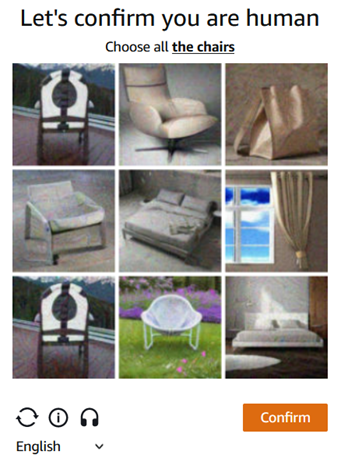
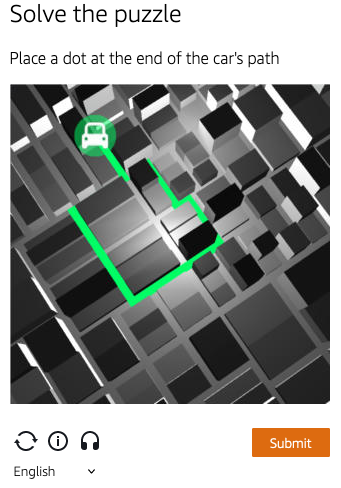
解决 AWS WAF 中的验证码与挑战
CapMonster Cloud 默认通过内置代理工作——这些代理已包含在费用内。仅当网站不接受令牌或对内置服务的访问受限时,才需要指定您自己的代理。
如果代理按 IP 授权,请将地址 65.21.190.34 加入白名单。
请求参数
重要提示:某些参数的值是动态的,也就是说,在每次渲染包含 Amazon (AWS WAF) 的页面时都会发生变化。
请在创建任务前立即提取这些参数,以避免在解决过程中出现错误。
自动提取参数的示例请参见章节 如何查找任务创建所需的所有参数。
选项 1
type<string>requiredAmazonTask
websiteURL<string>required解决验证码的主页面地址。
websiteKey<string>required可以在渲染验证码时的 apiKey 字段找到。
captchaScript<string>requiredHTML 页面中 jsapi.js 的链接,格式如 <Integration URL>/jsapi.js。
cookieSolution<boolean>optional默认 false — 响应将包含 "captcha_voucher" 和 "existing_token"。
如果需要 "aws-waf-token" cookie,请设置为 true。
proxyType<string>optionalhttp - 标准 http/https 代理;
https - 仅在 "http" 无效时尝试(某些自定义代理需要);
socks4 - socks4 代理;
socks5 - socks5 代理。
proxyAddress<string>optional代理 IPv4/IPv6 地址。禁止:
- 透明代理(客户端 IP 可见);
- 本地机器上的代理。
proxyPort<integer>optional代理端口。
proxyLogin<string>optional代理服务器登录名。
proxyPassword<string>optional代理服务器密码。
选项 2
type<string>requiredAmazonTask
websiteURL<string>required解决验证码的主页面地址。
challengeScript<string>requiredchallenge.js 的链接(详见下面说明)。
websiteKey<string>required可以从 HTML 验证码页面或通过 JavaScript 获取:window.gokuProps.key。
context<string>required可以从 HTML 验证码页面或通过 JavaScript 获取:window.gokuProps.context。
iv<string>required可以从 HTML 验证码页面或通过 JavaScript 获取:window.gokuProps.iv。
captchaScript<string>optionalcaptcha.js 链接(如果仅存在挑战,则可能为空)。
cookieSolution<boolean>optional默认 false — 响应将包含 "captcha_voucher" 和 "existing_token"。
如果需要 "aws-waf-token" cookie,请设置为 true。
proxyType<string>optionalhttp - 标准 http/https 代理;
https - 仅在 "http" 无效时尝试(某些自定义代理需要);
socks4 - socks4 代理;
socks5 - socks5 代理。
proxyAddress<string>optional代理 IPv4/IPv6 地址。禁止:
- 透明代理(客户端 IP 可见);
- 本地机器上的代理。
proxyPort<integer>optional代理端口。
proxyLogin<string>optional代理服务器登录名。
proxyPassword<string>optional代理服务器密码。
选项 3
如果网站使用隐形验证码且仅加载 challenge.js,请使用此选项。
在这种情况下,不需要传递选项 2 的所有参数 — 可保留为空。只需传递 challenge.js 的值。
type<string>requiredAmazonTask
websiteURL<string>required解决验证码的主页面地址。
challengeScript<string>requiredchallenge.js 链接。
captchaScript<string>requiredcaptcha.js 链接。在此选项中提供任意字符串。
websiteKey<string>required提供任意字符串。
context<string>required提供任意字符串。
iv<string>required提供任意字符串。
cookieSolution<boolean>optional设置为 true 以获取 "aws-waf token"。
userAgent<string>optional浏览器的 User-Agent。
请仅传递当前 Windows 系统下的有效 UA。当前推荐值为:userAgentPlaceholder
proxyType<string>optionalhttp - 标准 http/https 代理;
https - 仅在 "http" 无效时尝试(某些自定义代理需要);
socks4 - socks4 代理;
socks5 - socks5 代理。
proxyAddress<string>optional代理 IPv4/IPv6 地址。禁止:
- 透明代理(客户端 IP 可见);
- 本地机器上的代理。
proxyPort<integer>optional代理端口。
proxyLogin<string>optional代理服务器登录名。
proxyPassword<string>optional代理服务器密码。
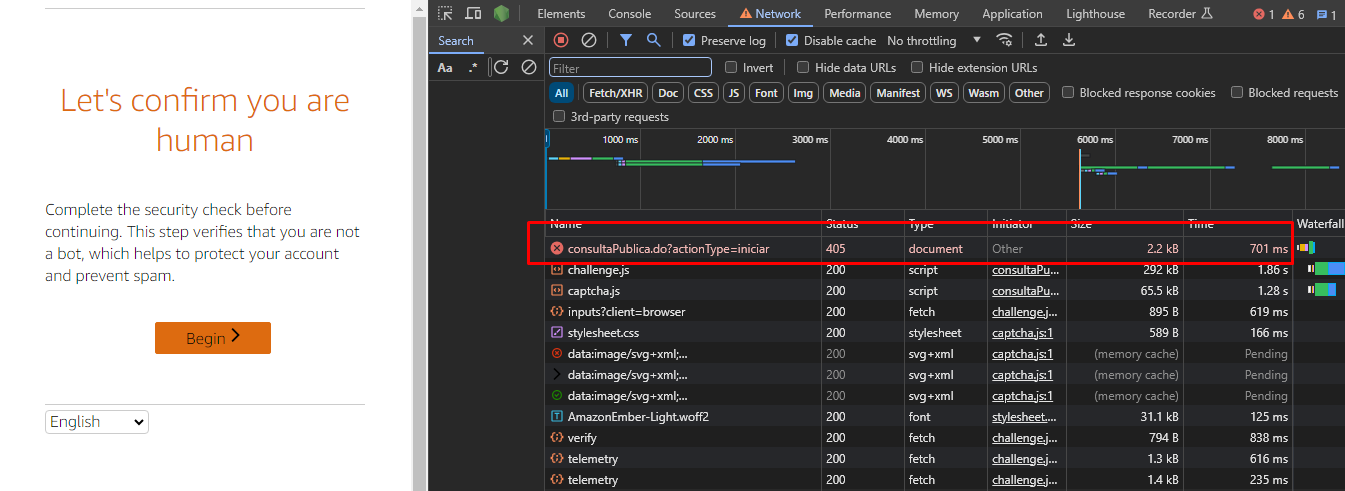
如何获取 websiteKey、context、iv 和 challengeScript 参数
访问网站时,您会收到 405 响应和带验证码的 HTML 页面。可以从此页面中提取所有参数:
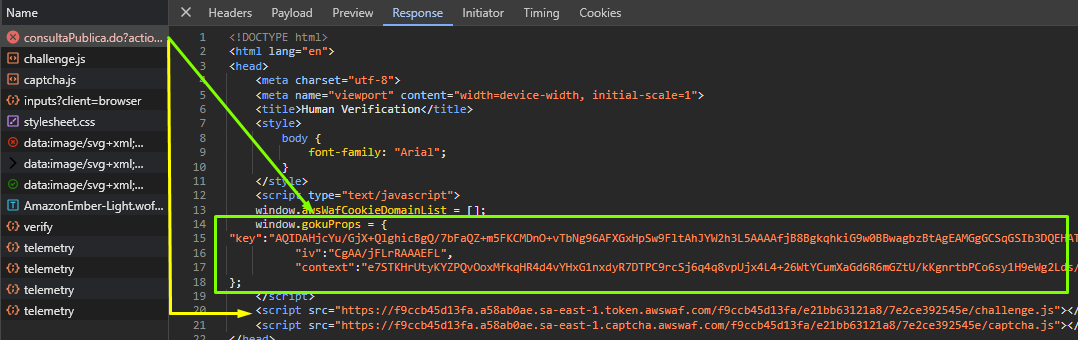
任务创建方法
选项 1
- AmazonTask (无代理)
- AmazonTask (有代理)
https://api.capmonster.cloud/createTask
请求
{
  "clientKey": "API_KEY",
  "task": {
    "type": "AmazonTask",
    "websiteURL": "https://example.com/index.html",
    "websiteKey": "h15hX7brbaRTR...Za1_1",
    "userAgent": "userAgentPlaceholder",
    "captchaScript": "https://234324vgvc23.yejk.captcha-sdk.awswaf.com/234324vgvc23/jsapi.js",
    "cookieSolution": true
  }
}
响应
{
  "errorId": 0,
  "taskId": 407533072
}
https://api.capmonster.cloud/createTask
请求
{
  "clientKey": "API_KEY",
  "task": {
    "type": "AmazonTask",
    "websiteURL": "https://example.com/index.html",
    "websiteKey": "h15hX7brbaRTR...Za1_1",
    "userAgent": "userAgentPlaceholder",
    "captchaScript": "https://234324vgvc23.yejk.captcha-sdk.awswaf.com/234324vgvc23/jsapi.js",
    "cookieSolution": true,
    "proxyType": "http",
    "proxyAddress": "8.8.8.8",
    "proxyPort": 8080,
    "proxyLogin": "proxyLoginHere",
    "proxyPassword": "proxyPasswordHere"
  }
}
响应
{
  "errorId": 0,
  "taskId": 407533072
}
选项 2
- AmazonTask (无代理)
- AmazonTask (有代理)
https://api.capmonster.cloud/createTask
请求
{
  "clientKey": "API_KEY",
  "task": {
    "type": "AmazonTask",
    "websiteURL": "https://example.com",
    "challengeScript": "https://41bcdd4fb3cb.610cd090.us-east-1.token.awswaf.com/41bcdd4fb3cb/0d21de737ccb/cd77baa6c832/challenge.js",
    "captchaScript": "https://41bcdd4fb3cb.610cd090.us-east-1.captcha.awswaf.com/41bcdd4fb3cb/0d21de737ccb/cd77baa6c832/captcha.js",
    "websiteKey": "AQIDA...wZwdADFLWk7XOA==",
    "context": "qoJYgnKsc...aormh/dYYK+Y=",
    "iv": "CgAAXFFFFSAAABVk",
    "cookieSolution": true
  }
}
响应
{
  "errorId": 0,
  "taskId": 407533072
}
https://api.capmonster.cloud/createTask
请求
{
  "clientKey": "API_KEY",
  "task": {
    "type": "AmazonTask",
    "websiteURL": "https://example.com",
    "challengeScript": "https://41bcdd4fb3cb.610cd090.us-east-1.token.awswaf.com/41bcdd4fb3cb/0d21de737ccb/cd77baa6c832/challenge.js",
    "captchaScript": "https://41bcdd4fb3cb.610cd090.us-east-1.captcha.awswaf.com/41bcdd4fb3cb/0d21de737ccb/cd77baa6c832/captcha.js",
    "websiteKey": "AQIDA...wZwdADFLWk7XOA==",
    "context": "qoJYgnKsc...aormh/dYYK+Y=",
    "iv": "CgAAXFFFFSAAABVk",
    "cookieSolution": true,
    "proxyType": "http",
    "proxyAddress": "8.8.8.8",
    "proxyPort": 8080,
    "proxyLogin": "proxyLoginHere",
    "proxyPassword": "proxyPasswordHere"
  }
}
响应
{
  "errorId": 0,
  "taskId": 407533072
}
选项 3
- AmazonTask (无代理)
- AmazonTask (有代理)
https://api.capmonster.cloud/createTask
请求
{
  "clientKey": "API_KEY",
  "task": {
    "type": "AmazonTask",
    "websiteURL": "https://example.com",
    "challengeScript": "https://41bcdd4fb3cb.610cd090.us-east-1.token.awswaf.com/41bcdd4fb3cb/0d21de737ccb/cd77baa6c832/challenge.js",
    "captchaScript": "",
    "websiteKey": "",
    "context": "",
    "iv": "",
    "cookieSolution": true
  }
}
响应
{
  "errorId": 0,
  "taskId": 407533072
}
https://api.capmonster.cloud/createTask
请求
{
  "clientKey": "API_KEY",
  "task": {
    "type": "AmazonTask",
    "websiteURL": "https://example.com",
    "challengeScript": "https://41bcdd4fb3cb.610cd090.us-east-1.token.awswaf.com/41bcdd4fb3cb/0d21de737ccb/cd77baa6c832/challenge.js",
    "captchaScript": "",
    "websiteKey": "",
    "context": "",
    "iv": "",
    "cookieSolution": true,
    "proxyType": "http",
    "proxyAddress": "8.8.8.8",
    "proxyPort": 8080,
    "proxyLogin": "proxyLoginHere",
    "proxyPassword": "proxyPasswordHere"
  }
}
响应
{
  "errorId": 0,
  "taskId": 407533072
}
获取任务结果方法
使用getTaskResult方法获取 AmazonTask 的解决方案。
https://api.capmonster.cloud/getTaskResult
要求
{
  "clientKey":"API_KEY",
  "taskId": 407533072
}
回应
{
  "errorId": 0,
  "status": "ready",
  "solution": {
    "cookies": {
      "aws-waf-token": "10115f5b-ebd8-45c7-851e-cfd4f6a82e3e:EAoAua1QezAhAAAA:dp7sp2rXIRcnJcmpWOC1vIu+yq/A3EbR6b6K7c67P49usNF1f1bt/Af5pNcZ7TKZlW+jIZ7QfNs8zjjqiu8C9XQq50Pmv2DxUlyFtfPZkGwk0d27Ocznk18/IOOa49Rydx+/XkGA7xoGLNaUelzNX34PlyXjoOtL0rzYBxMAQy0D1tn+Q5u97kJBjs5Mytqu9tXPIPCTSn4dfXv5llSkv9pxBEnnhwz6HEdmdJMdfur+YRW1MgCX7i3L2Y0/CNL8kd8CEhTMzwyoXekrzBM="
    },
    "userAgent": "userAgentPlaceholder"
  }
}
如何查找任务创建所需的所有参数
自动方法
为了自动化获取所需参数,可以通过 浏览器(普通模式或 headless 模式,例如使用 Playwright)进行提取,或直接从 HTTP 请求中获取。由于动态参数的有效时间较短,建议在获取后尽快使用。
所提供的代码片段仅作为获取必要参数的基础示例。具体实现方式取决于包含验证码的网站、本身的页面结构,以及所使用的 HTML 元素和选择器。
- JavaScript
- Python
- C#
显示代码 (Node.js)
import { chromium } from "playwright";

const CAPTCHA_URL = "https://example.com";

(async () => {
  const browser = await chromium.launch({ headless: false });
  const page = await browser.newPage();

  await page.goto(CAPTCHA_URL);

  const captchaParams = await page.evaluate(() => {
    const gokuProps = window.gokuProps || {};
    const scripts = Array.from(document.querySelectorAll("script"));

    return {
      websiteKey: gokuProps.key || "未找到",
      context: gokuProps.context || "未找到",
      iv: gokuProps.iv || "未找到",
      challengeScriptUrl:
        scripts.find((script) => script.src.includes("challenge.js"))?.src ||
        "未找到",
      captchaScriptUrl:
        scripts.find((script) => script.src.includes("captcha.js"))?.src ||
        "未找到",
    };
  });

  console.log("验证码参数:", captchaParams);

  await browser.close();
})();
显示代码
import asyncio
from playwright.async_api import async_playwright

CAPTCHA_URL = "https://example.com"

async def main():
    async with async_playwright() as p:
        browser = await p.chromium.launch(headless=False)
        page = await browser.new_page()

        await page.goto(CAPTCHA_URL)

        captcha_params = await page.evaluate("""
            () => {
                const gokuProps = window.gokuProps || {};
                const scripts = Array.from(document.querySelectorAll('script'));

                return {
                    websiteKey: gokuProps.key || "未找到",
                    context: gokuProps.context || "未找到",
                    iv: gokuProps.iv || "未找到",
                    challengeScriptUrl: scripts.find(script => script.src.includes('challenge.js'))?.src ||
                        "未找到",
                    captchaScriptUrl: scripts.find(script => script.src.includes('captcha.js'))?.src ||
                        "未找到"
                };
            }
        """)

        print("验证码参数:", captcha_params)

        await browser.close()

asyncio.run(main())
显示代码
using System;
using System.Collections.Generic;
using System.Threading.Tasks;
using Microsoft.Playwright;

class Program
{
    public static async Task Main(string[] args)
    {
        const string CAPTCHA_URL = "https://example.com";

        using var playwright = await Playwright.CreateAsync();
        var browser = await playwright.Chromium.LaunchAsync(new BrowserTypeLaunchOptions
        {
            Headless = false
        });

        var context = await browser.NewContextAsync();
        var page = await context.NewPageAsync();

        await page.GotoAsync(CAPTCHA_URL);

        var captchaParams = await page.EvaluateAsync<Dictionary<string, string>>(@"
            (() => {
                const gokuProps = window.gokuProps || {};
                const scripts = Array.from(document.querySelectorAll('script'));
                return {
                    websiteKey: gokuProps.key || '未找到',
                    context: gokuProps.context || '未找到',
                    iv: gokuProps.iv || '未找到',
                    challengeScriptUrl: scripts.find(script => script.src.includes('challenge.js'))?.src ||
                    '未找到',
                    captchaScriptUrl: scripts.find(script => script.src.includes('captcha.js'))?.src ||
                    '未找到'
                };
            })()
        ");

        Console.WriteLine("验证码参数:");
        foreach (var param in captchaParams)
        {
            Console.WriteLine($"{param.Key}: {param.Value}");
        }

        await browser.CloseAsync();
    }
}
使用 SDK 库
- JavaScript
- Python
- C#
显示代码(用于浏览器)
// https://github.com/ZennoLab/capmonstercloud-client-js

import { CapMonsterCloudClientFactory, ClientOptions, AmazonRequest } from '@zennolab_com/capmonstercloud-client';

const API_KEY = "YOUR_API_KEY";  // 输入您的 CapMonster Cloud API 密钥

document.addEventListener("DOMContentLoaded", async () => {
    const client = CapMonsterCloudClientFactory.Create(
        new ClientOptions({ clientKey: API_KEY })
    );

    // 基本示例,无需代理
    // CapMonster Cloud 会自动使用它们的代理
    let amazonRequest = new AmazonRequest({
        websiteURL: "https://example.com", // AWS WAF 保护页面的 URL
        websiteKey: "websiteKey",
        challengeScript: "https://41bcdd4fb3cb.610cd090.us-east-1.token.awswaf.com/41bcdd4fb3cb/0d21de737ccb/cd77baa6c832/challenge.js",
        captchaScript: "https://41bcdd4fb3cb.610cd090.us-east-1.captcha.awswaf.com/41bcdd4fb3cb/0d21de737ccb/cd77baa6c832/captcha.js",
        context: "qoJYgnKsc...aormh/dYYK+Y=",
        iv: "CgAAXFFFFSAAABVk",
        cookieSolution: false
    });

    // 使用您自己的代理的示例
    // 如果想使用自己的代理,请取消注释以下代码块
    /*
    const proxy = {
        proxyType: "http",
        proxyAddress: "123.45.67.89",
        proxyPort: 8080,
        proxyLogin: "username",
        proxyPassword: "password"
    };

    amazonRequest = new AmazonRequest({
        websiteURL: "https://example.com",
        websiteKey: "websiteKey",
        challengeScript: "https://41bcdd4fb3cb.610cd090.us-east-1.token.awswaf.com/41bcdd4fb3cb/0d21de737ccb/cd77baa6c832/challenge.js",
        captchaScript: "https://41bcdd4fb3cb.610cd090.us-east-1.captcha.awswaf.com/41bcdd4fb3cb/0d21de737ccb/cd77baa6c832/captcha.js",
        context: "qoJYgnKsc...aormh/dYYK+Y=",
        iv: "CgAAXFFFFSAAABVk",
        proxy,
        userAgent: "userAgentPlaceholder",
        cookieSolution: false
    });
    */

    // 如有必要,可以检查余额
    const balance = await client.getBalance();
    console.log("Balance:", balance);

    const result = await client.Solve(amazonRequest);
    console.log("Solution:", result);
});
显示代码 (Node.js)
// https://github.com/ZennoLab/capmonstercloud-client-js

import { CapMonsterCloudClientFactory, ClientOptions, AmazonRequest } from '@zennolab_com/capmonstercloud-client';

const API_KEY = "YOUR_API_KEY";  // 输入您的 CapMonster Cloud API 密钥

async function solveAwsWaf() {
    const client = CapMonsterCloudClientFactory.Create(
        new ClientOptions({ clientKey: API_KEY })
    );

    // 基本示例,无需代理
    // CapMonster Cloud 会自动使用它们的代理
    let amazonRequest = new AmazonRequest({
        websiteURL: "https://example.com",               // AWS WAF 保护页面的 URL
        websiteKey: "websiteKey",
        challengeScript: "https://41bcdd4fb3cb.610cd090.us-east-1.token.awswaf.com/41bcdd4fb3cb/0d21de737ccb/cd77baa6c832/challenge.js",
        captchaScript: "https://41bcdd4fb3cb.610cd090.us-east-1.captcha.awswaf.com/41bcdd4fb3cb/0d21de737ccb/cd77baa6c832/captcha.js",
        context: "qoJYgnKsc...aormh/dYYK+Y=",
        iv: "CgAAXFFFFSAAABVk",
        cookieSolution: false
    });

    // 使用您自己的代理的示例
    // 如果想使用自己的代理,请取消注释以下代码块

    /*
    const proxy = {
        proxyType: "http",
        proxyAddress: "123.45.67.89",
        proxyPort: 8080,
        proxyLogin: "username",
        proxyPassword: "password"
    };

    amazonRequest = new AmazonRequest({
        websiteURL: "https://example.com", // AWS WAF 保护页面的 URL
        websiteKey: "websiteKey",
        challengeScript: "https://41bcdd4fb3cb.610cd090.us-east-1.token.awswaf.com/41bcdd4fb3cb/0d21de737ccb/cd77baa6c832/challenge.js",
        captchaScript: "https://41bcdd4fb3cb.610cd090.us-east-1.captcha.awswaf.com/41bcdd4fb3cb/0d21de737ccb/cd77baa6c832/captcha.js",
        context: "qoJYgnKsc...aormh/dYYK+Y=",
        iv: "CgAAXFFFFSAAABVk",
        proxy,
        userAgent: "userAgentPlaceholder",
        cookieSolution: false
    });
    */

    // 如有必要,可以检查余额
    const balance = await client.getBalance();
    console.log("Balance:", balance);

    const result = await client.Solve(amazonRequest);
    console.log("Solution:", result);
}

solveAwsWaf().catch(console.error);
显示代码
# https://github.com/ZennoLab/capmonstercloud-client-python

import asyncio
from capmonstercloudclient import CapMonsterClient, ClientOptions
from capmonstercloudclient.requests import AmazonWafRequest
# from capmonstercloudclient.requests.baseRequestWithProxy import ProxyInfo  # 如果计划使用代理,请取消注释

API_KEY = "YOUR_API_KEY"  # 输入您的 CapMonster Cloud API 密钥

async def solve_amazon_waf_captcha():
    client_options = ClientOptions(api_key=API_KEY)
    cap_monster_client = CapMonsterClient(options=client_options)

    # 基本示例,无需代理
    # CapMonster Cloud 会自动使用它们的代理
    amazon_waf_request = AmazonWafRequest(
        websiteUrl="https://example.com",  # AWS WAF 保护页面的 URL
        challengeScript="https://example.com/path/to/challenge.js",  # 替换为正确值
        captchaScript="https://example.com/path/to/captcha.js",
        websiteKey="your_website_key",
        context="your_context_value",
        iv="your_iv_value",
        cookieSolution=False
    )

    # 使用您自己的代理的示例
    # 如果想使用自己的代理,请取消注释以下代码块
    # proxy = ProxyInfo(
    #     proxyType="http",
    #     proxyAddress="123.45.67.89",
    #     proxyPort=8080,
    #     proxyLogin="username",
    #     proxyPassword="password"
    # )
    #
    # amazon_waf_request = AmazonWafRequest(
    #     websiteUrl="https://example.com",
    #     challengeScript="https://example.com/path/to/challenge.js",
    #     captchaScript="https://example.com/path/to/captcha.js",
    #     websiteKey="your_website_key",
    #     context="your_context_value",
    #     iv="your_iv_value",
    #     cookieSolution=False,
    #     proxy=proxy
    # )

    # 如有必要,可以检查余额
    balance = await cap_monster_client.get_balance()
    print("Balance:", balance)

    result = await cap_monster_client.solve_captcha(amazon_waf_request)
    print("Solution:", result)

asyncio.run(solve_amazon_waf_captcha())
显示代码
// https://github.com/ZennoLab/capmonstercloud-client-dotnet

using System;
using System.Threading.Tasks;
using Zennolab.CapMonsterCloud;
using Zennolab.CapMonsterCloud.Requests;

class Program
{
    static async Task Main(string[] args)
    {
        // 输入您的 CapMonster Cloud API 密钥
        var clientOptions = new ClientOptions
        {
            ClientKey = "YOUR_API_KEY"
        };

        var cmCloudClient = CapMonsterCloudClientFactory.Create(clientOptions);

        // 基本示例,无需代理
        // CapMonster Cloud 会自动使用它们的代理

        var amazonWafRequest = new AmazonWafRequest
        {
            WebsiteUrl = "https://example.com",
            WebsiteKey = "website_key",
            ChallengeScript = "URL_of_challenge.js",
            CaptchaScript = "URL_of_captcha.js",
            Context = "context_value",
            Iv = "iv_value",
            CookieSolution = false
        };

        // 使用您自己的代理的示例
        // 如果想使用自己的代理,请取消注释以下代码块

        /*
        var amazonWafRequest = new AmazonWafRequest
        {
            WebsiteUrl = "https://example.com",
            WebsiteKey = "website_key",
            ChallengeScript = "URL_of_challenge.js",
            CaptchaScript = "URL_of_captcha.js",
            Context = "context_value",
            Iv = "iv_value",
            CookieSolution = false,

            Proxy = new ProxyContainer(
                "123.45.67.89",
                8080,
                ProxyType.Http,
                "username",
                "password"
            )
        };
        */

        // 如有必要,可以检查余额
        var balance = await cmCloudClient.GetBalanceAsync();
        Console.WriteLine("Balance: " + balance);

        var amazonWafResult = await cmCloudClient.SolveAsync(amazonWafRequest);

        Console.WriteLine("ExistingToken: " + amazonWafResult.Solution.ExistingToken);
        Console.WriteLine("CaptchaVoucher: " + amazonWafResult.Solution.CaptchaVoucher);
    }
}