Altcha - Alternative CAPTCHA
任务示例
- PoW (工作量证明)
- Code Captcha


还有一种 隐形验证码 (Invisible Captcha),在页面上没有可见界面,不需要用户操作 — 验证在后台自动完成。
CapMonster Cloud 默认通过内置代理工作——这些代理已包含在费用内。仅当网站不接受令牌或对内置服务的访问受限时,才需要指定您自己的代理。
如果代理按 IP 授权,请将地址 65.21.190.34 加入白名单。
请求参数
重要提示:某些参数的值是动态的 — 它们会在每次渲染包含 Altcha 的页面时发生变化。
请在创建任务前立即提取这些参数,以避免在解决过程中出现错误。
参数提取示例请参见章节 如何获取创建任务所需的所有参数。
type<string>requiredCustomTask
class<string>requiredaltcha
websiteURL<string>requiredAltcha 所在的主页面 URL。
websiteKey<string>required对于此任务,可以发送空字符串。
challenge (metadata 内)<string>required从网站获取的任务唯一标识符。
iterations (metadata 内)<string>required计算迭代次数或最大值。
重要提示: 参数
iterations对应maxnumber的值!
salt (metadata 内)<string>required从网站获取的 salt,用于生成哈希。
重要提示: 请务必完整发送
salt字段的值! 如果网站返回如下内容:
"salt":"46d5b1c8871e5152d902ee3f?edk=1493462145de1ce33a52fb569b27a364&codeChallenge=464Cjs7PbiJJhJZ_ReJ-y9UGGDndcpsnP6vS8x1nEJyTkhjQkJyL2jcnYEuMKcrG&expires=1761048664"
— 请原样复制并在请求中完整发送,包含所有字符和参数(如 edk、codeChallenge 等)。
signature (metadata 内)<string>required请求的数字签名。
userAgent<string>optional浏览器 User-Agent。
请只传递 Windows 的有效 UA,目前为: userAgentPlaceholder
proxyType<string>optionalhttp - 常规 http/https 代理;
https - 仅当 "http" 无效时使用(某些自定义代理需要);
socks4 - socks4 代理;
socks5 - socks5 代理。
proxyAddress<string>optional代理 IPv4/IPv6 地址。禁止:
- 使用透明代理(可看到客户端 IP);
- 使用本地机器代理。
proxyPort<integer>optional代理端口。
proxyLogin<string>optional代理服务器登录名。
proxyPassword<string>optional代理服务器密码。
创建任务方法
- Altcha CustomTask(无代理)
- Altcha CustomTask(使用代理)
https://api.capmonster.cloud/createTask
请求
{
  "clientKey": "API_KEY",
  "task": {
    "type": "CustomTask",
    "class": "altcha",
    "websiteURL": "https://example.com",
    "websiteKey": "",
    "userAgent": "userAgentPlaceholder",
    "metadata": {
      "challenge": "3dd28253be6cc0c54d95f7f98c517e68744597cc6e66109619d1ac975c39181c",
      "iterations": "5000",
      "salt": "46d5b1c8871e5152d902ee3f?edk=1493462145de1ce33a52fb569b27a364&codeChallenge=464Cjs7PbiJJhJZ_ReJ-y9UGGDndcpsnP6vS8x1nEJyTkhjQkJyL2jcnYEuMKcrG&expires=1761048664",
      "signature": "4b1cf0e0be0f4e5247e50b0f9a449830f1fbca44c32ff94bc080146815f31a18"
    }
  }
}
响应
{
  "errorId": 0,
  "taskId": 407533072
}
https://api.capmonster.cloud/createTask
请求
{
  "clientKey": "API_KEY",
  "task": {
    "type": "CustomTask",
    "class": "altcha",
    "websiteURL": "https://example.com",
    "websiteKey": "",
    "userAgent": "userAgentPlaceholder",
    "metadata": {
      "challenge": "3dd28253be6cc0c54d95f7f98c517e68744597cc6e66109619d1ac975c39181c",
      "iterations": "5000",
      "salt": "46d5b1c8871e5152d902ee3f?edk=1493462145de1ce33a52fb569b27a364&codeChallenge=464Cjs7PbiJJhJZ_ReJ-y9UGGDndcpsnP6vS8x1nEJyTkhjQkJyL2jcnYEuMKcrG&expires=1761048664",
      "signature": "4b1cf0e0be0f4e5247e50b0f9a449830f1fbca44c32ff94bc080146815f31a18"
    },
    "proxyType":"http",
    "proxyAddress":"8.8.8.8",
    "proxyPort":8080,
    "proxyLogin":"proxyLoginHere",
    "proxyPassword":"proxyPasswordHere"
  }
}
响应
{
  "errorId": 0,
  "taskId": 407533072
}
获取任务结果方法
使用 getTaskResult 方法获取 Altcha 解决方案。
https://api.capmonster.cloud/getTaskResult
请求
{
  "clientKey": "API_KEY",
  "taskId": 407533072
}
响应
{
  "errorId": 0,
  "status": "ready",
  "solution": {
    "data": {
      "token": "eyJhbGdvcml...Ljc2MDEzM30=",
      "number": 44619
    }
  }
}
如何获取创建任务所需的所有参数
以下示例展示了如何提取 Altcha 参数,以便在 CapMonster Cloud 中创建任务。请注意,不同网站的 captcha 实现可能不同,因此获取参数的方法也可能有所变化。
-
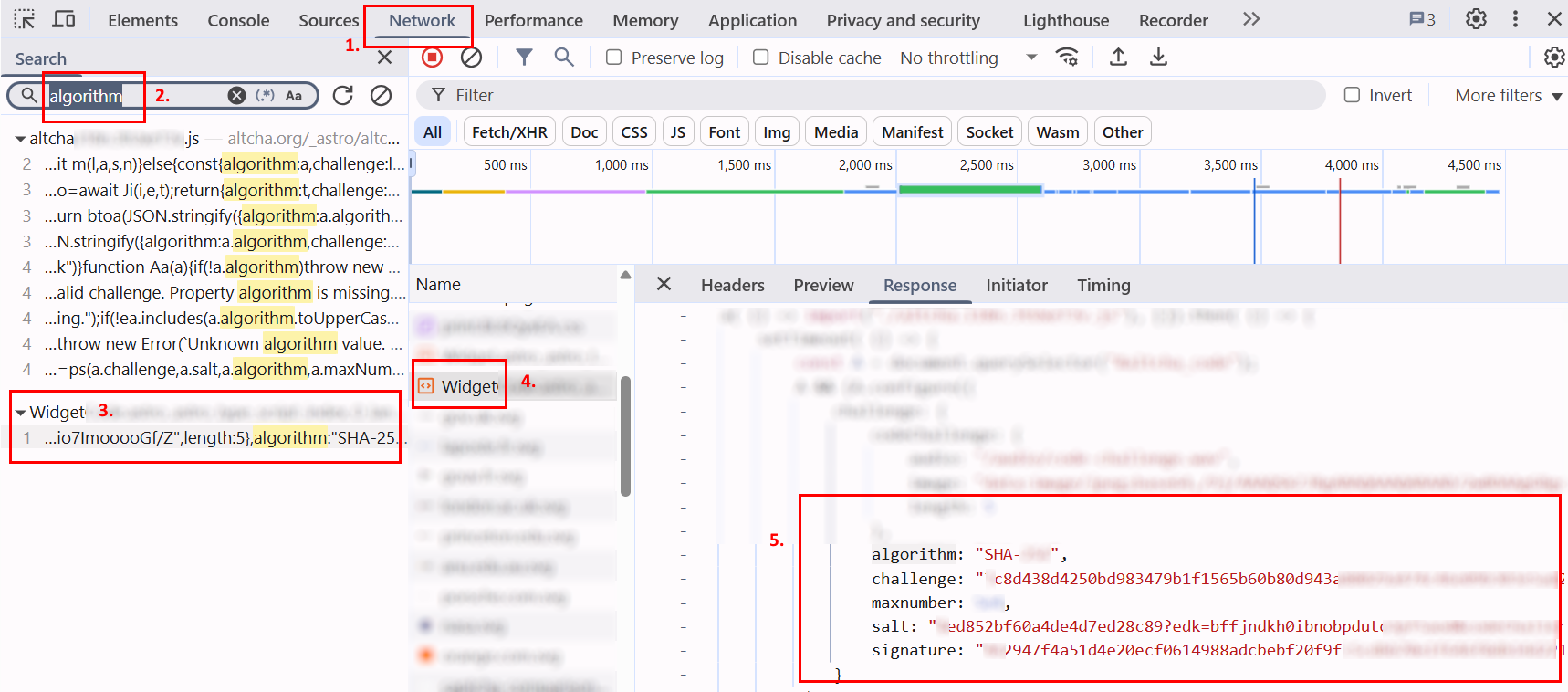
在浏览器中打开 Altcha 页面,启动 开发者工具(F12 或 Ctrl+Shift+I),并切换到 Network 标签。
-
点击验证码复选框并手动完成验证。在 Network 搜索栏 输入任意参数名称(例如 "algorithm")。
-
找到包含 JSON 参数的请求。
-
点击请求,如有需要切换到 Response 查看服务器返回的数据。
-
复制参数 — 这些值将用于创建 CapMonster Cloud 任务。
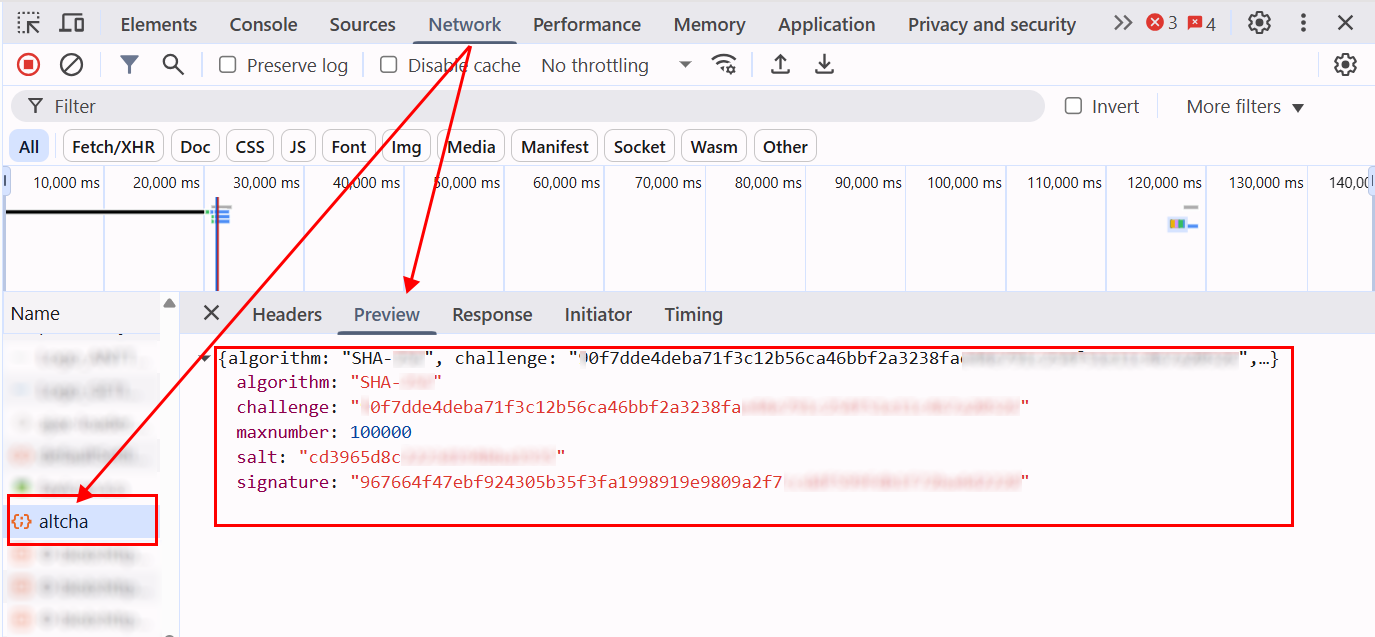
一般来说,在页面激活 captcha 后,需要分析网络请求并识别所有相关交互。这些步骤有助于确定参数并理解验证过程。例如,下图显示了名为
altcha的请求,其中包含所有关键参数:
在获取所需参数后,需要将它们传入 metadata 对象中,以便在 CapMonster Cloud 创建任务时使用。示例结构:
metadata: {
  challenge: "<challenge 值>",
  iterations: "<maxnumber 值>", // 必须用引号括起来,与其他参数一致
  salt: "<salt 值>",
  signature: "<signature 值>",
}
您还可以使用以下代码示例提取所有参数:
GET 请求示例
对指定 URL 执行 HTTP GET 请求,并将响应输出到控制台。
const url = 'https://example-portal.mysite.rs.gov.br/Altcha/Example'; // 用于提取验证码参数的 API 端点

fetch(url, { method: 'GET' })
  .then(res => res.text())
  .then(data => console.log('Response:', data))
  .catch(err => console.error(err));
参数拦截器
浏览器脚本,重写 fetch 和 XMLHttpRequest,以自动监控网络请求并提取关键 Altcha 验证码参数。将此脚本粘贴到验证码页面的浏览器控制台中并激活验证码 — 所需参数将自动输出到控制台。
(function() {
  const keywords = ['algorithm','challenge','maxnumber','salt','signature'];
  const foundParams = {};

  const intercept = (url, body, text) => {
    keywords.forEach(key => {
      if ((url && url.includes(key)) || (body && body.includes(key)) || (text && text.includes(key))) {
        foundParams[key] = foundParams[key] || [];
        if (url?.includes(key)) foundParams[key].push(url);
        if (body?.includes(key)) foundParams[key].push(body);
        if (text?.includes(key)) foundParams[key].push(text);
      }
    });
    if (Object.keys(foundParams).length) console.log('Found parameters:', foundParams);
  };

  const originalFetch = window.fetch;
  window.fetch = async (...args) => {
    const [resource, config] = args;
    const url = typeof resource === 'string' ? resource : resource.url;
    const body = config?.body;
    const response = await originalFetch.apply(this, args);
    try {
      const text = await response.clone().text();
      intercept(url, body, text);
    } catch {}
    return response;
  };

  const originalOpen = XMLHttpRequest.prototype.open;
  const originalSend = XMLHttpRequest.prototype.send;

  XMLHttpRequest.prototype.open = function(method, url, ...rest) {
    this._url = url;
    return originalOpen.call(this, method, url, ...rest);
  };

  XMLHttpRequest.prototype.send = function(body) {
    this.addEventListener('load', () => intercept(this._url, body, this.responseText));
    return originalSend.call(this, body);
  };
})();
Altcha 自动化解决示例 — Node.js 与 Playwright
在某些情况下,仅发送 number 参数即可确认解决方案。但有时网站要求 所有参数,以 base64 格式加密。
例如:
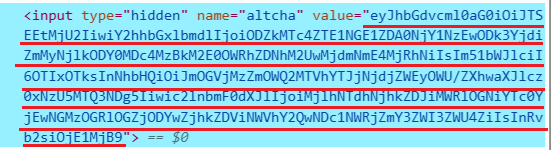
解码该值后,我们得到一个 JSON 对象,其中包含用于验证验证码的数据:
{
  "algorithm": "SHA-256",
  "challenge": "86d178e154a5d04665710897b7bfc269d86407830d3a49dad3a3e027f6a824a6",
  "number": 92199,
  "salt": "f8ec36f9d615aa2c67c7ea29e?expires=1759147489",
  "signature": "29a57a68dd2b1de8cba74b104c38de8fc860f8dd5b5eacd04755dcff7eb7ee8f",
  "took": 1520
}
在 CapMonster Cloud 的响应中,会单独返回 number,以及包含 number 的完整参数集合,已编码为 base64。
在下面的示例中,通过 token 确认解决方案,该 token 包含完整的参数集。
如果您只需要发送 number,则需要相应地调整确认逻辑。
显示代码示例
const { chromium } = require("playwright");

// 替换为你的值:
// - API_KEY → 你的 CapMonster Cloud 密钥
// - ALTCHA_PAGE → Altcha 页面地址
const API_KEY = "your_capmonster_cloud_api_key";
const ALTCHA_PAGE = "https://url_with_altcha";

(async () => {
  const browser = await chromium.launch({ headless: false, devtools: true });
  const context = await browser.newContext();
  const page = await context.newPage();

  await page.route("**/*", (route) => {
    const url = route.request().url();
    if (url.includes("api.capmonster.cloud")) return route.abort();
    return route.continue();
  });

  let challengeResp = null; // 存储 Altcha challenge 的变量
  page.on("response", async (response) => {
    try {
      if (response.url().includes("/Altcha/GerarDesafio")) {
        challengeResp = await response.json(); // 获取 challenge JSON 参数
        console.log("Captured /Altcha/GerarDesafio:", challengeResp);
      }
    } catch {}
  });

  await page.goto(ALTCHA_PAGE, { waitUntil: "networkidle" });

  try {
    await page.waitForSelector("altcha-widget input[type='checkbox']", { timeout: 10000 });
    await page.click("altcha-widget input[type='checkbox']");
  } catch {
    const widgetHandle = await page.$("altcha-widget");
    if (widgetHandle) await widgetHandle.click(); // 如果标准选择器未找到
  }

  // 等待 challenge
  const start = Date.now();
  while (!challengeResp && Date.now() - start < 30000) {
    await new Promise((r) => setTimeout(r, 300));
  }
  if (!challengeResp) {
    console.error("无法捕获 /Altcha/GerarDesafio。");
    await browser.close();
    return;
  }

  const { challenge, salt, signature, maxnumbers } = challengeResp;

  // 构建 CapMonster Cloud 创建任务请求体
  const createTaskBody = {
    clientKey: API_KEY,
    task: {
      type: "CustomTask",
      class: "altcha",
      websiteURL: ALTCHA_PAGE,
      websiteKey: "",
      userAgent:
        "userAgentPlaceholder",
      metadata: {
        challenge,
        iterations: maxnumbers,
        salt,
        signature,
      },
    },
  };

  // 创建任务
  const taskResp = await fetch("https://api.capmonster.cloud/createTask", {
    method: "POST",
    headers: { "Content-Type": "application/json" },
    body: JSON.stringify(createTaskBody),
  }).then((r) => r.json());

  console.log("CreateTask response:", taskResp);
  if (!taskResp || !taskResp.taskId) {
    console.error("创建任务失败:", taskResp);
    await browser.close();
    return;
  }

  const taskId = taskResp.taskId;

  // 等待任务解决
  let fullSolution = null;
  const maxPollMs = 120000;
  const pollStart = Date.now();
  while (Date.now() - pollStart < maxPollMs) {
    const res = await fetch("https://api.capmonster.cloud/getTaskResult", {
      method: "POST",
      headers: { "Content-Type": "application/json" },
      body: JSON.stringify({ clientKey: API_KEY, taskId }),
    }).then((r) => r.json());

    if (res.status === "ready") {
      fullSolution = res.solution;
      console.log("CapMonster 完整解决方案:", fullSolution);
      break;
    }
    await new Promise((r) => setTimeout(r, 3000));
  }

  if (!fullSolution) {
    console.error("在指定时间内未收到解决方案。");
    await browser.close();
    return;
  }

  // 提取 token
  const token =
    (fullSolution && fullSolution.data && fullSolution.data.token) ||
    fullSolution.token ||
    (fullSolution && fullSolution.data) ||
    null;

  if (!token) {
    console.error("CapMonster 响应中未找到 token:", fullSolution);
    await browser.close();
    return;
  }

  // 将 token 注入页面
  await page.evaluate((tokenValue) => {
    const cpv = document.querySelector("#captchaParaValidar");
    if (cpv) {
      cpv.value = tokenValue;
    } else {
      const created = document.createElement("input");
      created.type = "hidden";
      created.id = "captchaParaValidar";
      created.name = "captchaParaValidar";
      created.value = tokenValue;
      (document.querySelector("form") || document.body).appendChild(created);
    }

    let alt = document.querySelector('input[name="altcha"]');
    if (alt) {
      alt.value = tokenValue;
    } else {
      const created2 = document.createElement("input");
      created2.type = "hidden";
      created2.name = "altcha";
      created2.value = tokenValue;
      (document.querySelector("form") || document.body).appendChild(created2);
    }

    const widget = document.querySelector("altcha-widget");
    if (widget) {
      widget.setAttribute("data-state", "verified");
      const checkbox = widget.querySelector("input[type='checkbox']");
      if (checkbox) {
        checkbox.checked = true;
        checkbox.dispatchEvent(new Event("change", { bubbles: true }));
      }
      const label = widget.querySelector(".altcha-label");
      if (label) label.textContent = "Verified";
    }
  }, token);

  console.log("Token 已注入:", token);
})();