Known issues
store.steampowered.com
Our service can only solve captchas in English; on this site, the determination of the captcha language comes not from the system settings, but from the language selected on the site, so for a correct solution, be sure to select English.
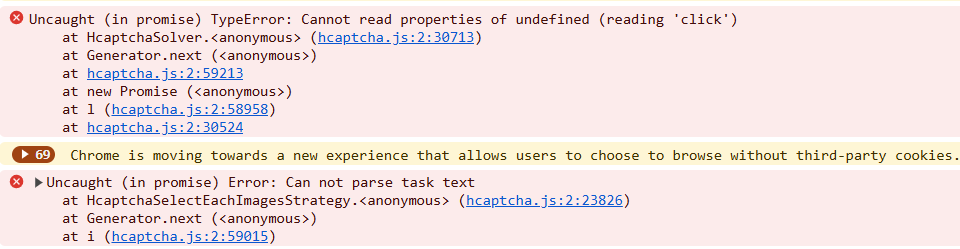
Error 'Uncaught (in promise) TypeError: Cannot read properties of undefined (reading 'click')'
If you encounter the error 'Uncaught (in promise) TypeError: Cannot read properties of undefined (reading 'click')' while solving a captcha using the click method (ComplexImageTask) through the CapMonster Cloud extension, as shown in the screenshot, it is recommended to set the 'Delay between click' value in the extension — this may help resolve the issue.
The extension does not respond to Cloudflare Turnstile
Accessing websiteKey via Shadow DOM
Sometimes the captcha key (websiteKey) is hidden inside a shadow-root with closed mode.
For example, in an iframe with the address:
https://challenges.cloudflare.com/cdn-cgi/challenge-platform/h/g/turnstile/if/.../0x4AAAAAAA1a2345abc-/auto/...
In this case, the websiteKey equals 0x4AAAAAAA1a2345abc.
If the extension loads before this iframe, you can make the shadowRoot open and extract the websiteKey.
If the iframe is already loaded — obtaining the key will be impossible.
As an alternative to the extension for testing and debugging, you can use Selenium (or other headless browsers), or run it together with the extension if necessary.
Example: Opening shadowRoot with Selenium
from selenium import webdriver
from selenium.webdriver.common.by import By
import time

# WebDriver setup
options = webdriver.ChromeOptions()
driver = webdriver.Chrome(options=options)

# Open page
driver.get("https://example.com")

# Inject JavaScript to open ShadowRoot
inject_script = """
const originalAttachShadow = Element.prototype.attachShadow;
Element.prototype.attachShadow = function(...args) {
    if (args[0] && args[0].mode === 'closed') {
        args[0].mode = 'open';
    }
    const shadowRoot = originalAttachShadow.apply(this, args);
    return shadowRoot;
};
console.log('ShadowRoot mode changed to open.');
"""
driver.execute_script(inject_script)

# Wait for the page to load
time.sleep(3)

# Example of interacting with shadow DOM after changing attachShadow
shadow_host = driver.find_element(By.CSS_SELECTOR, "shadow-host-selector")  # Specify the actual selector
shadow_root = driver.execute_script("return arguments[0].shadowRoot", shadow_host)

# Interact with elements in the shadow DOM
button = shadow_root.find_element(By.CSS_SELECTOR, "button")
button.click()

# Close the browser
driver.quit()
To use Selenium together with the extension, add the extension when launching the browser:
options = webdriver.ChromeOptions()
options.add_extension('your_extension.crx')  # path to the extension
driver = webdriver.Chrome(options=options)
Learn how to download the CRX file here.