Cloudflare Turnstile | Challenge | Waiting Room
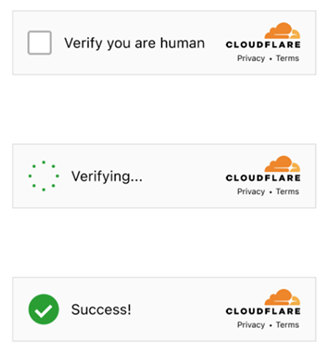
All Turnstile subtypes are automatically supported: manual, non-interactive, and invisible. Therefore, you do not need to specify a subtype for a standard captcha.
Before getting started, review all three captcha solving options and choose the one that best fits your needs.
Option 1. Turnstile (token)
You are required to solve a regular Turnstile captcha, like this one. Please note that captchas on Cloudflare pages may look identical. See how to distinguish a regular Turnstile from a Cloudflare Challenge.
-
CapMonster Cloud uses built-in proxies by default — their cost is already included in the service. You only need to specify your own proxies in cases where the website does not accept the token or access to the built-in services is restricted.
-
If you are using a proxy with IP authorization, make sure to whitelist the address 65.21.190.34.
-
After solving, you will receive a token to confirm captcha completion.
Request parameters
type<string>requiredTurnstileTask
websiteURL<string>requiredThe URL of the page where the captcha is solved
websiteKey<string>requiredTurnstile site key
pageAction<string>optionalThe action field found in the callback function when the captcha is loaded
data<string>optionalThe value of the data field, taken from the cData parameter.
proxyType<string>optionalhttp - standard http/https proxy;
https - try this if "http" doesn't work (needed for some custom proxies);
socks4 - socks4 proxy;
socks5 - socks5 proxy.
proxyAddress<string>optionalIP address of the proxy (IPv4/IPv6). Not allowed:
- using transparent proxies (those exposing the client IP);
- using local machine proxies.
proxyPort<integer>optionalProxy port.
proxyLogin<string>optionalProxy login.
proxyPassword<string>optionalProxy password.
Option 2. Challenge (token)
-
CapMonster Cloud uses built-in proxies by default — their cost is already included in the service. You only need to specify your own proxies in cases where the website does not accept the token or access to the built-in services is restricted.
-
If you are using a proxy with IP authorization, make sure to whitelist the address 65.21.190.34.
-
After solving, you will receive a token to confirm captcha completion.
Request parameters
type<string>requiredTurnstileTask
websiteURL<string>requiredThe URL of the page where the captcha is solved
websiteKey<string>requiredTurnstile site key
cloudflareTaskType<string>requiredtoken
pageAction<string>requiredThe action field found in the callback function. If using cloudflareTaskType, action is usually “managed” or “non-interactive”.
userAgent<string>requiredBrowser User-Agent.
Pass only a valid UA from Windows OS. Currently it is: userAgentPlaceholder
data<string>requiredThe value of the data field, taken from cData.
pageData<string>requiredThe value of pageData, taken from chlPageData.
apiJsUrl<string>optionalString containing the captcha script URL.
proxyType<string>optionalhttp - standard http/https proxy;
https - try this if "http" doesn't work (needed for some custom proxies);
socks4 - socks4 proxy;
socks5 - socks5 proxy.
proxyAddress<string>optionalIP address of the proxy (IPv4/IPv6). Not allowed:
- using transparent proxies (those exposing the client IP);
- using local machine proxies.
proxyPort<integer>optionalProxy port.
proxyLogin<string>optionalProxy login.
proxyPassword<string>optionalProxy password.
These parameters are in the object passed to window.turnstile.render(el, paramsObj) when creating the captcha. You can retrieve them, for example, by executing JavaScript before loading other scripts:
(function () {
const obj = {
render: function () {
const { action, cData, chlPageData } = arguments[1];
const params = [
["action", action],
["data", cData],
["pageData", chlPageData],
];
console.table(params)
}
};
Object.defineProperty(window, "turnstile", {
get: () => {
return obj;
},
});
})();
When window.turnstile.render(el, paramsObj) is called, the captcha loads on the page, and upon successful solving, the callback function passes the solution information.
window.turnstile.render(el, paramsObj):
el: DOM element to insert the captcha.paramsObj: Object containing captcha information and solving instructions. Usually includes sitekey, action, cData, chlPageData, callback.callback: Function called after captcha is successfully solved.
Option 3. Challenge (cookie)
-
Use your own proxies for this task.
-
After solving, you will receive special cookies to add to your browser.
Request parameters
type<string>requiredTurnstileTask
websiteURL<string>requiredThe URL of the page where the captcha is solved
websiteKey<string>requiredTurnstile site key (any string is acceptable)
cloudflareTaskType<string>requiredcf_clearance
htmlPageBase64<string>requiredBase64-encoded HTML page of "Just a moment" shown with 403 response.
Example to get htmlPageBase64:
var htmlContent = document.documentElement.outerHTML;
var htmlBase64 = btoa(unescape(encodeURIComponent(htmlContent)));
console.log(htmlBase64);
userAgent<string>requiredBrowser User-Agent.
Provide only the current Windows UA: userAgentPlaceholder
proxyType<string>requiredhttp - regular HTTP/HTTPS proxy;
https - use if http doesn’t work (required for some custom proxies);
socks4 - SOCKS4 proxy;
socks5 - SOCKS5 proxy.
proxyAddress<string>requiredProxy IP address (IPv4/IPv6). Not allowed:
- Transparent proxies
- Local machine proxies
proxyPort<integer>requiredProxy port.
proxyLogin<string>requiredProxy login.
proxyPassword<string>requiredProxy password.
Option 4. Waiting Room (cookie)
-
Use your own proxies for this task.
-
After solving, you will receive special cookies to add to your browser.
This is a new Cloudflare protection mechanism: the user must wait on average ~3 minutes before accessing the resource:

You can also identify this Cloudflare type via the page header:
Request parameters
type<string>requiredTurnstileTask
websiteURL<string>requiredThe URL of the page containing the check
websiteKey<string>requiredCloudflare site key
cloudflareTaskType<string>requiredwait_room
htmlPageBase64<string>requiredBase64-encoded HTML page containing <title>Waiting Room powered by Cloudflare</title>
userAgent<string>requiredBrowser User-Agent.
Provide only the current Windows UA: userAgentPlaceholder
proxyType<string>requiredhttp - regular HTTP/HTTPS proxy;
https - use if http doesn’t work (required for some custom proxies);
socks4 - SOCKS4 proxy;
socks5 - SOCKS5 proxy.
proxyAddress<string>requiredProxy IP address (IPv4/IPv6). Not allowed:
- Transparent proxies
- Local machine proxies
proxyPort<integer>requiredProxy port.
proxyLogin<string>requiredProxy login.
proxyPassword<string>requiredProxy password.
Request examples
Option 1. Turnstile (token)
- TurnstileTask (without proxy)
- TurnstileTask (with proxy)
https://api.capmonster.cloud/createTask
Request
{
"clientKey": "API_KEY",
"task": {
"type": "TurnstileTask",
"websiteURL": "http://tsmanaged.zlsupport.com",
"websiteKey": "0x4AAAAAAABUYP0XeMJF0xoy"
}
}
Response
{
"errorId": 0,
"taskId": 407533072
}
https://api.capmonster.cloud/createTask
Request
{
"clientKey": "API_KEY",
"task": {
"type": "TurnstileTask",
"websiteURL": "http://tsmanaged.zlsupport.com",
"websiteKey": "0x4AAAAAAABUYP0XeMJF0xoy",
"proxyType": "http",
"proxyAddress": "8.8.8.8",
"proxyPort": 8080,
"proxyLogin": "proxyLoginHere",
"proxyPassword": "proxyPasswordHere"
}
}
Response
{
"errorId": 0,
"taskId": 407533072
}
Option 2. Challenge (token)
- TurnstileTask (without proxy)
- TurnstileTask (with proxy)
https://api.capmonster.cloud/createTask
Request
{
"clientKey": "API_KEY",
"task": {
"type": "TurnstileTask",
"websiteURL": "https://example.com",
"websiteKey": "0x4AAAAAAADnPIDROrmt1Wwj",
"cloudflareTaskType": "token",
"userAgent": "userAgentPlaceholder",
"pageAction": "managed",
"pageData": "HUHDWUHuhuwfiweh32..uh2uhuhyugYUG=",
"data": "874291f4retD1366"
}
}
Response
{
"errorId": 0,
"taskId": 407533072
}
https://api.capmonster.cloud/createTask
Request
{
"clientKey": "API_KEY",
"task": {
"type": "TurnstileTask",
"websiteURL": "https://example.com",
"websiteKey": "0x4AAAAAAADnPIDROrmt1Wwj",
"cloudflareTaskType": "token",
"userAgent": "userAgentPlaceholder",
"pageAction": "managed",
"pageData": "HUHDWUHuhuwfiweh32..uh2uhuhyugYUG=",
"data": "874291f4retD1366",
"proxyType": "http",
"proxyAddress": "8.8.8.8",
"proxyPort": 8080,
"proxyLogin": "proxyLoginHere",
"proxyPassword": "proxyPasswordHere"
}
}
Response
{
"errorId": 0,
"taskId": 407533072
}
Option 3. Challenge (cookie)
https://api.capmonster.cloud/createTask
Request
{
"clientKey":"API_KEY",
"task": {
"type":"TurnstileTask",
"websiteURL":"https://example.com",
"websiteKey":"xxxxxxxxxx",
"cloudflareTaskType": "cf_clearance",
"htmlPageBase64": "PCFET0NUWVBFIGh0...vYm9keT48L2h0bWw+",
"userAgent": "userAgentPlaceholder",
"proxyType":"http",
"proxyAddress":"8.8.8.8",
"proxyPort":8080,
"proxyLogin":"proxyLoginHere",
"proxyPassword":"proxyPasswordHere"
}
}
Response
{
"errorId":0,
"taskId":407533072
}
Option 4. Waiting Room (cookie)
https://api.capmonster.cloud/createTask
Request
{
"clientKey":"API_KEY",
"task": {
"type":"TurnstileTask",
"websiteURL":"https://example.com",
"websiteKey":"xxxxxxxxxx",
"cloudflareTaskType": "wait_room",
"htmlPageBase64": "PCFET0NUWVBFIGh0...vYm9keT48L2h0bWw+",
"userAgent": "userAgentPlaceholder",
"proxyType":"http",
"proxyAddress":"8.8.8.8",
"proxyPort":8080,
"proxyLogin":"proxyLoginHere",
"proxyPassword":"proxyPasswordHere"
}
}
Response
{
"errorId":0,
"taskId":407533072
}
Get task result method
Use the getTaskResult method to retrieve the Turnstile solution. Depending on system load, the response can take between 5 and 20 seconds.
| Property | Type | Description |
|---|---|---|
| cf_clearance | String | Special Cloudflare cookies that you can set in your browser |
| token | String | Use this token when calling the callback function |
How to distinguish a standard Turnstile from Cloudflare Challenge
Cloudflare verification types can appear in different ways.
Standard Turnstile:
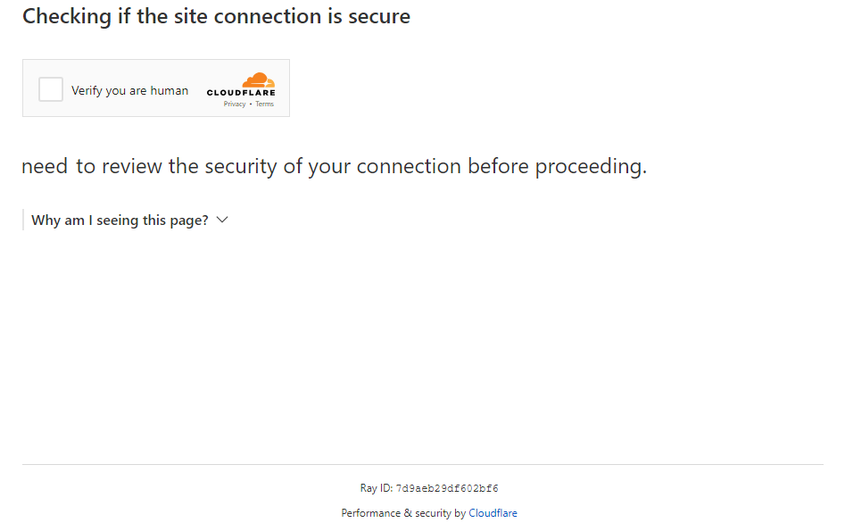
Stylized variants:
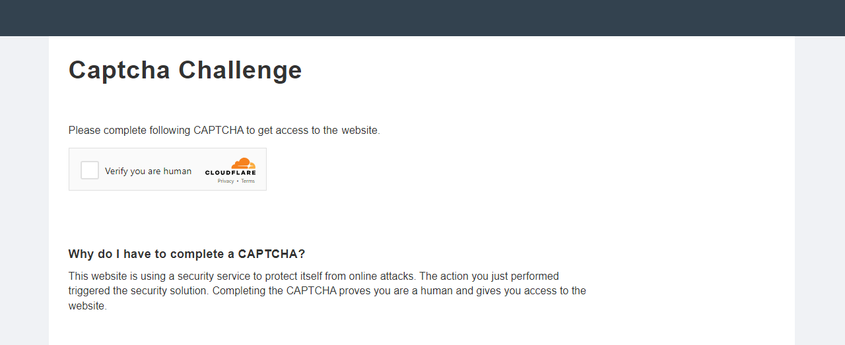
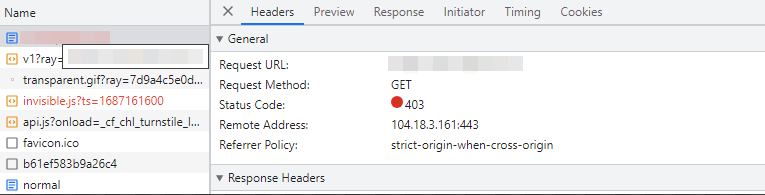
To confirm Challenge presence, open developer tools, inspect network traffic, and check the page source for typical signs:
- The first request to the site returns a 403 status code:
- The form with id challenge-form has an action attribute (not to be confused with Turnstile captcha action) containing the parameter
__cf_chl_f_tk=:
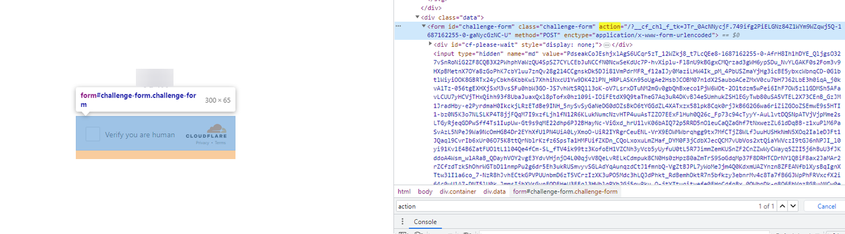
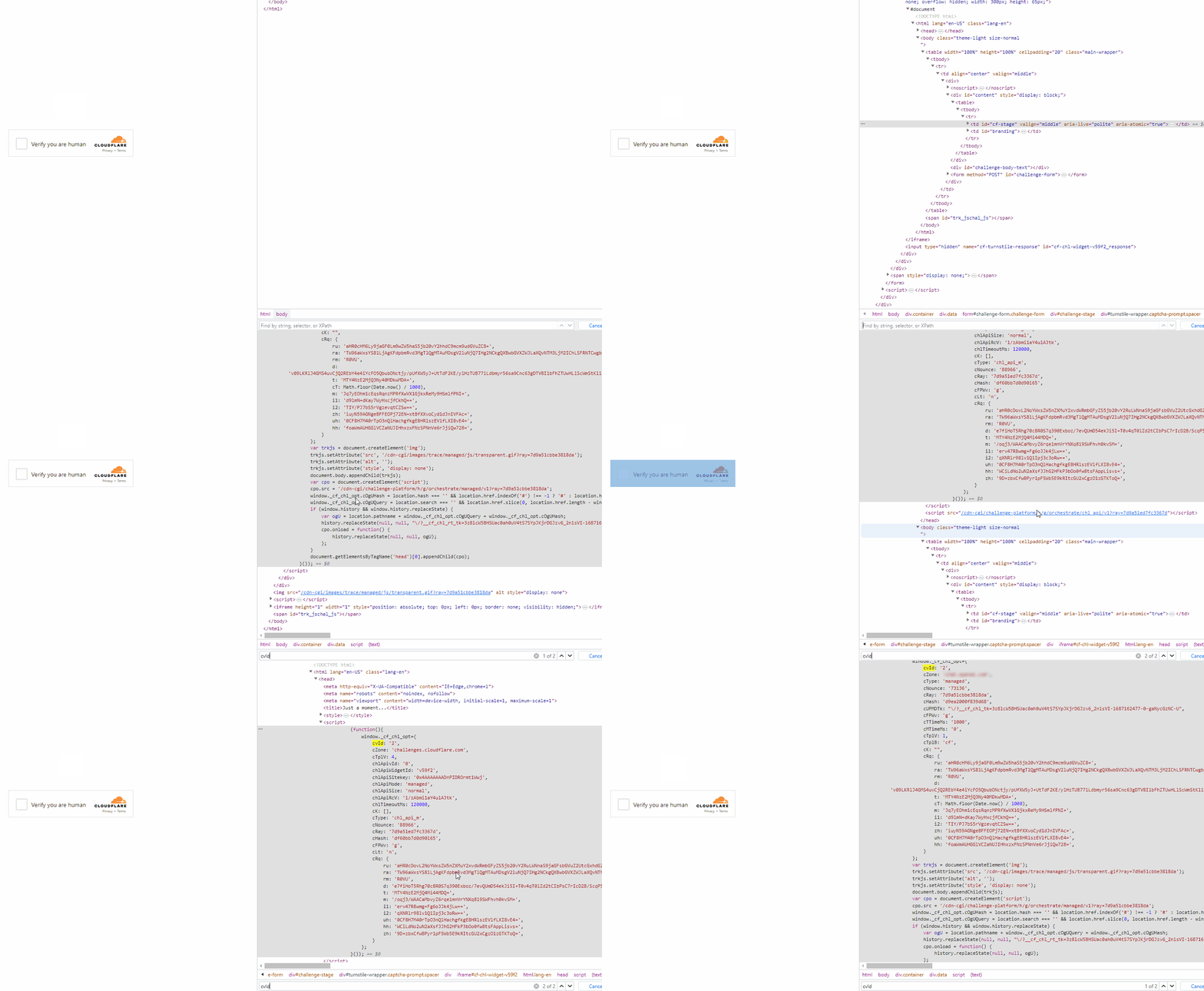
- The page contains two similar
<script>tags that create new values in thewindowobject:
Example implementation using Selenium on Node.js
const { Builder } = require('selenium-webdriver');
const chrome = require('selenium-webdriver/chrome');
(async function example() {
const options = new chrome.Options();
options.addArguments('--auto-open-devtools-for-tabs')
const driver = new Builder()
.forBrowser('chrome')
.setChromeOptions(options)
.build();
try {
driver.executeScript(`
window.turnstile = new Proxy(window.turnstile, {
get(target, prop) {
if (prop === 'render') {
return function(a, b) {
let p = {
type: "TurnstileTask",
websiteKey: b.sitekey,
websiteURL: window.location.href,
data: b.cData,
pagedata: b.chlPageData,
action: b.action,
userAgent: navigator.userAgent
}
console.log(JSON.stringify(p))
window.params = p;
window.turnstileCallback = b.callback;
return target.render.apply(this, arguments);
}
}
return target[prop];
}
});
`)
driver.get('SITE WITH CAPTCHA');
const params = await driver.executeScript(`
return new Promise((resolve, reject) => {
setTimeout(() => {
resolve(window.params)
}, 2000)
})
`);
if (params) {
const data = {
clientKey: 'API KEY',
task: {
type: 'TurnstileTask',
websiteURL: params.websiteURL,
websiteKey: params.websiteKey,
data: params.data,
action: params.action
}
}
const createResult = await fetch('https://api.capmonster.cloud/createTask', {
method: 'post',
body: JSON.stringify(data)
});
const createTaskResult = await createResult.json()
if (createTaskResult.taskId) {
const asyncDelay = (timeout) =>
new Promise(resolve => {
setTimeout(() => {
resolve();
}, timeout);
});
const getTaskResult = async (taskId) => {
const taskResult = await fetch('https://api.capmonster.cloud/getTaskResult', {
method: 'post',
body: JSON.stringify({
"clientKey":"API KEY",
"taskId": createTaskResult.taskId
})
});
const taskResponse = await taskResult.json();
if (taskResponse.status === 'processing') {
await asyncDelay(5000);
return await getTaskResult(taskId)
}
return taskResponse;
}
const taskRes = await getTaskResult(createTaskResult.taskId)
if (taskRes.solution) {
await driver.executeScript(`
window.turnstileCallback(${taskRes.solution.token});
`);
}
}
}
//DO SOMETHING
} finally {
await driver.quit();
}
})();
How to find all required parameters for task creation
Manually
- Open your website where the captcha appears in the browser.
- Right-click on the captcha element and select Inspect.
Option 1.
websiteKey
Can be found in Elements:


You can also use a console command by opening the captcha URL (starting with https://challenges.cloudflare.com/cdn-cgi/challenge-platform/h/g…) in a separate tab:
console.log(window._cf_chl_opt.chlApiSitekey);
chlApiSitekey is the sitekey.
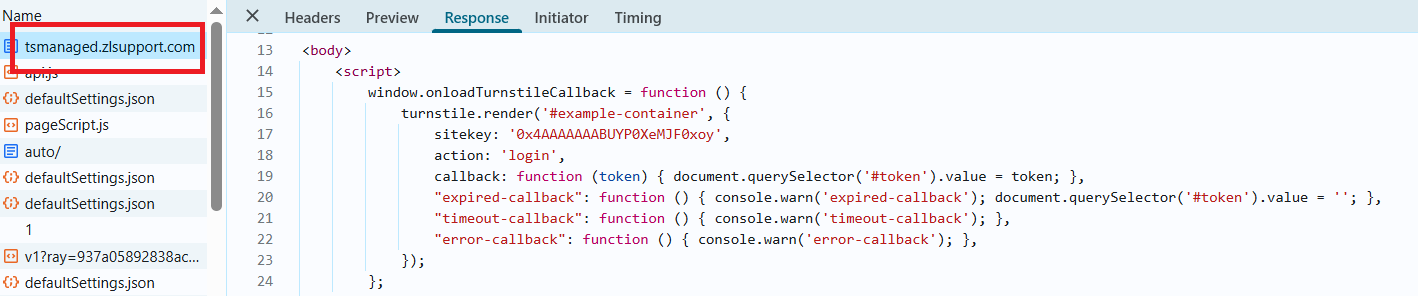
pageAction
Action and sitekey can also be found in the callback function:
For Options 2 and 3, it's better to extract the parameters automatically:
Automatically
To automate parameter extraction, you can retrieve them via a browser (regular or headless, e.g., using Playwright) or directly from HTTP requests. Since dynamic parameter values are short-lived, it is recommended to use them immediately after retrieval.
The provided code snippets are basic examples for learning how to extract the required parameters. The exact implementation will depend on your captcha page, its structure, and the HTML elements and selectors used.
- JavaScript
- Python
- C#
For Option 1: Turnstile (token) – in the browser
// Function to check for the presence of window.onloadTurnstileCallback
const checkTurnstileCallback = () => {
return new Promise((resolve, reject) => {
const timeout = setTimeout(() => reject('Callback timeout'), 30000);
const interval = setInterval(() => {
if (window.onloadTurnstileCallback !== undefined) {
clearInterval(interval);
clearTimeout(timeout);
const callbackDetails = window.onloadTurnstileCallback.toString();
const sitekeyMatch = callbackDetails.match(/sitekey: ['"]([^'"]+)['"]/);
const actionMatch = callbackDetails.match(/action: ['"]([^'"]+)['"]/);
resolve({
sitekey: sitekeyMatch ? sitekeyMatch[1] : null,
action: actionMatch ? actionMatch[1] : null,
});
}
}, 500);
});
};
// Try to find any element with data-sitekey
const turnstileElement = document.querySelector('[data-sitekey]');
if (turnstileElement) {
// Extract the data-sitekey attribute value
const sitekey = turnstileElement.getAttribute("data-sitekey");
console.log("Turnstile Sitekey (from element):", sitekey);
} else {
console.log("Turnstile element not found. Checking via callback...");
// If the element is not found, check via window.onloadTurnstileCallback
checkTurnstileCallback()
.then((data) => {
console.log("Turnstile Params (from callback):", data);
})
.catch((error) => {
console.error(error);
});
}
For Option 2: Challenge (token) – Node.js
import { chromium } from "playwright";
(async () => {
const browser = await chromium.launch({ headless: false });
const page = await browser.newPage();
let params = null;
try {
while (!params) {
await page.goto("https://example.com");
await page.evaluate(() => {
window.turnstile = new Proxy(window.turnstile, {
get(target, prop) {
if (prop === "render") {
return function (a, b) {
const p = {
websiteKey: b.sitekey,
websiteURL: window.location.href,
data: b.cData,
pagedata: b.chlPageData,
action: b.action,
userAgent: navigator.userAgent,
};
window.params = p;
return target.render.apply(this, arguments);
};
}
return target[prop];
},
});
});
params = await page.evaluate(() => {
return new Promise((resolve) => {
setTimeout(() => resolve(window.params || null), 5000);
});
});
if (!params) {
await page.waitForTimeout(3000);
}
}
console.log("Turnstile Params:", params);
} finally {
await browser.close();
}
})();
For Option 3: Challenge (cookie cf_clearance) – Node.js
import { chromium } from "playwright";
import { Buffer } from "buffer";
(async () => {
const browser = await chromium.launch({ headless: false });
const page = await browser.newPage();
let websiteKey = null;
while (!websiteKey) {
await page.goto("https://example.com");
await page.evaluate(() => {
window.turnstile = new Proxy(window.turnstile, {
get(target, prop) {
if (prop === "render") {
return function (a, b) {
window.websiteKey = b.sitekey;
return target.render.apply(this, arguments);
};
}
return target[prop];
},
});
});
websiteKey = await page.evaluate(() => {
return new Promise((resolve) => {
setTimeout(() => resolve(window.websiteKey || null), 5000);
});
});
if (!websiteKey) {
await page.waitForTimeout(3000);
}
}
const html = await page.content();
const htmlPageBase64 = Buffer.from(html).toString("base64");
const result = {
websiteKey,
htmlPageBase64,
};
console.log(result);
await browser.close();
})();
For Option 1: Turnstile (token)
import asyncio
from playwright.async_api import async_playwright
async def run():
async with async_playwright() as p:
browser = await p.chromium.launch(headless=False)
context = await browser.new_context()
page = await context.new_page()
await page.goto("https://example.com") # Replace with your website
# Try to find an element with data-sitekey
element = await page.query_selector('[data-sitekey]')
if element:
sitekey = await element.get_attribute("data-sitekey")
print("Turnstile Sitekey (from element):", sitekey)
else:
print("Turnstile element not found. Checking via callback...")
try:
result = await page.evaluate('''() => {
return new Promise((resolve, reject) => {
const timeout = setTimeout(() => reject('Callback timeout'), 30000);
const interval = setInterval(() => {
if (window.onloadTurnstileCallback !== undefined) {
clearInterval(interval);
clearTimeout(timeout);
const cbStr = window.onloadTurnstileCallback.toString();
const sitekeyMatch = cbStr.match(/sitekey: ['"]([^'"]+)['"]/);
const actionMatch = cbStr.match(/action: ['"]([^'"]+)['"]/);
resolve({
sitekey: sitekeyMatch ? sitekeyMatch[1] : null,
action: actionMatch ? actionMatch[1] : null,
});
}
}, 500);
});
}''')
print("Turnstile Params (from callback):", result)
except Exception as e:
print("Error:", e)
await browser.close()
asyncio.run(run())
For Option 2: Challenge (token)
import asyncio
from playwright.async_api import async_playwright
async def extract_turnstile_params():
async with async_playwright() as p:
browser = await p.chromium.launch(headless=False)
page = await browser.new_page()
params = None
while not params:
await page.goto("https://example.com")
await page.evaluate("""
window.turnstile = new Proxy(window.turnstile, {
get(target, prop) {
if (prop === "render") {
return function(a, b) {
const p = {
websiteKey: b.sitekey,
websiteURL: window.location.href,
data: b.cData,
pagedata: b.chlPageData,
action: b.action,
userAgent: navigator.userAgent
};
window.params = p;
return target.render.apply(this, arguments);
};
}
return target[prop];
}
});
""")
await page.wait_for_timeout(5000)
params = await page.evaluate("window.params || null")
if not params:
await page.wait_for_timeout(3000)
print("Turnstile Params:", params)
await browser.close()
asyncio.run(extract_turnstile_params())
For Option 3: Challenge (cookie cf_clearance)
import asyncio
import base64
from playwright.async_api import async_playwright
async def main():
async with async_playwright() as p:
browser = await p.chromium.launch(headless=False)
page = await browser.new_page()
website_key = None
while not website_key:
await page.goto("https://example.com")
await page.evaluate("""
() => {
window.turnstile = new Proxy(window.turnstile, {
get(target, prop) {
if (prop === 'render') {
return function(a, b) {
window.websiteKey = b.sitekey;
return target.render.apply(this, arguments);
};
}
return target[prop];
}
});
}
""")
website_key = await page.evaluate("""
() => new Promise(resolve => {
setTimeout(() => resolve(window.websiteKey || null), 5000);
})
""")
if not website_key:
await page.wait_for_timeout(3000)
html = await page.content()
html_base64 = base64.b64encode(html.encode("utf-8")).decode("utf-8")
result = {
"websiteKey": website_key,
"htmlPageBase64": html_base64
}
print(result)
await browser.close()
asyncio.run(main())
For Option 1: Turnstile (token)
using System;
using System.Text.RegularExpressions;
using System.Threading.Tasks;
using Microsoft.Playwright;
class Program
{
public static async Task Main()
{
using var playwright = await Playwright.CreateAsync();
var browser = await playwright.Chromium.LaunchAsync(new BrowserTypeLaunchOptions
{
Headless = false
});
var context = await browser.NewContextAsync();
var page = await context.NewPageAsync();
await page.GotoAsync("https://example.com"); // Replace with the target URL
var element = await page.QuerySelectorAsync("[data-sitekey]");
if (element != null)
{
var sitekey = await element.GetAttributeAsync("data-sitekey");
Console.WriteLine($"Turnstile Sitekey (from element): {sitekey}");
}
else
{
Console.WriteLine("Turnstile element not found. Checking via callback...");
try
{
var result = await page.EvaluateAsync(@"() => {
return new Promise((resolve, reject) => {
const timeout = setTimeout(() => reject('Callback timeout'), 30000);
const interval = setInterval(() => {
if (window.onloadTurnstileCallback !== undefined) {
clearInterval(interval);
clearTimeout(timeout);
const cbStr = window.onloadTurnstileCallback.toString();
const sitekeyMatch = cbStr.match(/sitekey: ['""]([^'""]+)['""]/);
const actionMatch = cbStr.match(/action: ['""]([^'""]+)['""]/);
resolve({
sitekey: sitekeyMatch ? sitekeyMatch[1] : null,
action: actionMatch ? actionMatch[1] : null
});
}
}, 500);
});
}");
Console.WriteLine("Turnstile Params (from callback): " + result?.ToString());
}
catch (Exception ex)
{
Console.WriteLine("Error: " + ex.Message);
}
}
await browser.CloseAsync();
}
}
For Option 2: Challenge (token)
using Microsoft.Playwright;
using System.Text.Json;
class Program
{
public static async Task Main()
{
using var playwright = await Playwright.CreateAsync();
var browser = await playwright.Chromium.LaunchAsync(new BrowserTypeLaunchOptions
{
Headless = false
});
var page = await browser.NewPageAsync();
object? parameters = null;
while (parameters == null)
{
await page.GotoAsync("https://example.com");
await page.EvaluateAsync(@"() => {
window.turnstile = new Proxy(window.turnstile, {
get(target, prop) {
if (prop === 'render') {
return function(a, b) {
const p = {
websiteKey: b.sitekey,
websiteURL: window.location.href,
data: b.cData,
pagedata: b.chlPageData,
action: b.action,
userAgent: navigator.userAgent
};
window.params = p;
return target.render.apply(this, arguments);
};
}
return target[prop];
}
});
}");
parameters = await page.EvaluateAsync(@"() => new Promise(resolve => {
setTimeout(() => resolve(window.params || null), 5000);
})");
if (parameters == null)
{
await page.WaitForTimeoutAsync(3000);
}
}
Console.WriteLine("Turnstile Params:");
Console.WriteLine(JsonSerializer.Serialize(parameters, new JsonSerializerOptions { WriteIndented = true }));
await browser.CloseAsync();
}
}
For Option 3: Challenge (cookie cf_clearance)
using System;
using System.Text;
using System.Threading.Tasks;
using Microsoft.Playwright;
class Program
{
public static async Task Main()
{
using var playwright = await Playwright.CreateAsync();
var browser = await playwright.Chromium.LaunchAsync(
new BrowserTypeLaunchOptions { Headless = false });
var page = await browser.NewPageAsync();
string websiteKey = null;
while (websiteKey == null)
{
await page.GotoAsync("https://example.com");
await page.EvaluateAsync(@"() => {
window.turnstile = new Proxy(window.turnstile, {
get(target, prop) {
if (prop === 'render') {
return function(a, b) {
window.websiteKey = b.sitekey;
return target.render.apply(this, arguments);
};
}
return target[prop];
}
});
}");
websiteKey = await page.EvaluateAsync<string>(@"() =>
new Promise(resolve => {
setTimeout(() => resolve(window.websiteKey || null), 5000);
})");
if (websiteKey == null)
{
await page.WaitForTimeoutAsync(3000);
}
}
var html = await page.ContentAsync();
var htmlBase64 = Convert.ToBase64String(Encoding.UTF8.GetBytes(html));
Console.WriteLine($"websiteKey: {websiteKey}");
Console.WriteLine($"htmlPageBase64: {htmlBase64}");
await browser.CloseAsync();
}
}
Use the SDK library
- JavaScript (for browser)
- Node.js
- Python
- C#
Option 1. Turnstile (token)
// https://github.com/ZennoLab/capmonstercloud-client-js
import {
CapMonsterCloudClientFactory,
ClientOptions,
TurnstileRequest
} from '@zennolab_com/capmonstercloud-client';
const API_KEY = "YOUR_API_KEY"; // Specify your CapMonster Cloud API key
document.addEventListener("DOMContentLoaded", async () => {
const client = CapMonsterCloudClientFactory.Create(
new ClientOptions({ clientKey: API_KEY })
);
// Basic example without proxy
// CapMonster Cloud automatically uses its own proxies
let turnstileRequest = new TurnstileRequest({
websiteURL: "http://tsmanaged.zlsupport.com", // URL of the page with the captcha
websiteKey: "0x4AAAAAAABUYP0XeMJF0xoy" // Replace with the correct value
});
// Example of using your own proxy
// Uncomment this block if you want to use your own proxy
/*
const proxy = {
proxyType: "https",
proxyAddress: "123.45.67.89",
proxyPort: 8080,
proxyLogin: "username",
proxyPassword: "password"
};
turnstileRequest = new TurnstileRequest({
websiteURL: "http://tsmanaged.zlsupport.com",
websiteKey: "0x4AAAAAAABUYP0XeMJF0xoy",
proxy,
userAgent: "userAgentPlaceholder"
});
*/
// Optionally, you can check the balance
const balance = await client.getBalance();
console.log("Balance:", balance);
const result = await client.Solve(turnstileRequest);
console.log("Solution:", result);
});
Option 2. Challenge (token)
// https://github.com/ZennoLab/capmonstercloud-client-js
import {
CapMonsterCloudClientFactory,
ClientOptions,
TurnstileRequest
} from '@zennolab_com/capmonstercloud-client';
const API_KEY = "YOUR_API_KEY"; // Specify your CapMonster Cloud API key
document.addEventListener("DOMContentLoaded", async () => {
const client = CapMonsterCloudClientFactory.Create(
new ClientOptions({ clientKey: API_KEY })
);
// Basic example without proxy
// CapMonster Cloud automatically uses its own proxies
let turnstileRequest = new TurnstileRequest({
websiteURL: "https://example.com", // URL of the captcha page
websiteKey: "0x4AAAAAAABUYP0XeMJF0xoy", // Replace with the correct value
data: "YOUR_DATA_HERE",
pageAction: "managed",
cloudflareTaskType: "token",
pageData: "YOUR_PAGE_DATA_HERE",
userAgent: "userAgentPlaceholder"
});
// Example of using your own proxy
// Uncomment this block if you want to use your own proxy
/*
const proxy = {
proxyType: "http",
proxyAddress: "123.45.67.89",
proxyPort: 8080,
proxyLogin: "username",
proxyPassword: "password"
};
turnstileRequest = new TurnstileRequest({
websiteURL: "https://example.com",
websiteKey: "0x4AAAAAAABUYP0XeMJF0xoy",
proxy,
data: "YOUR_DATA_HERE",
pageAction: "managed",
cloudflareTaskType: "token",
pageData: "YOUR_PAGE_DATA_HERE",
userAgent: "userAgentPlaceholder"
});
*/
// Optionally, you can check the balance
const balance = await client.getBalance();
console.log("Balance:", balance);
const result = await client.Solve(turnstileRequest);
console.log("Solution:", result);
});
Option 3. Challenge (cookie cf_clearance)
// https://github.com/ZennoLab/capmonstercloud-client-js
import {
CapMonsterCloudClientFactory,
ClientOptions,
TurnstileRequest
} from '@zennolab_com/capmonstercloud-client';
document.addEventListener("DOMContentLoaded", async () => {
const cmcClient = CapMonsterCloudClientFactory.Create(
new ClientOptions({ clientKey: 'YOUR_API_KEY' }) // Specify your CapMonster Cloud API key
);
// Optionally, you can check the balance
const balance = await cmcClient.getBalance();
console.log('Balance:', balance);
const proxy = {
proxyType: "http",
proxyAddress: '123.45.67.89',
proxyPort: 8080,
proxyLogin: 'username',
proxyPassword: 'password'
};
// Cloudflare cf_clearance can only be solved with your own proxy
const turnstileRequest = new TurnstileRequest({
websiteURL: 'https://example.com/',
websiteKey: '0x4AAAAAAABUY0VLtOUMAHxE',
cloudflareTaskType: 'cf_clearance',
proxy,
htmlPageBase64: 'PGh0bW...h0bWw+',
userAgent: 'userAgentPlaceholder'
});
const result = await cmcClient.Solve(turnstileRequest);
console.log('Solution:', result.solution);
});
Option 1. Turnstile (token)
// https://github.com/ZennoLab/capmonstercloud-client-js
import { CapMonsterCloudClientFactory, ClientOptions, TurnstileRequest } from '@zennolab_com/capmonstercloud-client';
const API_KEY = "YOUR_API_KEY"; // Specify your CapMonster Cloud API key
async function solveTurnstile() {
const client = CapMonsterCloudClientFactory.Create(
new ClientOptions({ clientKey: API_KEY })
);
// Basic example without proxy
// CapMonster Cloud automatically uses its own proxies
let turnstileRequest = new TurnstileRequest({
websiteURL: "http://tsmanaged.zlsupport.com", // URL of the page with the captcha
websiteKey: "0x4AAAAAAABUYP0XeMJF0xoy" // Replace with the correct value
});
// Example of using your own proxy
// Uncomment this block if you want to use your own proxy
/*
const proxy = {
proxyType: "https",
proxyAddress: "123.45.67.89",
proxyPort: 8080,
proxyLogin: "username",
proxyPassword: "password"
};
turnstileRequest = new TurnstileRequest({
websiteURL: "http://tsmanaged.zlsupport.com",
websiteKey: "0x4AAAAAAABUYP0XeMJF0xoy",
proxy,
userAgent: "userAgentPlaceholder"
});
*/
// Optionally, you can check the balance
const balance = await client.getBalance();
console.log("Balance:", balance);
const result = await client.Solve(turnstileRequest);
console.log("Solution:", result);
}
solveTurnstile().catch(err => console.error("Error:", err));
Option 2. Challenge (token)
// https://github.com/ZennoLab/capmonstercloud-client-js
import {
CapMonsterCloudClientFactory,
ClientOptions,
TurnstileRequest
} from '@zennolab_com/capmonstercloud-client';
const API_KEY = "YOUR_API_KEY"; // Specify your CapMonster Cloud API key
(async () => {
const client = CapMonsterCloudClientFactory.Create(
new ClientOptions({ clientKey: API_KEY })
);
// Basic example without proxy
// CapMonster Cloud automatically uses its own proxies
let turnstileRequest = new TurnstileRequest({
websiteURL: "https://example.com", // URL of the captcha page
websiteKey: "0x4AAAAAAABUYP0XeMJF0xoy", // Replace with the correct value
data: "YOUR_DATA_HERE",
pageAction: "managed",
cloudflareTaskType: "token",
pageData: "YOUR_PAGE_DATA_HERE",
userAgent: "userAgentPlaceholder"
});
// Example of using your own proxy
// Uncomment this block if you want to use your own proxy
/*
const proxy = {
proxyType: "http",
proxyAddress: "123.45.67.89",
proxyPort: 8080,
proxyLogin: "username",
proxyPassword: "password"
};
turnstileRequest = new TurnstileRequest({
websiteURL: "https://example.com",
websiteKey: "0x4AAAAAAABUYP0XeMJF0xoy",
proxy,
data: "YOUR_DATA_HERE",
pageAction: "managed",
cloudflareTaskType: "token",
pageData: "YOUR_PAGE_DATA_HERE",
userAgent: "userAgentPlaceholder"
});
*/
// Optionally, you can check the balance
const balance = await client.getBalance();
console.log("Balance:", balance);
const result = await client.Solve(turnstileRequest);
console.log("Solution:", result);
})();
Option 3. Challenge (cookie cf_clearance)
// https://github.com/ZennoLab/capmonstercloud-client-js
import { CapMonsterCloudClientFactory, ClientOptions, TurnstileRequest } from '@zennolab_com/capmonstercloud-client';
async function main() {
const cmcClient = CapMonsterCloudClientFactory.Create(
new ClientOptions({ clientKey: 'YOUR_API_KEY' }) // Specify your CapMonster Cloud API key
);
// Optionally, you can check the balance
const balance = await cmcClient.getBalance();
console.log('Balance:', balance);
const proxy = {
proxyType: "http",
proxyAddress: '123.45.67.89',
proxyPort: 8080,
proxyLogin: 'username',
proxyPassword: 'password'
};
// Cloudflare cf_clearance can only be solved with your own proxy
const turnstileRequest = new TurnstileRequest({
websiteURL: 'https://example.com/',
websiteKey: '0x4AAAAAAABUY0VLtOUMAHxE',
cloudflareTaskType: 'cf_clearance',
proxy,
htmlPageBase64: 'PGh0bW...h0bWw+',
userAgent: 'userAgentPlaceholder'
});
// Sending the task for solving
const result = await cmcClient.Solve(turnstileRequest);
console.log('Solution:', result.solution);
}
main().catch(console.error);
Option 1. Turnstile (token)
# https://github.com/ZennoLab/capmonstercloud-client-python
import asyncio
from capmonstercloudclient import CapMonsterClient, ClientOptions
from capmonstercloudclient.requests import TurnstileRequest
# from capmonstercloudclient.requests.baseRequestWithProxy import ProxyInfo # Uncomment if you plan to use a proxy
API_KEY = "YOUR_API_KEY" # Specify your CapMonster Cloud API key
async def solve_turnstile_token():
client_options = ClientOptions(api_key=API_KEY)
cap_monster_client = CapMonsterClient(options=client_options)
# Basic example without proxy
# CapMonster Cloud automatically uses its own proxies
turnstile_request = TurnstileRequest(
websiteURL="http://tsmanaged.zlsupport.com",
websiteKey="0x4AAAAAAABUYP0XeMJF0xoy",
)
# Example of using your own proxy
# Uncomment this block if you want to use your own proxy
#
# proxy = ProxyInfo(
# proxyType="http",
# proxyAddress="123.45.67.89",
# proxyPort=8080,
# proxyLogin="username",
# proxyPassword="password"
# )
#
# turnstile_request = TurnstileRequest(
# websiteURL="http://tsmanaged.zlsupport.com",
# websiteKey="0x4AAAAAAABUYP0XeMJF0xoy",
# proxy=proxy
# )
# Optionally, you can check the balance
balance = await cap_monster_client.get_balance()
print("Balance:", balance)
result = await cap_monster_client.solve_captcha(turnstile_request)
print("Solution:", result)
asyncio.run(solve_turnstile_token())
Option 2. Challenge (token)
# https://github.com/ZennoLab/capmonstercloud-client-python
import asyncio
from capmonstercloudclient import CapMonsterClient, ClientOptions
from capmonstercloudclient.requests import TurnstileRequest
# from capmonstercloudclient.requests.baseRequestWithProxy import ProxyInfo # Uncomment if you plan to use a proxy
API_KEY = "YOUR_API_KEY" # Specify your CapMonster Cloud API key
async def solve_turnstile_token():
client_options = ClientOptions(api_key=API_KEY)
cap_monster_client = CapMonsterClient(options=client_options)
# Basic example without proxy
# CapMonster Cloud automatically uses its own proxies
turnstile_request = TurnstileRequest(
websiteURL="http://example.com", # URL of the captcha page
websiteKey="0x4AAAAAAABUYP0XeMJF0xoy", # Replace with the correct value
data="YOUR_DATA_HERE",
pageAction="managed",
cloudflareTaskType="token",
pageData="YOUR_PAGE_DATA_HERE",
userAgent="userAgentPlaceholder"
)
# Example of using your own proxy
# Uncomment this block if you want to use your own proxy
#
# proxy = ProxyInfo(
# proxyType="http",
# proxyAddress="123.45.67.89",
# proxyPort=8080,
# proxyLogin="username",
# proxyPassword="password"
# )
#
# turnstile_request = TurnstileRequest(
# websiteURL="http://tsmanaged.zlsupport.com",
# websiteKey="0x4AAAAAAABUYP0XeMJF0xoy",
# proxy=proxy,
# data="YOUR_DATA_HERE",
# pageAction="managed",
# cloudflareTaskType="token",
# pageData="YOUR_PAGE_DATA_HERE",
# userAgent="userAgentPlaceholder"
# )
# Optionally, you can check the balance
balance = await cap_monster_client.get_balance()
print("Balance:", balance)
result = await cap_monster_client.solve_captcha(turnstile_request)
print("Solution:", result)
asyncio.run(solve_turnstile_token())
Option 3. Challenge (cookie cf_clearance)
# https://github.com/ZennoLab/capmonstercloud-client-python
import asyncio
from capmonstercloudclient import CapMonsterClient, ClientOptions
from capmonstercloudclient.requests import TurnstileRequest
from capmonstercloudclient.requests.baseRequestWithProxy import ProxyInfo # Using ProxyInfo
API_KEY = "YOUR_API_KEY" # Specify your CapMonster Cloud API key
async def solve_cf_clearance():
client_options = ClientOptions(api_key=API_KEY)
cap_monster_client = CapMonsterClient(options=client_options)
# Example of setting up a proxy
proxy = ProxyInfo(
proxyType="http",
proxyAddress="123.45.67.89",
proxyPort=8080,
proxyLogin="username",
proxyPassword="password"
)
# Cloudflare cf_clearance can only be solved with your own proxy
turnstile_request = TurnstileRequest(
websiteURL="https://example.com",
websiteKey="0x4AAAAAAABUYP0XeMJF0xoy",
cloudflareTaskType="cf_clearance",
htmlPageBase64="BASE64_HTML_PAGE_HERE",
userAgent="userAgentPlaceholder",
proxy=proxy
)
# Optionally, you can check the balance
balance = await cap_monster_client.get_balance()
print("Balance:", balance)
result = await cap_monster_client.solve_captcha(turnstile_request)
print("Solution:", result)
asyncio.run(solve_cf_clearance())
Option 1. Turnstile (token)
// https://github.com/ZennoLab/capmonstercloud-client-dotnet
using System;
using System.Threading.Tasks;
using Zennolab.CapMonsterCloud;
using Zennolab.CapMonsterCloud.Requests;
class Program
{
static async Task Main(string[] args)
{
// Your CapMonster Cloud API key
var clientOptions = new ClientOptions
{
ClientKey = "YOUR_API_KEY"
};
var cmCloudClient = CapMonsterCloudClientFactory.Create(clientOptions);
// Basic example without proxy
// CapMonster Cloud automatically uses its own proxies
var turnstileRequest = new TurnstileRequest
{
WebsiteUrl = "http://tsmanaged.zlsupport.com", // URL of the page with the captcha
WebsiteKey = "0x4AAAAAAABUYP0XeMJF0xoy" // Replace with the correct value
};
// Example of using your own proxy
// Uncomment this block if you want to use your own proxy
/*
var turnstileRequest = new TurnstileRequest
{
WebsiteUrl = "http://tsmanaged.zlsupport.com",
WebsiteKey = "0x4AAAAAAABUYP0XeMJF0xoy",
Proxy = new ProxyContainer(
"123.45.67.89",
8080,
ProxyType.Http,
"username",
"password"
)
};
*/
// Optionally, you can check the balance
var balance = await cmCloudClient.GetBalanceAsync();
Console.WriteLine("Balance: " + balance);
var turnstileResult = await cmCloudClient.SolveAsync(turnstileRequest);
Console.WriteLine("Solution: " + turnstileResult.Solution.Value);
}
}
Option 2. Challenge (token)
// https://github.com/ZennoLab/capmonstercloud-client-dotnet
using System;
using System.Threading.Tasks;
using Zennolab.CapMonsterCloud;
using Zennolab.CapMonsterCloud.Requests;
class Program
{
static async Task Main(string[] args)
{
// Specify your CapMonster Cloud API key
var clientOptions = new ClientOptions
{
ClientKey = "YOUR_API_KEY"
};
var cmCloudClient = CapMonsterCloudClientFactory.Create(clientOptions);
// Basic example without proxy
// CapMonster Cloud automatically uses its own proxies
var turnstileRequest = new TurnstileRequest
{
WebsiteUrl = "https://example.com", // URL of the captcha page
WebsiteKey = "0x4AAAAAAABUYP0XeMJF0xoy", // Replace with the correct value
Data = "data_here",
PageAction = "managed",
CloudflareTaskType = "token",
PageData = "pagedata_here",
UserAgent = "userAgentPlaceholder"
};
// Example of using your own proxy
// Uncomment this block if you want to use your own proxy
/*
var turnstileRequest = new TurnstileRequest
{
WebsiteUrl = "https://example.com",
WebsiteKey = "0x4AAAAAAABUYP0XeMJF0xoy",
Data = "data_here",
PageAction = "managed",
CloudflareTaskType = "token",
PageData = "pagedata_here",
UserAgent = "userAgentPlaceholder",
Proxy = new ProxyContainer(
"123.45.67.89",
8080,
ProxyType.Http,
"username",
"password"
)
};
*/
// Optionally, you can check the balance
var balance = await cmCloudClient.GetBalanceAsync();
Console.WriteLine("Balance: " + balance);
var turnstileResult = await cmCloudClient.SolveAsync(turnstileRequest);
Console.WriteLine("Solution: " + turnstileResult.Solution.Value);
}
}
Option 3. Challenge (cookie cf_clearance)
// https://github.com/ZennoLab/capmonstercloud-client-dotnet
using Zennolab.CapMonsterCloud;
using Zennolab.CapMonsterCloud.Requests;
class Program
{
static async Task Main(string[] args)
{
var clientOptions = new ClientOptions
{
ClientKey = "YOUR_API_KEY" // Specify your CapMonster Cloud API key
};
var cmCloudClient = CapMonsterCloudClientFactory.Create(clientOptions);
// Cloudflare cf_clearance can only be solved with your own proxy
var turnstileRequest = new TurnstileRequest
{
WebsiteUrl = "https://example.com", // URL of the captcha page
WebsiteKey = "0x4AAAAAAADnPIDROrmt1Wwj", // Replace with the correct value
CloudflareTaskType = "cf_clearance",
HtmlPageBase64 = "htmlPageBase64Here",
UserAgent = "userAgentPlaceholder",
Proxy = new ProxyContainer(
"123.45.67.89",
8080,
ProxyType.Http,
"username",
"password"
)
};
var turnstileResult = await cmCloudClient.SolveAsync(turnstileRequest);
Console.WriteLine("Solution: " + turnstileResult.Solution.Clearance);
}
}
