ComplexImageTask Recaptcha
Using proxy servers is not required for this task.
The object contains data about the task for solving ReCaptcha2 from Google.
Request parameters
IMPORTANT: some parameter values are dynamic — they change with each render of the page using reCAPTCHA.
Extract them immediately before creating the task to avoid errors during solving.
See examples of automatic parameter extraction in the section How to find all required parameters for task creation.
type<string>requiredComplexImageTask
class<string>requiredrecaptcha
imageUrls<array>required (if imagesBase64 is not filled)Single image 4x4, 3x3 or a new 1x1 captcha part (in an array). Example: [“https://i.postimg.cc/yYjg75Kv/img1.jpg”]\
imagesBase64<array>required (if imageUrls is not filled)Single image 4x4, 3x3 or a new 1x1 captcha part in base64 format (in an array). Example: [ “/9j/4AAQSkZJRgABAQEAAAAAAAD…”]
Grid (inside metadata)<string>requiredImage grid size. Possible values: 4x4, 3x3, 1x1
TaskDefinition (inside metadata)<string>required (if Task is not filled)Technical value that defines the task type
How to get TaskDefinition
The data can be found in responses to /recaptcha/{recaptchaApi}/reload or /recaptcha/{recaptchaApi}/userverify requests, where recaptchaApi is "enterprise" or "api2" depending on the Recaptcha type. The response contains json, in which one can take a list of TaskDefinitions for loaded captchas.
Task (inside metadata)<string>required (if TaskDefinition is not filled)Possible values: Click on traffic lights and others
Task name (in English).
userAgent<string>optionalThe browser User-Agent to use when loading images if links were passed in imageUrls. It is required to use a modern browser signature, otherwise Google will return an error asking for a browser update.
websiteURL<string>optionalURL of the page where the captcha is solved.
Description of parameters
imageUrls: links to images.
imagesBase64: images in Base64 format.
Grid (inside metadata): additional metadata related to image grid sizes.
TaskDefinition (inside metadata): task description identifier/type, e.g.: /m/015qff means "Click on traffic lights".
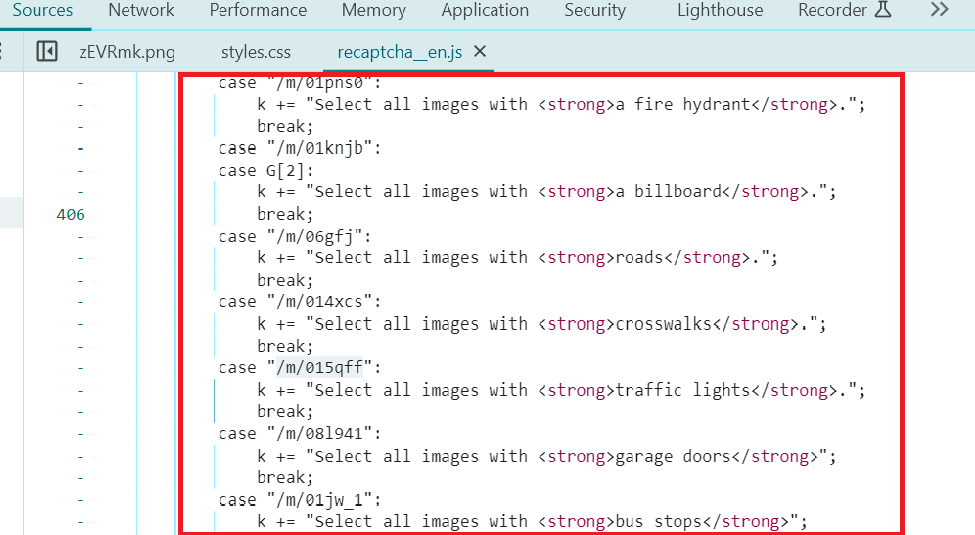
Task (inside metadata): additional metadata related to the task.
userAgent: information about the user agent. Current userAgent: userAgentPlaceholder
websiteURL: address of the web page with the captcha.
Create task method
https://api.capmonster.cloud/createTask
Request
{
  "clientKey": "API_KEY",
  "task": {
    "type": "ComplexImageTask",
    "class": "recaptcha",
    "imageUrls": [
      "https://i.postimg.cc/yYjg75Kv/payloadtraffic.jpg"
    ],
    "metadata": {
      "Task": "Click on traffic lights",
      "Grid": "3x3",
      "TaskDefinition": "/m/015qff"
    },
    "userAgent": "userAgentPlaceholder",
    "websiteUrl": "https://lessons.zennolab.com/captchas/recaptcha/v2_simple.php?level=middle"
  }
}
Response
{
  "errorId":0,
  "taskId":407533072
}
Get task result method
Use the getTaskResult method to get the captcha solution. Depending on the system load, you will receive a response after a time ranging from 300ms to 6s.
https://api.capmonster.cloud/getTaskResult
Request
{
  "clientKey":"API_KEY",
  "taskId": 407533072
}
Response
{
  "errorId": 0,
  "status": "ready",
  "solution": {
    "answer": [false, false, false, false, true, false, false, false, false]
  }
}
| Property | Type | Description |
|---|---|---|
| answer | Array | List with boolean values, "true" means that you need to click on the image corresponding to this position. |
How to find all required parameters for task creation
Manually
- Open your website where the captcha appears in the browser.
- Right-click on the captcha element and select Inspect.
websitekey:
The process is similar to finding the websitekey for ReCaptchaV2Task and ReCaptchaV2Enterprise.
imageUrls:
Find the URL in the element attributes:
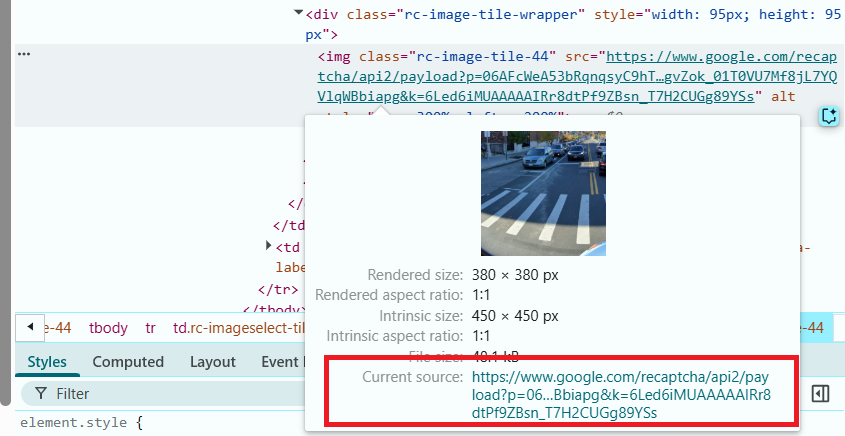
You can also get the full image URL by right-clicking on the image and selecting Open image in a new tab. Then, copy the URL directly from the browser's address bar.
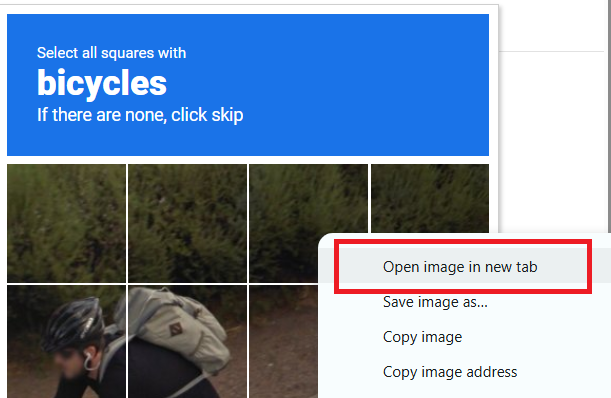
Task (inside metadata)
Task description. Right-click on the task text and in Developer Tools, find the corresponding element in the page structure:

Automatically
To automate parameter extraction, you can retrieve them via a browser (regular or headless, e.g., using Playwright) or directly from HTTP requests. Since dynamic parameter values are short-lived, it is recommended to use them immediately after retrieval.
The provided code snippets are basic examples for learning how to extract the required parameters. The exact implementation will depend on your captcha page, its structure, and the HTML elements and selectors used.
- JavaScript
- Python
- C#
Show code (for browser)
const img = document.querySelector('img.rc-image-tile-33') || document.querySelector('img.rc-image-tile-44');
const src = img ? img.src : null;
console.log(src);

// Task description
const descEl =
  document.querySelector('.rc-imageselect-desc-no-canonical') ||
  document.querySelector('.rc-imageselect-desc');

const taskDescription = descEl
  ? descEl.textContent.trim()
  : 'Task description not found';

console.log(taskDescription);

// Number of visible tiles
const tiles = document.querySelectorAll('.rc-imageselect-tile');
const visibleTiles = Array.from(tiles).filter(tile => tile.offsetParent !== null);

const tileCount = visibleTiles.length;

let gridSize;
if (tileCount === 9) {
  gridSize = '3x3';
} else if (tileCount === 16) {
  gridSize = '4x4';
} else if (tileCount === 25) {
  gridSize = '5x5';
} else {
  gridSize = 'Unknown';
}

console.log(`Grid size: ${gridSize}`);
Show code (Node.js)
import { chromium } from "playwright";

async function extractCaptchaInfo() {
  const browser = await chromium.launch({ headless: false });
  const page = await browser.newPage();

  const url =
    "https://lessons.zennolab.com/captchas/recaptcha/v2_simple.php?level=high";
  await page.goto(url);

  const frames = page.frames();
  const checkboxFrame = frames.find((f) => f.url().includes("api2/anchor"));

  if (!checkboxFrame) {
    console.error("Checkbox iframe for reCAPTCHA not found");
    await browser.close();
    return;
  }

  const checkbox = await checkboxFrame.waitForSelector("#recaptcha-anchor", {
    timeout: 5000,
  });
  await checkbox.click();

  await page.waitForTimeout(1000);
  const updatedFrames = page.frames();
  const challengeFrame = updatedFrames.find((f) =>
    f.url().includes("api2/bframe")
  );

  if (!challengeFrame) {
    console.error("Challenge iframe for reCAPTCHA not found");
    await browser.close();
    return;
  }

  // Image
  const img =
    (await challengeFrame.$("img.rc-image-tile-33")) ||
    (await challengeFrame.$("img.rc-image-tile-44"));
  const src = img ? await img.getAttribute("src") : null;
  console.log("Image:", src);

  // Task
  try {
    await challengeFrame.waitForSelector(
      ".rc-imageselect-desc-no-canonical, .rc-imageselect-desc",
      {
        timeout: 5000,
      }
    );
    const taskDescription = await challengeFrame.$eval(
      ".rc-imageselect-desc-no-canonical, .rc-imageselect-desc",
      (el) => {
        const strong = el.querySelector("strong");
        const text = strong ? strong.textContent.trim() : "Not found";
        return text;
      }
    );
    console.log("Task: select all images with:", taskDescription);
  } catch (error) {
    console.log("Task description not found.");
  }

  // Grid size
  const tiles = await challengeFrame.$$(".rc-imageselect-tile");
  const visibleTiles = await Promise.all(tiles.map((tile) => tile.isVisible()));
  const tileCount = visibleTiles.filter(Boolean).length;

  let gridSize;
  if (tileCount === 9) {
    gridSize = "3x3";
  } else if (tileCount === 16) {
    gridSize = "4x4";
  } else if (tileCount === 25) {
    gridSize = "5x5";
  } else {
    gridSize = "Unknown";
  }

  console.log(`Grid size: ${gridSize}`);

  await browser.close();
}

extractCaptchaInfo();
Show code
import asyncio
from playwright.async_api import async_playwright

async def extract_captcha_info():
    async with async_playwright() as p:
        browser = await p.chromium.launch(headless=False)
        page = await browser.new_page()

        await page.goto("https://lessons.zennolab.com/captchas/recaptcha/v2_simple.php?level=high")

        # Find the checkbox iframe
        checkbox_frame = next((f for f in page.frames if "api2/anchor" in f.url), None)
        if not checkbox_frame:
            print("Checkbox iframe for reCAPTCHA not found")
            await browser.close()
            return

        checkbox = await checkbox_frame.wait_for_selector("#recaptcha-anchor", timeout=5000)
        await checkbox.click()

        await page.wait_for_timeout(1000)

        # Find the challenge iframe
        challenge_frame = next((f for f in page.frames if "api2/bframe" in f.url), None)
        if not challenge_frame:
            print("Challenge iframe for reCAPTCHA not found")
            await browser.close()
            return

        # Image: look for classes rc-image-tile-33 or rc-image-tile-44
        img = await challenge_frame.query_selector("img.rc-image-tile-33") or await challenge_frame.query_selector("img.rc-image-tile-44")
        src = await img.get_attribute("src") if img else None
        print("Image:", src)

        # Task
        try:
            await challenge_frame.wait_for_selector(".rc-imageselect-desc-no-canonical, .rc-imageselect-desc", timeout=5000)
            task_text = await challenge_frame.eval_on_selector(
                ".rc-imageselect-desc-no-canonical, .rc-imageselect-desc",
                "el => el.querySelector('strong')?.textContent?.trim() || 'Not found'"
            )
            print("Task: select all images with:", task_text)
        except:
            print("Task description not found.")

        # Grid size
        tiles = await challenge_frame.query_selector_all(".rc-imageselect-tile")
        visible_count = 0
        for tile in tiles:
            if await tile.is_visible():
                visible_count += 1

        if visible_count == 9:
            grid = "3x3"
        elif visible_count == 16:
            grid = "4x4"
        elif visible_count == 25:
            grid = "5x5"
        else:
            grid = "Unknown"

        print("Grid size:", grid)
        await browser.close()

asyncio.run(extract_captcha_info())
Show code
using System;
using System.Linq;
using System.Threading.Tasks;
using Microsoft.Playwright;

class Program
{
    public static async Task Main()
    {
        using var playwright = await Playwright.CreateAsync();
        var browser = await playwright.Chromium.LaunchAsync(new() { Headless = false });
        var page = await browser.NewPageAsync();

        await page.GotoAsync("https://lessons.zennolab.com/captchas/recaptcha/v2_simple.php?level=high");

        var checkboxFrame = page.Frames.FirstOrDefault(f => f.Url.Contains("api2/anchor"));
        if (checkboxFrame == null)
        {
            Console.WriteLine("Checkbox iframe for reCAPTCHA not found");
            await browser.CloseAsync();
            return;
        }

        var checkbox = await checkboxFrame.WaitForSelectorAsync("#recaptcha-anchor");
        await checkbox.ClickAsync();

        await page.WaitForTimeoutAsync(1000);

        var challengeFrame = page.Frames.FirstOrDefault(f => f.Url.Contains("api2/bframe"));
        if (challengeFrame == null)
        {
            Console.WriteLine("Challenge iframe for reCAPTCHA not found");
            await browser.CloseAsync();
            return;
        }

        // Look for image with classes rc-image-tile-33 or rc-image-tile-44
        var img = await challengeFrame.QuerySelectorAsync("img.rc-image-tile-33") ?? await challengeFrame.QuerySelectorAsync("img.rc-image-tile-44");
        var src = img != null ? await img.GetAttributeAsync("src") : null;
        Console.WriteLine("Image: " + src);

        try
        {
            await challengeFrame.WaitForSelectorAsync(".rc-imageselect-desc-no-canonical, .rc-imageselect-desc");
            var taskText = await challengeFrame.EvalOnSelectorAsync<string>(
                ".rc-imageselect-desc-no-canonical, .rc-imageselect-desc",
                @"el => {
                    const strong = el.querySelector('strong');
                    return strong ? strong.textContent.trim() : 'Not found';
                }");
            Console.WriteLine("Task: select all images with: " + taskText);
        }
        catch
        {
            Console.WriteLine("Task description not found.");
        }

        var tiles = await challengeFrame.QuerySelectorAllAsync(".rc-imageselect-tile");
        int visibleCount = 0;
        foreach (var tile in tiles)
        {
            if (await tile.IsVisibleAsync())
                visibleCount++;
        }

        string gridSize = visibleCount switch
        {
            9 => "3x3",
            16 => "4x4",
            25 => "5x5",
            _ => "Unknown"
        };

        Console.WriteLine("Grid size: " + gridSize);
        await browser.CloseAsync();
    }
}
Use the SDK library
- JavaScript
- Python
- C#
Show code (for browser)
// https://github.com/ZennoLab/capmonstercloud-client-js

import { CapMonsterCloudClientFactory, ClientOptions, ComplexImageRecaptchaRequest } from '@zennolab_com/capmonstercloud-client';

document.addEventListener('DOMContentLoaded', async () => {
  const cmcClient = CapMonsterCloudClientFactory.Create(
      new ClientOptions({ clientKey: 'YOUR_API_KEY' }) // Specify your CapMonster Cloud API key
  );

  // Optionally, you can check the balance
  const balance = await cmcClient.getBalance();
  console.log("Balance:", balance);

  const complexImageRecaptchaRequest = new ComplexImageRecaptchaRequest({
      imageUrls: ['https://i.postimg.cc/yYjg75Kv/payloadtraffic.jpg'], // Replace with actual values
      metaData: {
          Grid: '3x3',
          Task: 'Please click each image containing a mountain',
          TaskDefinition: '/m/015qff'
      },
      websiteURL: 'https://lessons.zennolab.com/captchas/recaptcha/v2_simple.php?level=middle' // URL of the page with the captcha
  });

  const result = await cmcClient.Solve(complexImageRecaptchaRequest);
  console.log("Solution:", result);
});
Show code (Node.js)
// https://github.com/ZennoLab/capmonstercloud-client-js

import { CapMonsterCloudClientFactory, ClientOptions, ComplexImageRecaptchaRequest } from '@zennolab_com/capmonstercloud-client';

const API_KEY = "YOUR_API_KEY"; // Specify your CapMonster Cloud API key

async function solveComplexImageRecaptcha() {
    const cmcClient = CapMonsterCloudClientFactory.Create(
        new ClientOptions({ clientKey: API_KEY })
    );

    // Optionally, you can check the balance
    const balance = await cmcClient.getBalance();
    console.log("Balance:", balance);

    const complexImageRecaptchaRequest = new ComplexImageRecaptchaRequest({
        imageUrls: ['https://i.postimg.cc/yYjg75Kv/payloadtraffic.jpg'], // Replace with actual values
        metaData: {
            Grid: '3x3',
            Task: 'Please click each image containing a mountain',
            TaskDefinition: '/m/015qff'
        },
        websiteURL: 'https://lessons.zennolab.com/captchas/recaptcha/v2_simple.php?level=middle' // URL of the page with the captcha
    });

    const result = await cmcClient.Solve(complexImageRecaptchaRequest);
    console.log("Solution:", result);
}

solveComplexImageRecaptcha().catch(console.error);
Show code
# https://github.com/ZennoLab/capmonstercloud-client-python

import asyncio
from capmonstercloudclient import CapMonsterClient, ClientOptions
from capmonstercloudclient.requests import RecaptchaComplexImageTaskRequest

# Your CapMonster Cloud API key
client_options = ClientOptions(api_key="YOUR_API_KEY")
cap_monster_client = CapMonsterClient(options=client_options)

complex_image_recaptcha_request = RecaptchaComplexImageTaskRequest(
    imagesUrls=["https://i.postimg.cc/yYjg75Kv/payloadtraffic.jpg"],  # Replace with actual values
    metadata={
        "Task": "Click on traffic lights",
        "Grid": "3x3",
        "TaskDefinition": "/m/015qff",
        "websiteUrl": "https://lessons.zennolab.com/captchas/recaptcha/v2_simple.php?level=middle"  # URL of the page with the captcha
    }
)

async def solve_captcha():
    # Optionally, you can check the balance
    balance = await cap_monster_client.get_balance()
    print("Balance:", balance)

    solution = await cap_monster_client.solve_captcha(complex_image_recaptcha_request)
    return solution

responses = asyncio.run(solve_captcha())
print("Solution:", responses)
Show code
// https://github.com/ZennoLab/capmonstercloud-client-dotnet

using System;
using System.Threading.Tasks;
using Zennolab.CapMonsterCloud.Requests;
using Zennolab.CapMonsterCloud;

class Program
{
    static async Task Main(string[] args)
    {
        var clientOptions = new ClientOptions
        {
            ClientKey = "YOUR_API_KEY" // Your CapMonster Cloud API key
        };

        var cmCloudClient = CapMonsterCloudClientFactory.Create(clientOptions);

        // Optionally, you can check the balance
        var balance = await cmCloudClient.GetBalanceAsync();
        Console.WriteLine("Balance: " + balance);

        var complexImageRecaptchaRequest = new RecaptchaComplexImageTaskRequest
        {
            ImageUrls = new[] { "https://i.postimg.cc/yYjg75Kv/payloadtraffic.jpg" }, // Replace with actual values
            Metadata = new RecaptchaComplexImageTaskRequest.RecaptchaMetadata
            {
                Task = "Click on traffic lights",
                Grid = RecaptchaComplexImageTaskRequest.RecaptchaMetadata.GridSize.Grid3x3,
                TaskDefinition = "/m/015qff"
            }
        };

        var complexImageRecaptchaResult = await cmCloudClient.SolveAsync(complexImageRecaptchaRequest);

        Console.WriteLine("Captcha Solution: " + string.Join(", ", complexImageRecaptchaResult.Solution.Answer));
    }
}