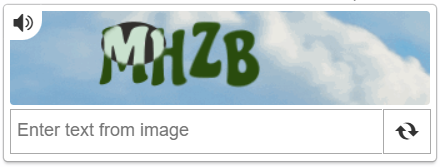
MTCaptcha
CapMonster Cloud uses built-in proxies by default — their cost is already included in the service. You only need to specify your own proxies in cases where the website does not accept the token or access to the built-in services is restricted.
If you are using a proxy with IP authorization, make sure to whitelist the address 65.21.190.34.
Request parameters
type<string>requiredMTCaptchaTask
websiteURL<string>requiredThe URL of the page where the captcha is solved.
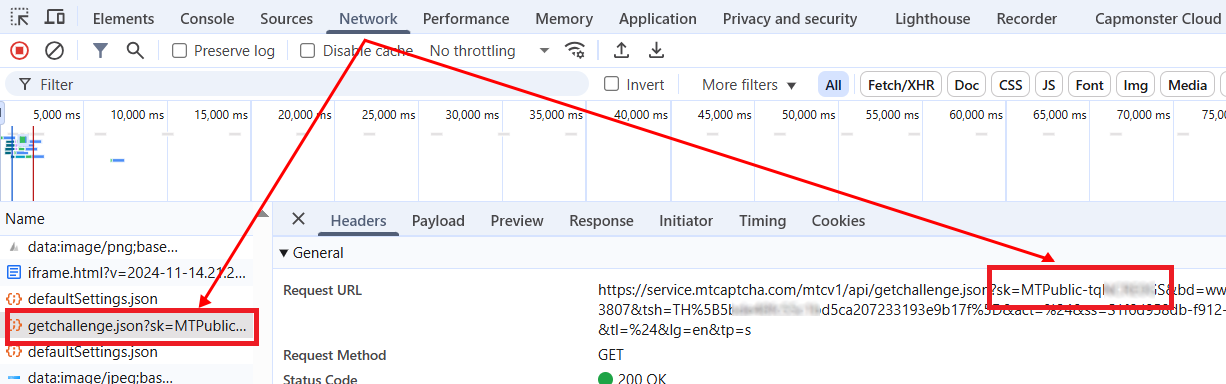
websiteKey<string>requiredThe MTcaptcha key, passed in the request parameters as sk (see example below on how to find it).
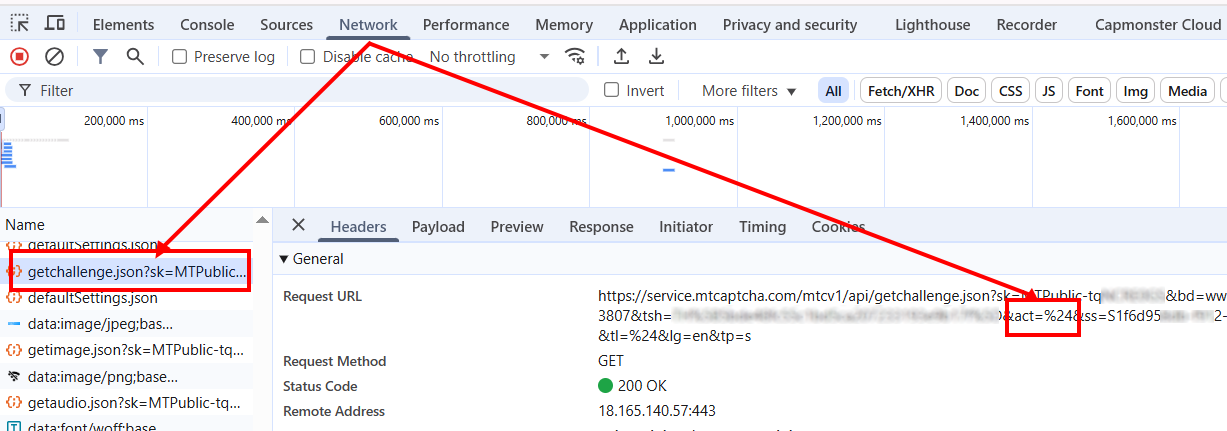
pageAction<string>optionalThe action parameter is passed in the request as act and displayed when validating the token.
Include it in the request only if its value differs from the default - %24.
Example in HTML:
<script>
var mtcaptchaConfig = {
      "sitekey": "MTPublic-abCDEFJAB",
      "action": "login"
};
</script>
isInvisible<bool>optionaltrue if the captcha is invisible, i.e., has a hidden confirmation field. If bot suspicion occurs, an additional verification is triggered.
userAgent<string>optionalBrowser User-Agent.
Pass only a valid UA from Windows OS. Currently it is: userAgentPlaceholder
proxyType<string>optionalhttp - regular http/https proxy;
https - try this option only if "http" does not work (required for some custom proxies);
socks4 - socks4 proxy;
socks5 - socks5 proxy.
proxyAddress<string>optionalProxy IPv4/IPv6 IP address. Not allowed:
- use of transparent proxies (where the client IP is visible);
- use of proxies on local machines.
proxyPort<integer>optionalProxy port.
proxyLogin<string>optionalProxy server login.
proxyPassword<string>optionalProxy server password.
Create task method
- MTCaptchaTask (without proxy)
- MTCaptchaTask (with proxy)
https://api.capmonster.cloud/createTask
Request
{
  "clientKey": "API_KEY",
  "task":
  {
    "type": "MTCaptchaTask",
    "websiteURL": "https://www.example.com",
    "websiteKey": "MTPublic-abCDEFJAB",
    "isInvisible": false,
    "pageAction": "login"
  }
}
Response
{
  "errorId":0,
  "taskId":407533077
}
https://api.capmonster.cloud/createTask
Request
{
  "clientKey": "API_KEY",
  "task":
  {
    "type": "MTCaptchaTask",
    "websiteURL": "https://www.example.com",
    "websiteKey": "MTPublic-abCDEFJAB",
    "isInvisible": false,
    "pageAction": "login",
    "proxyType":"http",
    "proxyAddress":"8.8.8.8",
    "proxyPort":8080,
    "proxyLogin":"proxyLoginHere",
    "proxyPassword":"proxyPasswordHere"
  }
}
Response
{
  "errorId":0,
  "taskId":407533077
}
Get task result method
Use the getTaskResult method to get the solution for the MTCaptcha captcha.
https://api.capmonster.cloud/getTaskResult
Request
{
  "clientKey": "API_KEY",
  "taskId": 407533077
}
Response
{
  "errorId": 0,
  "errorCode": null,
  "errorDescription": null,
  "solution": {
    "token": "v1(155506dc,c8c2e356,MTPublic-abCDEFJAB,70f03532a53...5FSDA**)"
  },
  "status": "ready"
}
How to find CAPTCHA parameters
websiteKey
This parameter can be found in the Network tab of Developer Tools.
Look for requests starting, for example, with getchallenge.json — the sk parameter corresponds to websiteKey.
pageAction
The same request contains the pageAction parameter: the needed value is passed as act.
By default, it equals %24; if the value differs (e.g., ..&act=login&...), specify it when creating the task.
Use the SDK library
- JavaScript
- Python
- C#
Show code (for browser)
// https://github.com/ZennoLab/capmonstercloud-client-js

import { CapMonsterCloudClientFactory, ClientOptions, MTCaptchaRequest } from '@zennolab_com/capmonstercloud-client';

const API_KEY = "YOUR_API_KEY"; // Specify your CapMonster Cloud API key

document.addEventListener("DOMContentLoaded", async () => {
    const client = CapMonsterCloudClientFactory.Create(
        new ClientOptions({ clientKey: API_KEY })
    );

    // Basic example without proxy
    // CapMonster Cloud automatically uses its own proxies
    let mtcaptchaRequest = new MTCaptchaRequest({
        websiteURL: "https://www.example.com",       // URL of the page with MTCaptcha
        websiteKey: "MTPublic-abCDEFJAB",
        isInvisible: false,                          // true -- if Invisible MTCaptcha is used
        pageAction: "login"
    });

    // Example of using your own proxy
    // Uncomment this block if you want to use your own proxy
    /*
    const proxy = {
        proxyType: "http",
        proxyAddress: "123.45.67.89",
        proxyPort: 8080,
        proxyLogin: "username",
        proxyPassword: "password"
    };

    mtcaptchaRequest = new MTCaptchaRequest({
        websiteURL: "https://www.example.com",
        websiteKey: "MTPublic-abCDEFJAB",
        isInvisible: false,
        pageAction: "login",
        proxy,
        userAgent: "userAgentPlaceholder"
    });
    */

    // Optionally, you can check the balance
    const balance = await client.getBalance();
    console.log("Balance:", balance);

    const result = await client.Solve(mtcaptchaRequest);
    console.log("Solution:", result);
});
Show code (Node.js)
// https://github.com/ZennoLab/capmonstercloud-client-js

import { CapMonsterCloudClientFactory, ClientOptions, MTCaptchaRequest } from '@zennolab_com/capmonstercloud-client';

const API_KEY = "YOUR_API_KEY"; // Specify your CapMonster Cloud API key

async function solveMTCaptcha() {
    const client = CapMonsterCloudClientFactory.Create(
        new ClientOptions({ clientKey: API_KEY })
    );

    // Basic example without proxy
    // CapMonster Cloud automatically uses its own proxies
    let mtcaptchaRequest = new MTCaptchaRequest({
        websiteURL: "https://www.example.com",       // URL of the page with MTCaptcha
        websiteKey: "MTPublic-abCDEFJAB",
        isInvisible: false,                          // true -- if Invisible MTCaptcha is used
        pageAction: "login"
    });

    // Example of using your own proxy
    // Uncomment this block if you want to use your own proxy

    /*
    const proxy = {
        proxyType: "http",
        proxyAddress: "123.45.67.89",
        proxyPort: 8080,
        proxyLogin: "username",
        proxyPassword: "password"
    };

    mtcaptchaRequest = new MTCaptchaRequest({
        websiteURL: "https://www.example.com",
        websiteKey: "MTPublic-abCDEFJAB",
        isInvisible: false,
        pageAction: "login",
        proxy,
        userAgent: "userAgentPlaceholder"
    });
    */

    // Optionally, you can check the balance
    const balance = await client.getBalance();
    console.log("Balance:", balance);

    const result = await client.Solve(mtcaptchaRequest);
    console.log("Solution:", result);
}

solveMTCaptcha().catch(console.error);
Show code
# https://github.com/ZennoLab/capmonstercloud-client-python

import asyncio
from capmonstercloudclient import CapMonsterClient, ClientOptions
from capmonstercloudclient.requests import MTCaptchaRequest
# from capmonstercloudclient.requests.baseRequestWithProxy import ProxyInfo  # Uncomment if you plan to use a proxy

API_KEY = "YOUR_API_KEY"  # Specify your CapMonster Cloud API key

async def solve_mt_captcha():
    client_options = ClientOptions(api_key=API_KEY)
    cap_monster_client = CapMonsterClient(options=client_options)

    # Basic example without proxy
    # CapMonster Cloud automatically uses its own proxies
    mtcaptcha_request = MTCaptchaRequest(
        websiteUrl="https://www.example.com",  # URL of the page with the captcha
        websiteKey="MTPublic-abCDEFJAB",
        isInvisible=False,                      # True if the captcha is invisible
        pageAction="login"
    )

    # Example of using your own proxy
    # Uncomment this block if you want to use your own proxy

    # proxy = ProxyInfo(
    #     proxyType="http",
    #     proxyAddress="123.45.67.89",
    #     proxyPort=8080,
    #     proxyLogin="username",
    #     proxyPassword="password"
    # )
    #
    # mtcaptcha_request = MTCaptchaRequest(
    #     websiteUrl="https://www.example.com",
    #     websiteKey="MTPublic-abCDEFJAB",
    #     isInvisible=False,
    #     pageAction="login",
    #     proxy=proxy
    # )

    # Optionally, you can check the balance
    balance = await cap_monster_client.get_balance()
    print("Balance:", balance)

    result = await cap_monster_client.solve_captcha(mtcaptcha_request)
    print("Solution:", result)

asyncio.run(solve_mt_captcha())
Show code
// https://github.com/ZennoLab/capmonstercloud-client-dotnet

using System;
using System.Threading.Tasks;
using Zennolab.CapMonsterCloud;
using Zennolab.CapMonsterCloud.Requests;

class Program
{
    static async Task Main(string[] args)
    {
        // Specify your CapMonster Cloud API key
        var clientOptions = new ClientOptions
        {
            ClientKey = "YOUR_API_KEY"
        };

        var cmCloudClient = CapMonsterCloudClientFactory.Create(clientOptions);

        // Basic example without proxy
        // CapMonster Cloud automatically uses its own proxies
        var mtcaptchaRequest = new MTCaptchaTaskRequest
        {
            WebsiteUrl = "https://www.example.com",     // URL of the page with the captcha
            WebsiteKey = "MTPublic-tqNCRE0GS",
            Invisible = false,                          // true if using invisible captcha
            PageAction = "login",
            UserAgent = "userAgentPlaceholder"
        };

        // Example of using your own proxy
        // Uncomment this block if you want to use your own proxy

        /*
        mtcaptchaRequest = new MTCaptchaTaskRequest
        {
            WebsiteUrl = "https://www.example.com",
            WebsiteKey = "MTPublic-tqNCRE0GS",
            Invisible = false,
            PageAction = "login",
            UserAgent = "userAgentPlaceholder",

            Proxy = new ProxyContainer(
                "123.45.67.89",
                8080,
                ProxyType.Http,
                "username",
                "password"
            )
        };
        */

        // Optionally, you can check the balance
        var balance = await cmCloudClient.GetBalanceAsync();
        Console.WriteLine("Balance: " + balance);

        var mtcaptchaResult = await cmCloudClient.SolveAsync(mtcaptchaRequest);

        Console.WriteLine("MTCaptcha Solution: " + mtcaptchaResult.Solution.Value);
    }
}