GeeTest
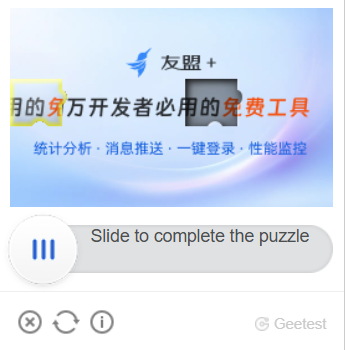
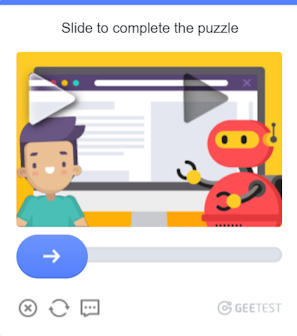
Your application should send the site address, public domain key (gt) and key (challenge).
The result of solving the task is three or five tokens for form submission.
CapMonster Cloud uses built-in proxies by default — their cost is already included in the service. You only need to specify your own proxies in cases where the website does not accept the token or access to the built-in services is restricted.
Proxies with IP authorization are not yet supported.
- The
gt,challengeandgeetestApiServerSubdomainparameters are most often found inside theinitGeetestJavaScript function. - Also you can see in the HTML code of the page. You can find it in the
<sсript>block, which appears after the page is fully loaded in the browser.
V3

V4 (captcha_id = gt)

GeeTest V3
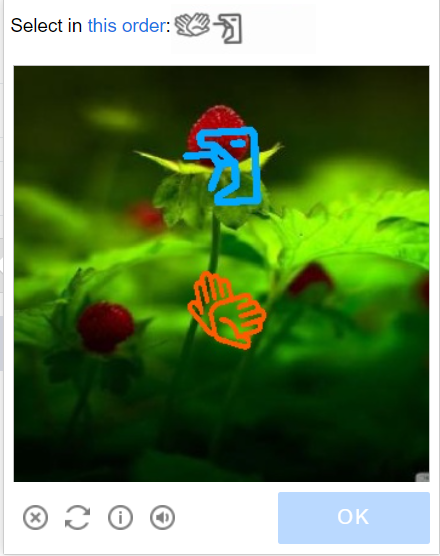
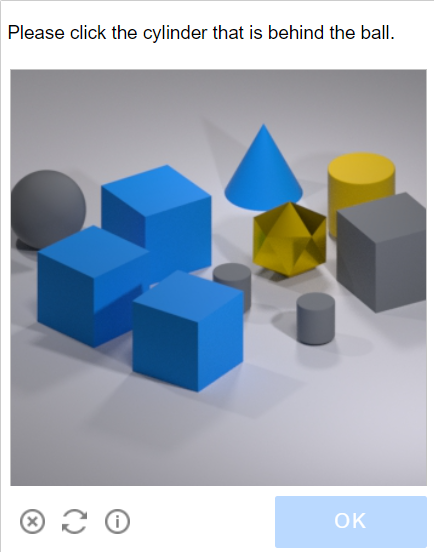
Possible captcha variants
- Intelligent mode
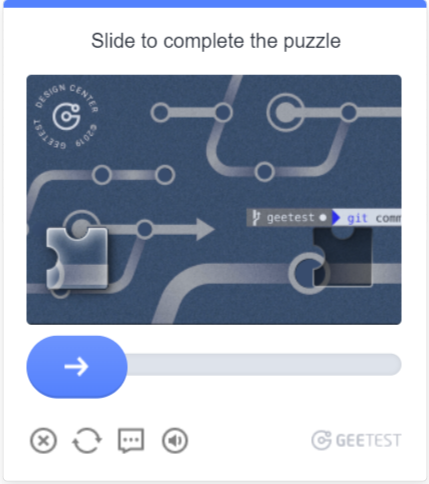
- Slide CAPTCHA
- Icon CAPTCHA
- Space CAPTCHA

Request parameters
IMPORTANT: some parameter values are dynamic — they change with each render of the page using GeeTest v3.
Extract them immediately before creating the task to avoid errors during solving.
See examples of automatic parameter extraction in the section How to find all required parameters for task creation.
type<string>requiredGeeTestTask
websiteURL<string>requiredAddress of the page on which the captcha is solved. The correct Url is always passed to Referer on the request https://api-na.geetest.com/gettype.php? For example: We are at https://example.com#login, but we see that the captcha is not actually initialised there, but at https://example.com.
gt<string>requiredThe GeeTest identifier key gt for the domain. Static value, rarely updated.
challenge<string>required only for V3A dynamic key.
Each time our API is called, we need to get a new key value. If the captcha is loaded on the page, then the challenge value is no longer valid and you will get the error ERROR_TOKEN_EXPIRED.
You will be charged for tasks with ERROR_TOKEN_EXPIRED error.
It is necessary to examine the requests and find the one in which this value is returned and, before each creation of the recognition task, execute this request and parse the challenge from it.
version<integer>required only for V43
geetestApiServerSubdomain<string>optionalGeetest API subdomain server (must be different from api.geetest.com).
Optional parameter. May be required for some sites.
geetestGetLib<string>optionalPath to the captcha script to display it on the page.
Optional parameter. May be required for some sites.
Send JSON as a string.
proxyType<string>optionalhttp - regular http/https proxy;
https - try this option only if "http" doesn't work (required for some custom proxies);
socks4 - socks4 proxy;
socks5 - socks5 proxy.
proxyAddress<string>optionalIPv4/IPv6 proxy IP address. Not allowed:
- using transparent proxies (where you can see the client's IP);
- using proxies on local machines.
proxyPort<integer>optionalProxy port.
proxyLogin<string>optionalProxy-server login.
proxyPassword<string>optionalProxy-server password.
userAgent<string>optionalBrowser User-Agent.
Pass only a valid UA from Windows OS. Currently it is: userAgentPlaceholder
Create task method
- GeeTestTask (without proxy)
- GeeTestTask (with proxy)
https://api.capmonster.cloud/createTask
Request
{
  "clientKey": "YOUR_CAPMONSTER_CLOUD_API_KEY",
  "task": {
    "type": "GeeTestTask",
    "websiteURL": "https://www.geetest.com/en/demo",
    "gt": "022397c99c9f646f6477822485f30404",
    "challenge": "7f044f48bc951ecfbfc03842b5e1fe59",
    "geetestApiServerSubdomain": "api-na.geetest.com"

  }
}
Response
{
  "errorId":0,
  "taskId":407533072
}
https://api.capmonster.cloud/createTask
Request
{
  "clientKey": "YOUR_CAPMONSTER_CLOUD_API_KEY",
  "task": {
    "type": "GeeTestTask",
    "websiteURL": "https://www.geetest.com/en/demo",
    "gt": "022397c99c9f646f6477822485f30404",
    "challenge": "7f044f48bc951ecfbfc03842b5e1fe59",
    "geetestApiServerSubdomain": "api-na.geetest.com",
    "proxyType": "http",
    "proxyAddress": "8.8.8.8",
    "proxyPort": 8080,
    "proxyLogin": "proxyLoginHere",
    "proxyPassword": "proxyPasswordHere",
    "userAgent": "userAgentPlaceholder"
  }
}
Response
{
  "errorId":0,
  "taskId":407533072
}
Use the getTaskResult method to get the result of GeeTest recognition. Depending on the system load, you will receive a response after a time in the range from 10 s to 30 s.
Get task result method
https://api.capmonster.cloud/getTaskResult
Request
{
  "clientKey":"API_KEY",
  "taskId": 407533072
}
Response
{
  "errorId": 0,
  "status": "ready",
  "solution": {
    "challenge": "0f759dd1ea6c4wc76cedc2991039ca4f23",
    "validate": "6275e26419211d1f526e674d97110e15",
    "seccode": "510cd9735583edcb158601067195a5eb|jordan"
  }
}
| Property | Type | Description |
|---|---|---|
| challenge | String | All three parameters are required when submitting the form on the target site. |
| validate | String | |
| seccode | String |
How to find all required parameters for task creation
Manually
- Open your website where the captcha appears in the browser.
- Right-click on the captcha element and select Inspect.
All parameters can be found in init-params among the requests:

Automatically
To automate parameter extraction, you can retrieve them via a browser (regular or headless, e.g., using Playwright) or directly from HTTP requests. Since dynamic parameter values are short-lived, it is recommended to use them immediately after retrieval.
The provided code snippets are basic examples for learning how to extract the required parameters. The exact implementation will depend on your captcha page, its structure, and the HTML elements and selectors used.
- JavaScript
- Python
- C#
Show code (in browser)
(function detectGeeTestV3Browser() {
  const t = Date.now();
  const url = `https://example.com/api/v1/captcha/gee-test/init-params?t=${t}`;

  fetch(url)
    .then(res => res.json())
    .then(data => {
      const { gt, challenge } = data;
      if (gt && challenge) {
        console.log("GeeTest v3 detected:");
        console.log({ gt, challenge });
      } else {
        console.log("Failed to find gt/challenge parameters");
      }
    })
    .catch(err => console.error("Request error:", err));
})();
Show code (Node.js)
async function detectGeeTestV3() {
  const result = {
    version: null,
    data: {},
  };

  const t = Date.now(); // Get current timestamp
  try {
    const response = await fetch(
      `https://example.com/api/v1/captcha/gee-test/init-params?t=${t}`
    );

    if (response.ok) {
      const data = await response.json();
      const challenge = data.challenge;
      const gt = data.gt;

      if (gt && challenge) {
        result.version = "v3";
        result.data = { gt, challenge };
        console.log(result.data);
      } else {
        console.log("Error: Missing gt or challenge");
      }
    } else {
      console.log("Error: Invalid response status", response.status);
    }
  } catch (error) {
    console.error("Request failed", error);
  }

  return result;
}

detectGeeTestV3();
Show code
import requests
import asyncio
import time

async def detect_gee_test_v3():
  result = {
      'version': None,
      'data': {},
  }

  t = int(time.time() * 1000)
  response = requests.get(f'https://example.com/api/v1/captcha/gee-test/init-params?t={t}')

  if response.status_code == 200:
      data = response.json()
      challenge = data.get('challenge')
      gt = data.get('gt')

      if gt and challenge:
          result['version'] = 'v3'
          result['data'] = {'gt': gt, 'challenge': challenge}
          print(result['data'])
      else:
          print('error')

  return result

asyncio.run(detect_gee_test_v3())
Show code
using System;
using System.Net.Http;
using System.Threading.Tasks;
using Newtonsoft.Json.Linq;

class Program
{
    static async Task DetectGeeTestV3()
    {
        var result = new
        {
            version = (string)null,
            data = new { gt = (string)null, challenge = (string)null },
        };

        using (var client = new HttpClient())
        {
            long t = DateTimeOffset.Now.ToUnixTimeMilliseconds();
            var url = $"https://example.com/api/v1/captcha/gee-test/init-params?t={t}";

            var response = await client.GetAsync(url);

            if (response.IsSuccessStatusCode)
            {
                var responseContent = await response.Content.ReadAsStringAsync();
                var data = JObject.Parse(responseContent);
                var challenge = data["challenge"]?.ToString();
                var gt = data["gt"]?.ToString();

                if (!string.IsNullOrEmpty(gt) && !string.IsNullOrEmpty(challenge))
                {
                    result = new
                    {
                        version = "v3",
                        data = new { gt = gt, challenge = challenge }
                    };
                    Console.WriteLine($"GT: {gt}, Challenge: {challenge}");
                }
                else
                {
                    Console.WriteLine("Error: Missing required parameters.");
                }
            }
            else
            {
                Console.WriteLine("Error: Failed to get response.");
            }
        }
    }

    static async Task Main(string[] args)
    {
        await DetectGeeTestV3();
    }
}
Use the SDK library
- JavaScript
- Python
- C#
Show code (for browser)
// https://github.com/ZennoLab/capmonstercloud-client-js

import {
    CapMonsterCloudClientFactory,
    ClientOptions,
    GeeTestRequest
} from '@zennolab_com/capmonstercloud-client';

const API_KEY = "YOUR_API_KEY"; // Specify your CapMonster Cloud API key

document.addEventListener('DOMContentLoaded', async () => {
    const client = CapMonsterCloudClientFactory.Create(
        new ClientOptions({ clientKey: API_KEY })
    );

    // Optionally, you can check the balance
    const balance = await client.getBalance();
    console.log("Balance:", balance);

    // Basic example without proxy
    // CapMonster Cloud automatically uses its own proxies
    let geetestRequest = new GeeTestRequest({
        websiteURL: "https://example.com/geetest.php", // URL of the page with captcha
        gt: "81dc9bdb52d04dc20036dbd8313ed055",        // Replace with the correct value
        challenge: "d93591bdf7860e1e4ee2fca799911215"  // Replace with the correct value
    });

    // Example of using your own proxy
    // Uncomment this block if you want to use your own proxy

    /*
    const proxy = {
        proxyType: "https",
        proxyAddress: "123.45.67.89",
        proxyPort: 8080,
        proxyLogin: "username",
        proxyPassword: "password"
    };

    geetestRequest = new GeeTestRequest({
        websiteURL: "https://example.com/geetest.php",
        gt: "81dc9bdb52d04dc20036dbd8313ed055",
        challenge: "d93591bdf7860e1e4ee2fca799911215",
        proxy,
        userAgent: "userAgentPlaceholder"
    });
    */

    const result = await client.Solve(geetestRequest);
    console.log("Solution:", result);
});
Show code (Node.js)
// https://github.com/ZennoLab/capmonstercloud-client-js

import { CapMonsterCloudClientFactory, ClientOptions, GeeTestRequest } from '@zennolab_com/capmonstercloud-client';

const API_KEY = "YOUR_API_KEY"; // Specify your CapMonster Cloud API key

async function solveGeeTest() {
    const client = CapMonsterCloudClientFactory.Create(
        new ClientOptions({ clientKey: API_KEY })
    );

    // Optionally, you can check the balance
    const balance = await client.getBalance();
    console.log("Balance:", balance);

    // Basic example without proxy
    // CapMonster Cloud automatically uses its own proxies
    let geetestRequest = new GeeTestRequest({
        websiteURL: "https://example.com/geetest.php", // URL of the page with captcha
        gt: "81dc9bdb52d04dc20036dbd8313ed055",       // Replace with the correct value
        challenge: "d93591bdf7860e1e4ee2fca799911215" // Replace with the correct value
    });

    // Example of using your own proxy
    // Uncomment this block if you want to use your own proxy

    /*
    const proxy = {
        proxyType: "https",
        proxyAddress: "123.45.67.89",
        proxyPort: 8080,
        proxyLogin: "username",
        proxyPassword: "password"
    };

    geetestRequest = new GeeTestRequest({
        websiteURL: "https://example.com/geetest.php",
        gt: "81dc9bdb52d04dc20036dbd8313ed055",
        challenge: "d93591bdf7860e1e4ee2fca799911215",
        proxy,
        userAgent: "userAgentPlaceholder"
    });
    */

    const result = await client.Solve(geetestRequest);
    console.log("Solution:", result);
}

solveGeeTest().catch(console.error);
Show code
# https://github.com/ZennoLab/capmonstercloud-client-python

import asyncio
from capmonstercloudclient import CapMonsterClient, ClientOptions
from capmonstercloudclient.requests import GeetestRequest
# from capmonstercloudclient.requests.baseRequestWithProxy import ProxyInfo   # Uncomment if you plan to use a proxy

API_KEY = "YOUR_API_KEY"  # Specify your CapMonster Cloud API key

async def solve_geetest():
    client_options = ClientOptions(api_key=API_KEY)
    cap_monster_client = CapMonsterClient(options=client_options)

    # Basic example without proxy
    # CapMonster Cloud automatically uses its own proxies
    geetest_request = GeetestRequest(
        websiteUrl="https://example.com",
        gt="81dc9bdb52d04dc20036dbd8313ed055",
        challenge="d93591bdf7860e1e4ee2fca799911215"
    )

    # Example of using your own proxy
    # Uncomment this block if you want to use your own proxy

    # proxy = ProxyInfo(
    #     proxyType="http",
    #     proxyAddress="123.45.67.89",
    #     proxyPort=8080,
    #     proxyLogin="username",
    #     proxyPassword="password"
    # )

    # geetest_request = GeetestRequest(
    #     websiteUrl="https://example.com",
    #     gt="81dc9bdb52d04dc20036dbd8313ed055",
    #     challenge="d93591bdf7860e1e4ee2fca799911215",
    #     proxy=proxy,
    #     userAgent="userAgentPlaceholder"
    # )

    # Optionally, you can check the balance
    balance = await cap_monster_client.get_balance()
    print("Balance:", balance)

    result = await cap_monster_client.solve_captcha(geetest_request)
    print("Solution:", result)

asyncio.run(solve_geetest())
Show code
// https://github.com/ZennoLab/capmonstercloud-client-dotnet

using System;
using System.Threading.Tasks;
using Zennolab.CapMonsterCloud;
using Zennolab.CapMonsterCloud.Requests;

class Program
{
    static async Task Main(string[] args)
    {
        // Your CapMonster Cloud API key
        var clientOptions = new ClientOptions
        {
            ClientKey = "YOUR_API_KEY"
        };

        var cmCloudClient = CapMonsterCloudClientFactory.Create(clientOptions);

        // Optionally, you can check the balance
        var balance = await cmCloudClient.GetBalanceAsync();
        Console.WriteLine("Balance: " + balance);

        // Basic example without proxy
        // CapMonster Cloud automatically uses its own proxies
        var geetestRequest = new GeeTestRequest
        {
            WebsiteUrl = "https://example.com/demo/geetest", // URL of the page with the captcha
            Gt = "your_gt_value",                             // Replace with the correct value
            Challenge = "your_challenge_value"               // Replace with the correct value
        };

        // Example of using your own proxy
        // Uncomment this block if you want to use your own proxy
        /*
        var geetestRequest = new GeeTestRequest
        {
            WebsiteUrl = "https://example.com/demo/geetest", // URL of the page with the captcha
            Gt = "your_gt_value",
            Challenge = "your_challenge_value",

            Proxy = new ProxyContainer(
                "123.45.67.89",
                8080,
                ProxyType.Http,
                "username",
                "password"
            )
        };
        */

        var geetestResult = await cmCloudClient.SolveAsync(geetestRequest);

        Console.WriteLine("Solution:");
        Console.WriteLine($"Challenge: {geetestResult.Solution.Challenge}");
        Console.WriteLine($"Validate:  {geetestResult.Solution.Validate}");
        Console.WriteLine($"SecCode:   {geetestResult.Solution.SecCode}");
    }
}
GeeTest V4
Possible captcha variant
Request parameters
type<string>requiredGeeTestTask
websiteURL<string>requiredAddress of the page on which the captcha is solved.
gt<string>requiredThe GeeTest identifier key for the domain - the captcha_id parameter.
version<integer>required only for V44
geetestApiServerSubdomain<string>optionalGeetest API subdomain server (must be different from api.geetest.com).
Optional parameter. May be required for some sites.
geetestGetLib<string>optionalPath to the captcha script to display it on the page.
Optional parameter. May be required for some sites.
Send JSON as a string.
initParameters<object>optionalAdditional parameters for version 4, used together with “riskType” (captcha type/characteristics of its verification).
proxyType<string>optionalhttp - regular http/https proxy;
https - try this option only if "http" doesn't work (required for some custom proxies);
socks4 - socks4 proxy;
socks5 - socks5 proxy.
proxyAddress<string>optionalIPv4/IPv6 proxy IP address. Not allowed:
- using transparent proxies (where you can see the client's IP);
- using proxies on local machines.
proxyPort<integer>optionalProxy port.
proxyLogin<string>optionalProxy-server login.
proxyPassword<string>optionalProxy-server password.
userAgent<string>optionalBrowser User-Agent used to recognize captcha.
Create task method
- GeeTestTask (without proxy)
- GeeTestTask (with proxy)
https://api.capmonster.cloud/createTask
Request
{
  "clientKey": "YOUR_CAPMONSTER_CLOUD_API_KEY",
  "task": {
    "type": "GeeTestTask",
    "websiteURL": "https://gt4.geetest.com/",
    "gt": "54088bb07d2df3c46b79f80300b0abbe",
    "version": 4,
    "initParameters": {
      "riskType": "slide"
    }
  }
}
Response
{
  "errorId":0,
  "taskId":407533072
}
https://api.capmonster.cloud/createTask
Request
{
  "clientKey": "YOUR_CAPMONSTER_CLOUD_API_KEY",
  "task": {
    "type": "GeeTestTask",
    "websiteURL": "https://gt4.geetest.com/",
    "gt": "54088bb07d2df3c46b79f80300b0abbe",
    "version": 4,
    "initParameters": {
      "riskType": "slide"
    },
    "proxyType": "http",
    "proxyAddress": "8.8.8.8",
    "proxyPort": 8080,
    "proxyLogin": "proxyLoginHere",
    "proxyPassword": "proxyPasswordHere",
    "userAgent": "userAgentPlaceholder"
  }
}
Response
{
  "errorId":0,
  "taskId":407533072
}
Use the getTaskResult to get the result of GeeTest recognition. Depending on the system load, you will receive a response after a time in the range from 10 s to 30 s.
Get task result method
https://api.capmonster.cloud/getTaskResult
Request
{
  "clientKey":"API_KEY",
  "taskId": 407533072
}
Response
{
  "errorId": 0,
  "status": "ready",
  "solution": {
    "captcha_id": "f5c2ad5a8a3cf37192d8b9c039950f79",
    "lot_number": "bcb2c6ce2f8e4e9da74f2c1fa63bd713",
    "pass_token": "edc7a17716535a5ae624ef4707cb6e7e478dc557608b068d202682c8297695cf",
    "gen_time": "1683794919",
    "captcha_output": "XwmTZEJCJEnRIJBlvtEAZ662T...[cut]...SQ3fX-MyoYOVDMDXWSRQig56"
  }
}
| Property | Type | Description |
|---|---|---|
| captcha_id | String | All five parameters are required when submitting the form on the target site. input[name=captcha_id] input[name=lot_number] input[name=pass_token] input[name=gen_time] input[name=captcha_output] |
| lot_number | String | |
| pass_token | String | |
| gen_time | String | |
| captcha_output | String |
How to find all required parameters for task creation
Manually
- Open your website where the captcha appears in the browser.
- Right-click on the captcha element and select Inspect.
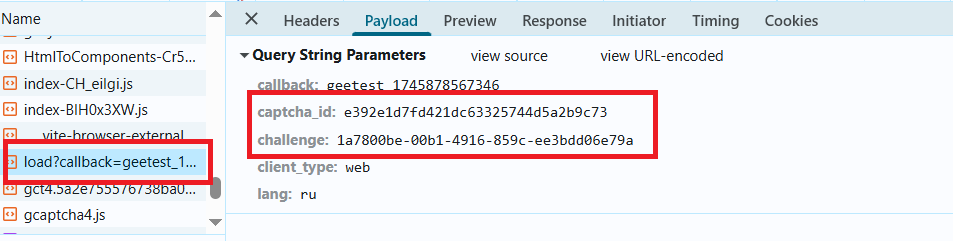
Parameters may load in load?callback:
Automatically
A convenient way to automate the search for all necessary parameters. Some parameters are regenerated every time the page loads, so you'll need to extract them through a browser — either regular or headless (e.g., using Playwright). Since the values of dynamic parameters are short-lived, the captcha must be solved immediately after retrieving them.
The code snippets provided are basic examples for familiarization with extracting the required parameters. The exact implementation will depend on your captcha page, its structure, and the HTML elements/selectors it uses.
- JavaScript
- Python
- C#
Show code (in browser)
(function() {
  function getQueryParams(url) {
    const params = new URLSearchParams(new URL(url).search);
    const captchaId = params.get('captcha_id');
    const challenge = params.get('challenge');
    const riskType = params.get('risk_type');
    return { captchaId, challenge, riskType };
  }

  const observer = new PerformanceObserver((list) => {
    const entries = list.getEntriesByType('resource');
    entries.forEach((entry) => {
      if (entry.name.includes('https://gcaptcha4.geetest.com/load?')) {
        const { captchaId, challenge, riskType } = getQueryParams(entry.name);
        if (captchaId && challenge) {
          console.log('GeeTest v4 detected (via PerformanceObserver):');
          console.log({ captchaId, challenge, riskType });
        }
      }
    });
  });

  observer.observe({ type: 'resource', buffered: true });
})();
Show code (Node.js)
import { chromium } from "playwright";

async function detectGeeTestV4(pageUrl) {
  const result = { version: null, data: {} };

  const browser = await chromium.launch({ headless: false });
  const context = await browser.newContext();
  const page = await context.newPage();

  page.on("response", async (response) => {
    const url = response.url();
    if (url.includes("https://gcaptcha4.geetest.com/load?")) {
      const urlParams = new URLSearchParams(url.split("?")[1]);
      const captchaId = urlParams.get("captcha_id");
      const challenge = urlParams.get("challenge");
      const riskType = urlParams.get("risk_type");

      if (captchaId && challenge && !result.version) {
        result.version = "v4";
        result.data = {
          captchaId: captchaId,
          challenge: challenge,
          riskType: riskType,
        };
        console.log("GeeTest v4 detected:");
        console.log(result.data);
      }
    }
  });

  await page.goto(pageUrl, { waitUntil: "networkidle" });
  await page.waitForTimeout(20000);

  if (!result.version) {
    console.log("error");
  }

  await browser.close();
  return result;
}

detectGeeTestV4("https://example.com").then((result) => {
  console.log(result);
});
Show code
import asyncio
from playwright.async_api import async_playwright
from urllib.parse import urlparse, parse_qs

async def detect_geetest_v4(page_url):
    result = {"version": None, "data": {}}

    async with async_playwright() as p:
        browser = await p.chromium.launch(headless=False)
        context = await browser.new_context()
        page = await context.new_page()

        async def on_request(request):
            url = request.url
            if "https://gcaptcha4.geetest.com/load?" in url:
                query = parse_qs(urlparse(url).query)
                captcha_id = query.get("captcha_id", [None])[0]
                challenge = query.get("challenge", [None])[0]
                risk_type = query.get("risk_type", [None])[0]

                if captcha_id and challenge and not result["version"]:
                    result["version"] = "v4"
                    result["data"] = {
                        "captchaId": captcha_id,
                        "challenge": challenge,
                        "riskType": risk_type
                    }
                    print("GeeTest v4 detected:")
                    print(result["data"])

        context.on("request", on_request)

        await page.goto(page_url, wait_until="networkidle")
        await asyncio.sleep(10)

        if not result["version"]:
            print("error")

        await browser.close()
        return result

asyncio.run(detect_geetest_v4("https://www.example.com"))
Show code
using System;
using System.Threading.Tasks;
using Microsoft.Playwright;
using System.Web;

class Program
{
    public static async Task Main(string[] args)
    {
        var result = new
        {
            Version = (string)null,
            Data = new
            {
                CaptchaId = (string)null,
                Challenge = (string)null,
                RiskType = (string)null
            }
        };

        using var playwright = await Playwright.CreateAsync();
        var browser = await playwright.Chromium.LaunchAsync(new BrowserTypeLaunchOptions
        {
            Headless = false
        });

        var context = await browser.NewContextAsync();
        var page = await context.NewPageAsync();

        page.Request += (_, request) =>
        {
            var url = request.Url;

            if (url.Contains("https://gcaptcha4.geetest.com/load?"))
            {
                var uri = new Uri(url);
                var queryParams = HttpUtility.ParseQueryString(uri.Query);
                var captchaId = queryParams.Get("captcha_id");
                var challenge = queryParams.Get("challenge");
                var riskType = queryParams.Get("risk_type");

                if (!string.IsNullOrEmpty(captchaId) && !string.IsNullOrEmpty(challenge))
                {
                    Console.WriteLine("GeeTest v4 detected:");
                    Console.WriteLine($"CaptchaId: {captchaId}");
                    Console.WriteLine($"Challenge: {challenge}");
                    Console.WriteLine($"RiskType: {riskType}");
                }
            }
        };

        await page.GotoAsync("https://www.example.com/", new PageGotoOptions
        {
            WaitUntil = WaitUntilState.NetworkIdle
        });

        await Task.Delay(10000);

        await browser.CloseAsync();
    }
}
Use the SDK library
- JavaScript
- Python
- C#
Show code (for browser)
// https://github.com/ZennoLab/capmonstercloud-client-js

import {
    CapMonsterCloudClientFactory,
    ClientOptions,
    GeeTestRequest
} from '@zennolab_com/capmonstercloud-client';

const API_KEY = "YOUR_API_KEY"; // Specify your CapMonster Cloud API key

document.addEventListener('DOMContentLoaded', async () => {
    const client = CapMonsterCloudClientFactory.Create(
        new ClientOptions({ clientKey: API_KEY })
    );

    // Optionally, you can check the balance
    const balance = await client.getBalance();
    console.log("Balance:", balance);

    // Basic example without proxy
    // CapMonster Cloud automatically uses its own proxies
    let geetestRequest = new GeeTestRequest({
        websiteURL: "https://example.com/geetest.php", // URL of the page with the captcha
        gt: "81dc9bdb52d04dc20036dbd8313ed055",
        challenge: "d93591bdf7860e1e4ee2fca799911215",
        version: "4",
        initParameters: { riskType: "slide" }
    });

    // Example of using your own proxy
    // Uncomment this block if you want to use your own proxy

    /*
    const proxy = {
        proxyType: "https",
        proxyAddress: "123.45.67.89",
        proxyPort: 8080,
        proxyLogin: "username",
        proxyPassword: "password"
    };

    geetestRequest = new GeeTestRequest({
        websiteURL: "https://example.com/geetest.php",
        gt: "81dc9bdb52d04dc20036dbd8313ed055",
        challenge: "d93591bdf7860e1e4ee2fca799911215",
        version: "4",
        initParameters: { riskType: "slide" },
        proxy,
        userAgent: "userAgentPlaceholder"
    });
    */

    const result = await client.Solve(geetestRequest);
    console.log("Solution:", result);
});
Show code (Node.js)
// https://github.com/ZennoLab/capmonstercloud-client-js

import { CapMonsterCloudClientFactory, ClientOptions, GeeTestRequest } from '@zennolab_com/capmonstercloud-client';

const API_KEY = "YOUR_API_KEY"; // Specify your CapMonster Cloud API key

async function solveGeeTest() {
    const client = CapMonsterCloudClientFactory.Create(
        new ClientOptions({ clientKey: API_KEY })
    );

    // Optionally, you can check the balance
    const balance = await client.getBalance();
    console.log("Balance:", balance);

    // Basic example without proxy
    // CapMonster Cloud automatically uses its own proxies
    let geetestRequest = new GeeTestRequest({
        websiteURL: "https://example.com/geetest.php", // URL of the page with the captcha
        gt: "81dc9bdb52d04dc20036dbd8313ed055",
        challenge: "d93591bdf7860e1e4ee2fca799911215",
        version: "4",
        initParameters: { riskType: "slide" }
    });

    // Example of using your own proxy
    // Uncomment this block if you want to use your own proxy

    /*
    const proxy = {
        proxyType: "https",
        proxyAddress: "123.45.67.89",
        proxyPort: 8080,
        proxyLogin: "username",
        proxyPassword: "password"
    };

    geetestRequest = new GeeTestRequest({
        websiteURL: "https://example.com/geetest.php",
        gt: "81dc9bdb52d04dc20036dbd8313ed055",
        challenge: "d93591bdf7860e1e4ee2fca799911215",
        version: "4",
        initParameters: { riskType: "slide" },
        proxy,
        userAgent: "userAgentPlaceholder"
    });
    */

    const result = await client.Solve(geetestRequest);
    console.log("Solution:", result);
}

solveGeeTest().catch(console.error);
Show code
# https://github.com/ZennoLab/capmonstercloud-client-python

import asyncio
from capmonstercloudclient import CapMonsterClient, ClientOptions
from capmonstercloudclient.requests import GeetestRequest
# from capmonstercloudclient.requests.baseRequestWithProxy import ProxyInfo  # Uncomment if you plan to use your own proxies

API_KEY = "YOUR_API_KEY"  # Specify your CapMonster Cloud API key

async def solve_geetest_v4():
    client_options = ClientOptions(api_key=API_KEY)
    cap_monster_client = CapMonsterClient(options=client_options)

    # Basic example without proxy
    # CapMonster Cloud automatically uses its own proxies
    geetest_request = GeetestRequest(
        websiteUrl="https://example.com/",
        gt="54088bb07d2df3c46b79f80300b0abbe",
        version=4,
        initParameters={
            "riskType": "slide"
        }
    )

    # Example of using your own proxy
    # Uncomment this block if you want to use your own proxy

    # proxy = ProxyInfo(
    #     proxyType="http",
    #     proxyAddress="123.45.67.89",
    #     proxyPort=8080,
    #     proxyLogin="username",
    #     proxyPassword="password"
    # )

    # geetest_request = GeetestRequest(
    #     websiteUrl="https://example.com/",
    #     gt="54088bb07d2df3c46b79f80300b0abbe",
    #     version=4,
    #     initParameters={
    #         "riskType": "slide"
    #     },
    #     proxy=proxy,
    #     userAgent="userAgentPlaceholder"
    # )

    # Optionally, you can check the balance
    balance = await cap_monster_client.get_balance()
    print("Balance:", balance)

    result = await cap_monster_client.solve_captcha(geetest_request)
    print("Solution:", result)

asyncio.run(solve_geetest_v4())
Show code
// https://github.com/ZennoLab/capmonstercloud-client-dotnet

using System;
using System.Collections.Generic;
using System.Threading.Tasks;
using Zennolab.CapMonsterCloud;
using Zennolab.CapMonsterCloud.Requests;

class Program
{
    static async Task Main(string[] args)
    {
        // Specify your CapMonster Cloud API key
        var clientOptions = new ClientOptions
        {
            ClientKey = "YOUR_API_KEY"
        };

        var cmCloudClient = CapMonsterCloudClientFactory.Create(clientOptions);

        // Optionally, you can check the balance
        var balance = await cmCloudClient.GetBalanceAsync();
        Console.WriteLine("Balance: " + balance);

        // Basic example without proxy
        // CapMonster Cloud automatically uses its own proxies
        var geetestRequest = new GeeTestRequest
        {
            WebsiteUrl = "https://example.com/", // URL of the page with the captcha
            Gt = "54088bb07d2df3c46b79f80300b0abbe",
            Version = 4,
            InitParameters = new Dictionary<string, string> { { "riskType", "slide" } } // Additional parameter for V4
        };

        // Example of using your own proxy
        // Uncomment this block if you want to use your own proxy
        /*
        var geetestRequest = new GeeTestRequest
        {
            WebsiteUrl = "https://example.com/",
            Gt = "54088bb07d2df3c46b79f80300b0abbe",
            Version = 4,
            InitParameters = new Dictionary<string, string> { { "riskType", "slide" } },

            Proxy = new ProxyContainer(
                "123.45.67.89",
                8080,
                ProxyType.Http,
                "username",
                "password"
            )
        };
        */

        var geetestResult = await cmCloudClient.SolveAsync(geetestRequest);

        Console.WriteLine("Solution:");
        Console.WriteLine($"CaptchaId:     {geetestResult.Solution.CaptchaId}");
        Console.WriteLine($"LotNumber:     {geetestResult.Solution.LotNumber}");
        Console.WriteLine($"PassToken:     {geetestResult.Solution.PassToken}");
        Console.WriteLine($"GenTime:       {geetestResult.Solution.GenTime}");
        Console.WriteLine($"CaptchaOutput: {geetestResult.Solution.CaptchaOutput}");
    }
}
Features of the GeeTest solution on app.gal**.com
This section is relevant **only for the GeeTest captcha on the app.gal**.com site**. These values should not be used for other sites.
When to use the challenge field?
For the app.gal**.com site, you need to specify the value of the challenge field depending on the action being performed. If this field is not specified, the default value **AddTypedCredentialItems** is used, but this does not suit all scenarios.
List of possible challenge values:
Action on app.gal**.com site | challenge Value |
|---|---|
| Sending an email code | SendEmailCode |
| Confirming an action (e.g., login) | SendVerifyCode |
| Claiming a reward | ClaimUserTask |
| Opening a mystery box | OpenMysteryBox |
| Purchasing in GGShop | BuyGGShop |
| Preparing to buy raffle tickets | PrepareBuyGGRaffleTickets |
| Adding credentials | AddTypedCredentialItems |
| Creating a report ticket | CreateReportTicket |
| Participating in an activity | PrepareParticipate |
| Updating credential data | RefreshCredentialValue |
| Synchronizing data | SyncCredentialValue |
| Social login | GetSocialAuthUrl |
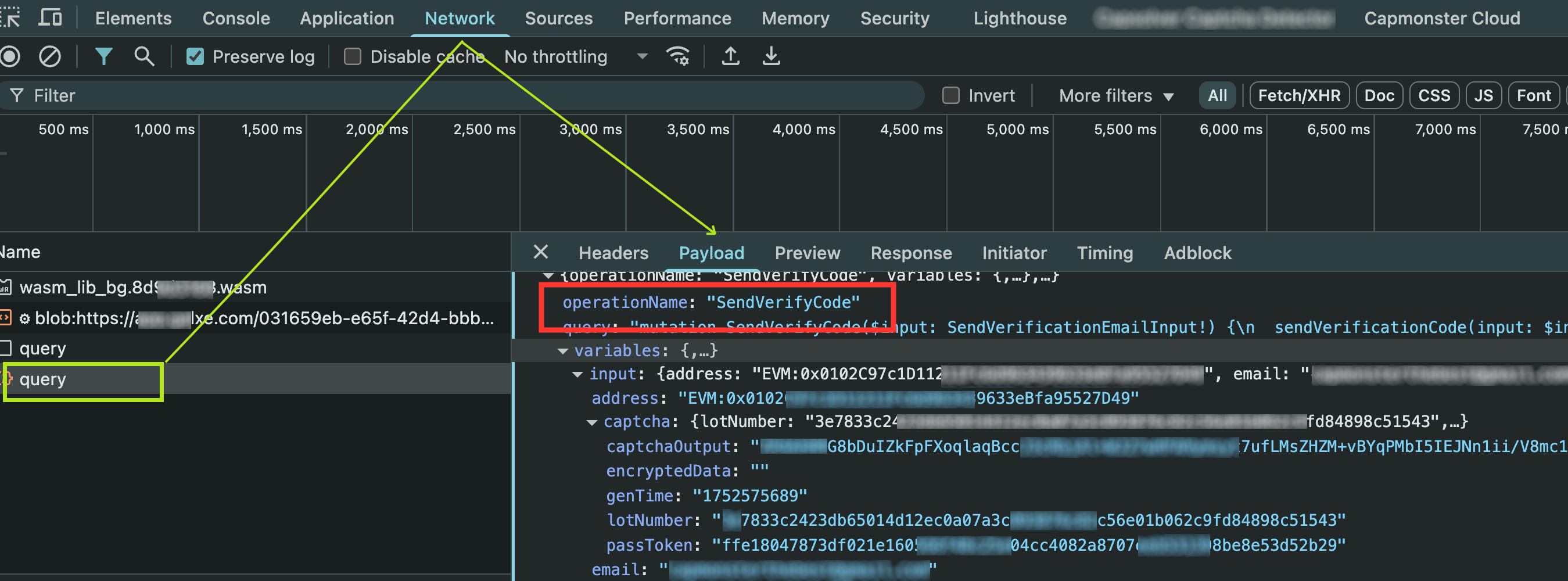
The
challengevalue must match theoperationNamevisible in the network requests (Networktab) via DevTools.
Task submission example
{
  "type": "GeeTestTaskProxyless",
  "websiteURL": "https://app.gal**.com/accountSetting/social",
  "gt": "244bcb8b9846215df5af4c624a750db4",
  "challenge": "SendVerifyCode"
}
Note: The GT key for gal**.com is always
244bcb8b9846215df5af4c624a750db4. You can leave this value as the default.
Example response
{
  "errorId": 0,
  "errorCode": null,
  "errorDescription": null,
  "solution": {
    "lot_number": "e0c84aab60867ad1316f8606d31ab58d2a54d8a4ca8e78b9339abd8ea62967cb",
    "captcha_output": "7DlZW2dul...cbEA5uIbwg==",
    "pass_token": "ce024389a0926e0d1081792c83e0c46f882084e45e95afa0e148fd03aed3ae10",
    "gen_time": "1753158042",
    "encryptedData": ""
  },
  "status": "ready"
}
The encryptedData field on the site side is usually empty, as the client logic ignores it. Although the value is returned via WebAssembly, in practice it is not used.