Amazon | AWS WAF Captcha and Challenge
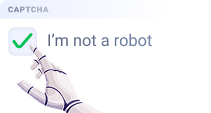
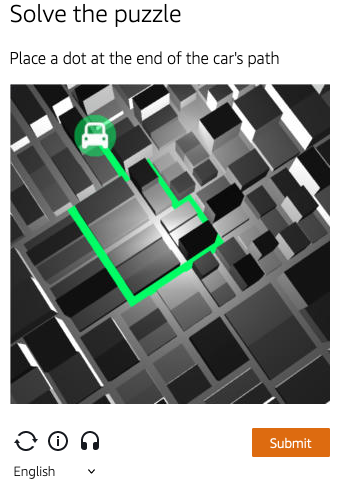
Examples of tasks
- Click
- Puzzle

Solving captcha and challenge in AWS WAF
CapMonster Cloud uses built-in proxies by default — their cost is already included in the service. You only need to specify your own proxies in cases where the website does not accept the token or access to the built-in services is restricted.
If you are using a proxy with IP authorization, make sure to whitelist the address 65.21.190.34.
Request parameters
IMPORTANT: some parameter values are dynamic — they change with each render of the page using Amazon (AWS WAF).
Extract them immediately before creating the task to avoid errors during solving.
See examples of automatic parameter extraction in the section How to find all required parameters for task creation.
Option 1
type<string>requiredAmazonTask
websiteURL<string>requiredThe main page address where the captcha is solved.
websiteKey<string>requiredCan be found in the apiKey field when rendering captcha.
captchaScript<string>requiredLink to jsapi.js on the HTML page, looks like <Integration URL>/jsapi.js.
cookieSolution<boolean>optionalDefault is false — the response will include "captcha_voucher" and "existing_token".
If you need the "aws-waf-token" cookie, set to true.
userAgent<string>optionalBrowser User-Agent.
Pass only a valid UA from Windows OS. Currently it is: userAgentPlaceholder
proxyType<string>optionalhttp - regular http/https proxy;
https - try this option only if "http" does not work (required for some custom proxies);
socks4 - socks4 proxy;
socks5 - socks5 proxy.
proxyAddress<string>optionalIPv4/IPv6 proxy address. Not allowed:
- using transparent proxies (where the client IP is visible);
- using proxies on local machines.
proxyPort<integer>optionalProxy port.
proxyLogin<string>optionalProxy server login.
proxyPassword<string>optionalProxy server password.
Option 2
type<string>requiredAmazonTask
websiteURL<string>requiredThe main page address where the captcha is solved.
challengeScript<string>requiredLink to challenge.js (see description below).
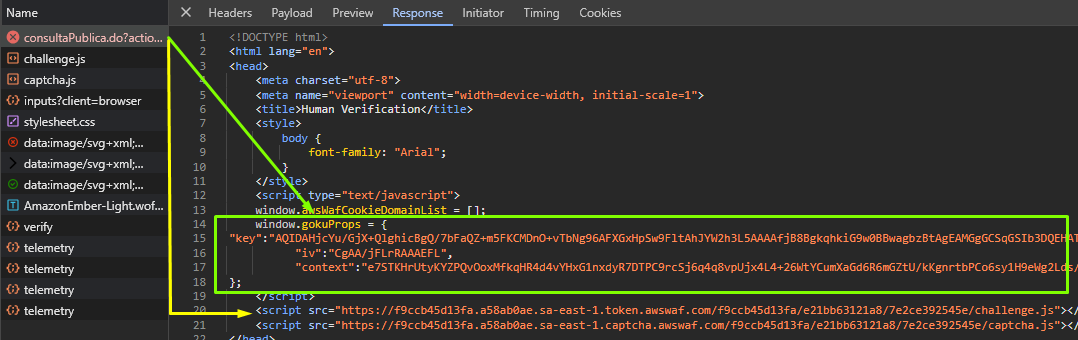
websiteKey<string>requiredA string that can be obtained from the HTML captcha page or using JavaScript: window.gokuProps.key.
context<string>requiredA string that can be obtained from the HTML captcha page or using JavaScript: window.gokuProps.context.
iv<string>requiredA string that can be obtained from the HTML captcha page or using JavaScript: window.gokuProps.iv.
captchaScript<string>optionalLink to captcha.js (may be absent if only a challenge is present).
cookieSolution<boolean>optionalDefault is false — the response will include "captcha_voucher" and "existing_token".
If you need the "aws-waf-token" cookie, set to true.
proxyType<string>optionalhttp - standard http/https proxy;
https - try this option only if "http" does not work (required for some custom proxies);
socks4 - socks4 proxy;
socks5 - socks5 proxy.
proxyAddress<string>optionalProxy IPv4/IPv6 address. Not allowed:
- transparent proxies (where the client IP can be seen);
- proxies on local machines.
proxyPort<integer>optionalProxy port.
proxyLogin<string>optionalProxy server login.
proxyPassword<string>optionalProxy server password.
Option 3
If the site uses an invisible captcha and only challenge.js is loaded, use this option.
In this case, you don’t need to pass all parameters from option 2 — they can remain empty. Pass only the challenge.js value.
type<string>requiredAmazonTask
websiteURL<string>requiredThe main page address where the captcha is solved.
challengeScript<string>requiredLink to challenge.js.
captchaScript<string>requiredLink to captcha.js. In this option, provide any string.
websiteKey<string>requiredProvide any string.
context<string>requiredProvide any string.
iv<string>requiredProvide any string.
cookieSolution<boolean>optionalSet to true to get the "aws-waf token".
proxyType<string>optionalhttp - standard http/https proxy;
https - try this option only if "http" does not work (required for some custom proxies);
socks4 - socks4 proxy;
socks5 - socks5 proxy.
proxyAddress<string>optionalProxy IPv4/IPv6 address. Not allowed:
- transparent proxies (where the client IP can be seen);
- proxies on local machines.
proxyPort<integer>optionalProxy port.
proxyLogin<string>optionalProxy server login.
proxyPassword<string>optionalProxy server password.
How to obtain websiteKey, context, iv, and challengeScript parameters
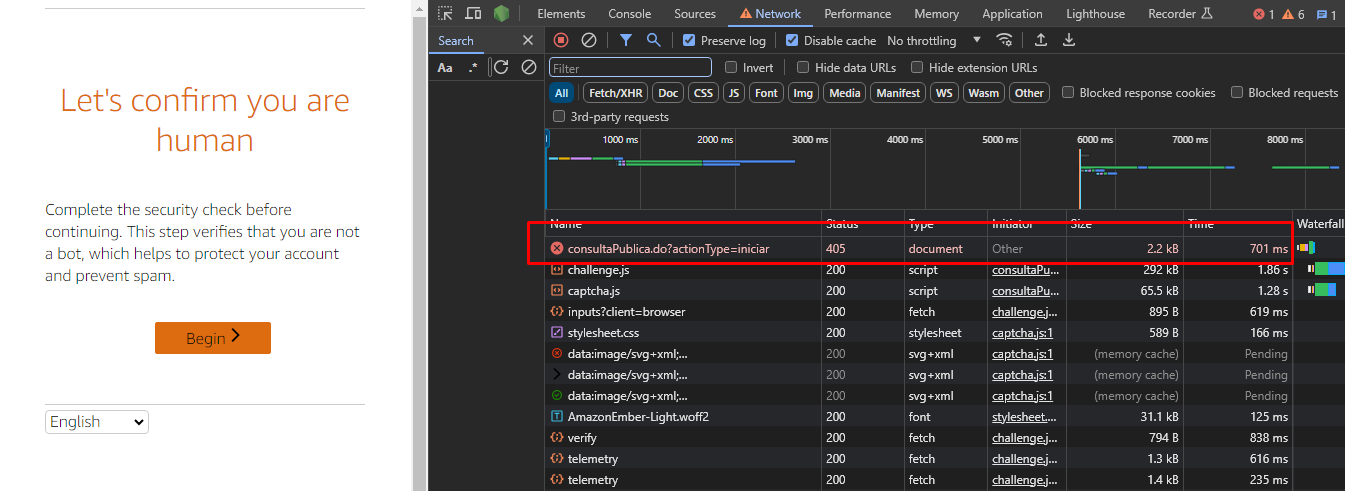
When navigating to the site, you get a 405 response and an HTML page with captcha. You can extract all parameters from this page:
Task creation methods
Option 1
- AmazonTask (without proxy)
- AmazonTask (with proxy)
https://api.capmonster.cloud/createTask
Request
{
  "clientKey": "API_KEY",
  "task": {
    "type": "AmazonTask",
    "websiteURL": "https://example.com/index.html",
    "websiteKey": "h15hX7brbaRTR...Za1_1",
    "userAgent": "userAgentPlaceholder",
    "captchaScript": "https://234324vgvc23.yejk.captcha-sdk.awswaf.com/234324vgvc23/jsapi.js",
    "cookieSolution": true
  }
}
Response
{
  "errorId": 0,
  "taskId": 407533072
}
https://api.capmonster.cloud/createTask
Request
{
  "clientKey": "API_KEY",
  "task": {
    "type": "AmazonTask",
    "websiteURL": "https://example.com/index.html",
    "websiteKey": "h15hX7brbaRTR...Za1_1",
    "userAgent": "userAgentPlaceholder",
    "captchaScript": "https://234324vgvc23.yejk.captcha-sdk.awswaf.com/234324vgvc23/jsapi.js",
    "cookieSolution": true,
    "proxyType": "http",
    "proxyAddress": "8.8.8.8",
    "proxyPort": 8080,
    "proxyLogin": "proxyLoginHere",
    "proxyPassword": "proxyPasswordHere"
  }
}
Response
{
  "errorId": 0,
  "taskId": 407533072
}
Option 2
- AmazonTask (without proxy)
- AmazonTask (with proxy)
https://api.capmonster.cloud/createTask
Request
{
  "clientKey": "API_KEY",
  "task": {
    "type": "AmazonTask",
    "websiteURL": "https://example.com",
    "challengeScript": "https://41bcdd4fb3cb.610cd090.us-east-1.token.awswaf.com/41bcdd4fb3cb/0d21de737ccb/cd77baa6c832/challenge.js",
    "captchaScript": "https://41bcdd4fb3cb.610cd090.us-east-1.captcha.awswaf.com/41bcdd4fb3cb/0d21de737ccb/cd77baa6c832/captcha.js",
    "websiteKey": "AQIDA...wZwdADFLWk7XOA==",
    "context": "qoJYgnKsc...aormh/dYYK+Y=",
    "iv": "CgAAXFFFFSAAABVk",
    "cookieSolution": true
  }
}
Response
{
  "errorId": 0,
  "taskId": 407533072
}
https://api.capmonster.cloud/createTask
Request
{
  "clientKey": "API_KEY",
  "task": {
    "type": "AmazonTask",
    "websiteURL": "https://example.com",
    "challengeScript": "https://41bcdd4fb3cb.610cd090.us-east-1.token.awswaf.com/41bcdd4fb3cb/0d21de737ccb/cd77baa6c832/challenge.js",
    "captchaScript": "https://41bcdd4fb3cb.610cd090.us-east-1.captcha.awswaf.com/41bcdd4fb3cb/0d21de737ccb/cd77baa6c832/captcha.js",
    "websiteKey": "AQIDA...wZwdADFLWk7XOA==",
    "context": "qoJYgnKsc...aormh/dYYK+Y=",
    "iv": "CgAAXFFFFSAAABVk",
    "cookieSolution": true,
    "proxyType": "http",
    "proxyAddress": "8.8.8.8",
    "proxyPort": 8080,
    "proxyLogin": "proxyLoginHere",
    "proxyPassword": "proxyPasswordHere"
  }
}
Response
{
  "errorId": 0,
  "taskId": 407533072
}
Option 3
- AmazonTask (without proxy)
- AmazonTask (with proxy)
https://api.capmonster.cloud/createTask
Request
{
  "clientKey": "API_KEY",
  "task": {
    "type": "AmazonTask",
    "websiteURL": "https://example.com",
    "challengeScript": "https://41bcdd4fb3cb.610cd090.us-east-1.token.awswaf.com/41bcdd4fb3cb/0d21de737ccb/cd77baa6c832/challenge.js",
    "captchaScript": "",
    "websiteKey": "",
    "context": "",
    "iv": "",
    "cookieSolution": true
  }
}
Response
{
  "errorId": 0,
  "taskId": 407533072
}
https://api.capmonster.cloud/createTask
Request
{
  "clientKey": "API_KEY",
  "task": {
    "type": "AmazonTask",
    "websiteURL": "https://example.com",
    "challengeScript": "https://41bcdd4fb3cb.610cd090.us-east-1.token.awswaf.com/41bcdd4fb3cb/0d21de737ccb/cd77baa6c832/challenge.js",
    "captchaScript": "",
    "websiteKey": "",
    "context": "",
    "iv": "",
    "cookieSolution": true,
    "proxyType": "http",
    "proxyAddress": "8.8.8.8",
    "proxyPort": 8080,
    "proxyLogin": "proxyLoginHere",
    "proxyPassword": "proxyPasswordHere"
  }
}
Response
{
  "errorId": 0,
  "taskId": 407533072
}
Get task result method
Use the getTaskResult method to get the AmazonTask solution.
https://api.capmonster.cloud/getTaskResult
Request
{
  "clientKey":"API_KEY",
  "taskId": 407533072
}
Response
{
  "errorId":0,
  "status":"ready",
  "solution": {
    "cookies": {
      "aws-waf-token": "10115f5b-ebd8-45c7-851e-cfd4f6a82e3e:EAoAua1QezAhAAAA:dp7sp2rXIRcnJcmpWOC1vIu+yq/A3EbR6b6K7c67P49usNF1f1bt/Af5pNcZ7TKZlW+jIZ7QfNs8zjjqiu8C9XQq50Pmv2DxUlyFtfPZkGwk0d27Ocznk18/IOOa49Rydx+/XkGA7xoGLNaUelzNX34PlyXjoOtL0rzYBxMAQy0D1tn+Q5u97kJBjs5Mytqu9tXPIPCTSn4dfXv5llSkv9pxBEnnhwz6HEdmdJMdfur+YRW1MgCX7i3L2Y0/CNL8kd8CEhTMzwyoXekrzBM="
    },
    "userAgent": "userAgentPlaceholder"
  }
}
How to find all required parameters for task creation
Automatically
To automate parameter extraction, you can retrieve them via a browser (regular or headless, e.g., using Playwright) or directly from HTTP requests. Since dynamic parameter values are short-lived, it is recommended to use them immediately after retrieval.
The provided code snippets are basic examples for learning how to extract the required parameters. The exact implementation will depend on your captcha page, its structure, and the HTML elements and selectors used.
- JavaScript
- Python
- C#
Show code (Node.js)
import { chromium } from "playwright";

const CAPTCHA_URL = "https://example.com";

(async () => {
  const browser = await chromium.launch({ headless: false });
  const page = await browser.newPage();

  await page.goto(CAPTCHA_URL);

  const captchaParams = await page.evaluate(() => {
    const gokuProps = window.gokuProps || {};
    const scripts = Array.from(document.querySelectorAll("script"));

    return {
      websiteKey: gokuProps.key || "Not found",
      context: gokuProps.context || "Not found",
      iv: gokuProps.iv || "Not found",
      challengeScriptUrl:
        scripts.find((script) => script.src.includes("challenge.js"))?.src ||
        "Not found",
      captchaScriptUrl:
        scripts.find((script) => script.src.includes("captcha.js"))?.src ||
        "Not found",
    };
  });

  console.log("Captcha params:", captchaParams);

  await browser.close();
})();
Show code
import asyncio
from playwright.async_api import async_playwright

CAPTCHA_URL = "https://example.com"

async def main():
    async with async_playwright() as p:
        browser = await p.chromium.launch(headless=False)
        page = await browser.new_page()

        await page.goto(CAPTCHA_URL)

        captcha_params = await page.evaluate("""
            () => {
                const gokuProps = window.gokuProps || {};
                const scripts = Array.from(document.querySelectorAll('script'));

                return {
                    websiteKey: gokuProps.key || "Not found",
                    context: gokuProps.context || "Not found",
                    iv: gokuProps.iv || "Not found",
                    challengeScriptUrl: scripts.find(script => script.src.includes('challenge.js'))?.src ||
                        "Not found",
                    captchaScriptUrl: scripts.find(script => script.src.includes('captcha.js'))?.src ||
                        "Not found"
                };
            }
        """)

        print("Captcha params:", captcha_params)

        await browser.close()

asyncio.run(main())
Show code
using System;
using System.Collections.Generic;
using System.Threading.Tasks;
using Microsoft.Playwright;

class Program
{
    public static async Task Main(string[] args)
    {
        const string CAPTCHA_URL = "https://example.com";

        using var playwright = await Playwright.CreateAsync();
        var browser = await playwright.Chromium.LaunchAsync(new BrowserTypeLaunchOptions
        {
            Headless = false
        });

        var context = await browser.NewContextAsync();
        var page = await context.NewPageAsync();

        await page.GotoAsync(CAPTCHA_URL);

        var captchaParams = await page.EvaluateAsync<Dictionary<string, string>>(@"
            (() => {
                const gokuProps = window.gokuProps || {};
                const scripts = Array.from(document.querySelectorAll('script'));
                return {
                    websiteKey: gokuProps.key || 'Not found',
                    context: gokuProps.context || 'Not found',
                    iv: gokuProps.iv || 'Not found',
                    challengeScriptUrl: scripts.find(script => script.src.includes('challenge.js'))?.src ||
                    'Not found',
                    captchaScriptUrl: scripts.find(script => script.src.includes('captcha.js'))?.src ||
                    'Not found'
                };
            })()
        ");

        Console.WriteLine("Captcha params:");
        foreach (var param in captchaParams)
        {
            Console.WriteLine($"{param.Key}: {param.Value}");
        }

        await browser.CloseAsync();
    }
}
Use the SDK library
- JavaScript
- Python
- C#
Show code (for browser)
// https://github.com/ZennoLab/capmonstercloud-client-js

import { CapMonsterCloudClientFactory, ClientOptions, AmazonRequest } from '@zennolab_com/capmonstercloud-client';

const API_KEY = "YOUR_API_KEY";  // Specify your CapMonster Cloud API key

document.addEventListener("DOMContentLoaded", async () => {
    const client = CapMonsterCloudClientFactory.Create(
        new ClientOptions({ clientKey: API_KEY })
    );

    // Basic example without proxy
    // CapMonster Cloud automatically uses its own proxies
    let amazonRequest = new AmazonRequest({
        websiteURL: "https://example.com", // URL of the page protected by AWS WAF
        websiteKey: "websiteKey",
        challengeScript: "https://41bcdd4fb3cb.610cd090.us-east-1.token.awswaf.com/41bcdd4fb3cb/0d21de737ccb/cd77baa6c832/challenge.js",
        captchaScript: "https://41bcdd4fb3cb.610cd090.us-east-1.captcha.awswaf.com/41bcdd4fb3cb/0d21de737ccb/cd77baa6c832/captcha.js",
        context: "qoJYgnKsc...aormh/dYYK+Y=",
        iv: "CgAAXFFFFSAAABVk",
        cookieSolution: false
    });

    // Example of using your own proxy
    // Uncomment this block if you want to use your own proxy
    /*
    const proxy = {
        proxyType: "http",
        proxyAddress: "123.45.67.89",
        proxyPort: 8080,
        proxyLogin: "username",
        proxyPassword: "password"
    };

    amazonRequest = new AmazonRequest({
        websiteURL: "https://example.com",
        websiteKey: "websiteKey",
        challengeScript: "https://41bcdd4fb3cb.610cd090.us-east-1.token.awswaf.com/41bcdd4fb3cb/0d21de737ccb/cd77baa6c832/challenge.js",
        captchaScript: "https://41bcdd4fb3cb.610cd090.us-east-1.captcha.awswaf.com/41bcdd4fb3cb/0d21de737ccb/cd77baa6c832/captcha.js",
        context: "qoJYgnKsc...aormh/dYYK+Y=",
        iv: "CgAAXFFFFSAAABVk",
        proxy,
        userAgent: "userAgentPlaceholder",
        cookieSolution: false
    });
    */

    // Optionally, you can check the balance
    const balance = await client.getBalance();
    console.log("Balance:", balance);

    const result = await client.Solve(amazonRequest);
    console.log("Solution:", result);
});
Show code (Node.js)
// https://github.com/ZennoLab/capmonstercloud-client-js

import { CapMonsterCloudClientFactory, ClientOptions, AmazonRequest } from '@zennolab_com/capmonstercloud-client';

const API_KEY = "YOUR_API_KEY";  // Specify your CapMonster Cloud API key

async function solveAwsWaf() {
    const client = CapMonsterCloudClientFactory.Create(
        new ClientOptions({ clientKey: API_KEY })
    );

    // Basic example without proxy
    // CapMonster Cloud automatically uses its own proxies
    let amazonRequest = new AmazonRequest({
        websiteURL: "https://example.com",               // URL of the page protected by AWS WAF
        websiteKey: "websiteKey",
        challengeScript: "https://41bcdd4fb3cb.610cd090.us-east-1.token.awswaf.com/41bcdd4fb3cb/0d21de737ccb/cd77baa6c832/challenge.js",
        captchaScript: "https://41bcdd4fb3cb.610cd090.us-east-1.captcha.awswaf.com/41bcdd4fb3cb/0d21de737ccb/cd77baa6c832/captcha.js",
        context: "qoJYgnKsc...aormh/dYYK+Y=",
        iv: "CgAAXFFFFSAAABVk",
        cookieSolution: false
    });

    // Example of using your own proxy
    // Uncomment this block if you want to use your own proxy

    /*
    const proxy = {
        proxyType: "http",
        proxyAddress: "123.45.67.89",
        proxyPort: 8080,
        proxyLogin: "username",
        proxyPassword: "password"
    };

    amazonRequest = new AmazonRequest({
        websiteURL: "https://example.com", // URL of the page protected by AWS WAF
        websiteKey: "websiteKey",
        challengeScript: "https://41bcdd4fb3cb.610cd090.us-east-1.token.awswaf.com/41bcdd4fb3cb/0d21de737ccb/cd77baa6c832/challenge.js",
        captchaScript: "https://41bcdd4fb3cb.610cd090.us-east-1.captcha.awswaf.com/41bcdd4fb3cb/0d21de737ccb/cd77baa6c832/captcha.js",
        context: "qoJYgnKsc...aormh/dYYK+Y=",
        iv: "CgAAXFFFFSAAABVk",
        proxy,
        userAgent: "userAgentPlaceholder",
        cookieSolution: false
    });
    */

    // Optionally, you can check the balance
    const balance = await client.getBalance();
    console.log("Balance:", balance);

    const result = await client.Solve(amazonRequest);
    console.log("Solution:", result);
}

solveAwsWaf().catch(console.error);
Show code
# https://github.com/ZennoLab/capmonstercloud-client-python

import asyncio
from capmonstercloudclient import CapMonsterClient, ClientOptions
from capmonstercloudclient.requests import AmazonWafRequest
# from capmonstercloudclient.requests.baseRequestWithProxy import ProxyInfo  # Uncomment if you plan to use a proxy

API_KEY = "YOUR_API_KEY"  # Specify your CapMonster Cloud API key

async def solve_amazon_waf_captcha():
    client_options = ClientOptions(api_key=API_KEY)
    cap_monster_client = CapMonsterClient(options=client_options)

    # Basic example without proxy
    # CapMonster Cloud automatically uses its own proxies
    amazon_waf_request = AmazonWafRequest(
        websiteUrl="https://example.com",  # URL of the page protected by AWS WAF
        challengeScript="https://example.com/path/to/challenge.js",  # Replace with correct value
        captchaScript="https://example.com/path/to/captcha.js",
        websiteKey="your_website_key",
        context="your_context_value",
        iv="your_iv_value",
        cookieSolution=False
    )

    # Example of using your own proxy
    # Uncomment this block if you want to use your own proxy
    # proxy = ProxyInfo(
    #     proxyType="http",
    #     proxyAddress="123.45.67.89",
    #     proxyPort=8080,
    #     proxyLogin="username",
    #     proxyPassword="password"
    # )
    #
    # amazon_waf_request = AmazonWafRequest(
    #     websiteUrl="https://example.com",
    #     challengeScript="https://example.com/path/to/challenge.js",
    #     captchaScript="https://example.com/path/to/captcha.js",
    #     websiteKey="your_website_key",
    #     context="your_context_value",
    #     iv="your_iv_value",
    #     cookieSolution=False,
    #     proxy=proxy
    # )

    # Optionally, you can check the balance
    balance = await cap_monster_client.get_balance()
    print("Balance:", balance)

    result = await cap_monster_client.solve_captcha(amazon_waf_request)
    print("Solution:", result)

asyncio.run(solve_amazon_waf_captcha())
Show code
// https://github.com/ZennoLab/capmonstercloud-client-dotnet

using System;
using System.Threading.Tasks;
using Zennolab.CapMonsterCloud;
using Zennolab.CapMonsterCloud.Requests;

class Program
{
    static async Task Main(string[] args)
    {
        // Specify your CapMonster Cloud API key
        var clientOptions = new ClientOptions
        {
            ClientKey = "YOUR_API_KEY"
        };

        var cmCloudClient = CapMonsterCloudClientFactory.Create(clientOptions);

        // Basic example without proxy
        // CapMonster Cloud automatically uses its own proxies

        var amazonWafRequest = new AmazonWafRequest
        {
            WebsiteUrl = "https://example.com",
            WebsiteKey = "website_key",
            ChallengeScript = "URL_of_challenge.js",
            CaptchaScript = "URL_of_captcha.js",
            Context = "context_value",
            Iv = "iv_value",
            CookieSolution = false
        };

        // Example of using your own proxy
        // Uncomment this block if you want to use your own proxy

        /*
        var amazonWafRequest = new AmazonWafRequest
        {
            WebsiteUrl = "https://example.com",
            WebsiteKey = "website_key",
            ChallengeScript = "URL_of_challenge.js",
            CaptchaScript = "URL_of_captcha.js",
            Context = "context_value",
            Iv = "iv_value",
            CookieSolution = false,

            Proxy = new ProxyContainer(
                "123.45.67.89",
                8080,
                ProxyType.Http,
                "username",
                "password"
            )
        };
        */

        // Optionally, you can check the balance
        var balance = await cmCloudClient.GetBalanceAsync();
        Console.WriteLine("Balance: " + balance);

        var amazonWafResult = await cmCloudClient.SolveAsync(amazonWafRequest);

        Console.WriteLine("ExistingToken: " + amazonWafResult.Solution.ExistingToken);
        Console.WriteLine("CaptchaVoucher: " + amazonWafResult.Solution.CaptchaVoucher);
    }
}