Altcha - Alternative CAPTCHA
Examples of tasks
- PoW (Proof-of-Work)
- Code Captcha

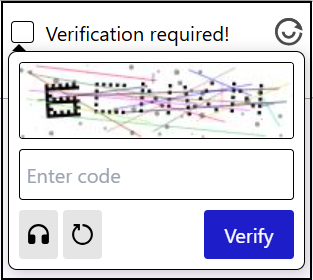
There is also an invisible captcha (Invisible Captcha), which has no visible interface on the page and does not require any user actions — verification occurs in the background.
CapMonster Cloud uses built-in proxies by default — their cost is already included in the service. You only need to specify your own proxies in cases where the website does not accept the token or access to the built-in services is restricted.
If you are using a proxy with IP authorization, make sure to whitelist the address 65.21.190.34.
Request parameters
IMPORTANT: some parameter values are dynamic — they change with each render of the page using Altcha.
Extract them immediately before creating the task to avoid errors during solving.
See examples of parameter extraction in the section How to find all required parameters for task creation.
type<string>requiredCustomTask
class<string>requiredaltcha
websiteURL<string>requiredThe main page URL where the Altcha is located.
websiteKey<string>requiredFor this task, sending an empty string is allowed.
challenge (inside metadata)<string>requiredUnique task identifier obtained from the website.
iterations (inside metadata)<string>requiredNumber of iterations or the maximum number for calculations.
Important: the
iterationsparameter corresponds to themaxnumbervalue!
salt (inside metadata)<string>requiredSalt obtained from the site, used for hash generation.
Important: Always send the full value of the
saltfield! If the site returns something like this:
"salt":"46d5b1c8871e5152d902ee3f?edk=1493462145de1ce33a52fb569b27a364&codeChallenge=464Cjs7PbiJJhJZ_ReJ-y9UGGDndcpsnP6vS8x1nEJyTkhjQkJyL2jcnYEuMKcrG&expires=1761048664"
— copy and include it in your request exactly as it is, with all characters and parameters (edk, codeChallenge, etc.).
signature (inside metadata)<string>requiredDigital signature of the request.
userAgent<string>optionalBrowser User-Agent.
Pass only a valid UA from Windows OS. Currently it is: userAgentPlaceholder
proxyType<string>optionalhttp - regular http/https proxy;
https - try this option only if "http" does not work (required for some custom proxies);
socks4 - socks4 proxy;
socks5 - socks5 proxy.
proxyAddress<string>optionalIPv4/IPv6 proxy address. Not allowed:
- using transparent proxies (where the client IP is visible);
- using proxies on local machines.
proxyPort<integer>optionalProxy port.
proxyLogin<string>optionalProxy server login.
proxyPassword<string>optionalProxy server password.
Create task method
- Altcha CustomTask (without proxy)
- Altcha CustomTask (with proxy)
https://api.capmonster.cloud/createTask
Request
{
  "clientKey": "API_KEY",
  "task": {
    "type": "CustomTask",
    "class": "altcha",
    "websiteURL": "https://example.com",
    "websiteKey": "",
    "userAgent": "userAgentPlaceholder",
    "metadata": {
      "challenge": "3dd28253be6cc0c54d95f7f98c517e68744597cc6e66109619d1ac975c39181c",
      "iterations": "5000",
      "salt": "46d5b1c8871e5152d902ee3f?edk=1493462145de1ce33a52fb569b27a364&codeChallenge=464Cjs7PbiJJhJZ_ReJ-y9UGGDndcpsnP6vS8x1nEJyTkhjQkJyL2jcnYEuMKcrG&expires=1761048664",
      "signature": "4b1cf0e0be0f4e5247e50b0f9a449830f1fbca44c32ff94bc080146815f31a18"
    }
  }
}
Response
{
  "errorId": 0,
  "taskId": 407533072
}
https://api.capmonster.cloud/createTask
Request
{
  "clientKey": "API_KEY",
  "task": {
    "type": "CustomTask",
    "class": "altcha",
    "websiteURL": "https://example.com",
    "websiteKey": "",
    "userAgent": "userAgentPlaceholder",
    "metadata": {
      "challenge": "3dd28253be6cc0c54d95f7f98c517e68744597cc6e66109619d1ac975c39181c",
      "iterations": "5000",
      "salt": "46d5b1c8871e5152d902ee3f?edk=1493462145de1ce33a52fb569b27a364&codeChallenge=464Cjs7PbiJJhJZ_ReJ-y9UGGDndcpsnP6vS8x1nEJyTkhjQkJyL2jcnYEuMKcrG&expires=1761048664",
      "signature": "4b1cf0e0be0f4e5247e50b0f9a449830f1fbca44c32ff94bc080146815f31a18"
    },
    "proxyType":"http",
    "proxyAddress":"8.8.8.8",
    "proxyPort":8080,
    "proxyLogin":"proxyLoginHere",
    "proxyPassword":"proxyPasswordHere"
  }
}
Response
{
  "errorId": 0,
  "taskId": 407533072
}
Get task result method
Use the getTaskResult method to obtain the Altcha solution.
https://api.capmonster.cloud/getTaskResult
Request
{
  "clientKey": "API_KEY",
  "taskId": 407533072
}
Response
{
  "errorId": 0,
  "status": "ready",
  "solution": {
    "data": {
      "token": "eyJhbGdvcml...Ljc2MDEzM30==",
      "number": 44619
    }
  }
}
How to find all required parameters for task creation
Below are examples of extracting Altcha parameters needed to submit a solving task to CapMonster Cloud. Note that captcha implementations may differ across websites, so parameter extraction methods may vary.
-
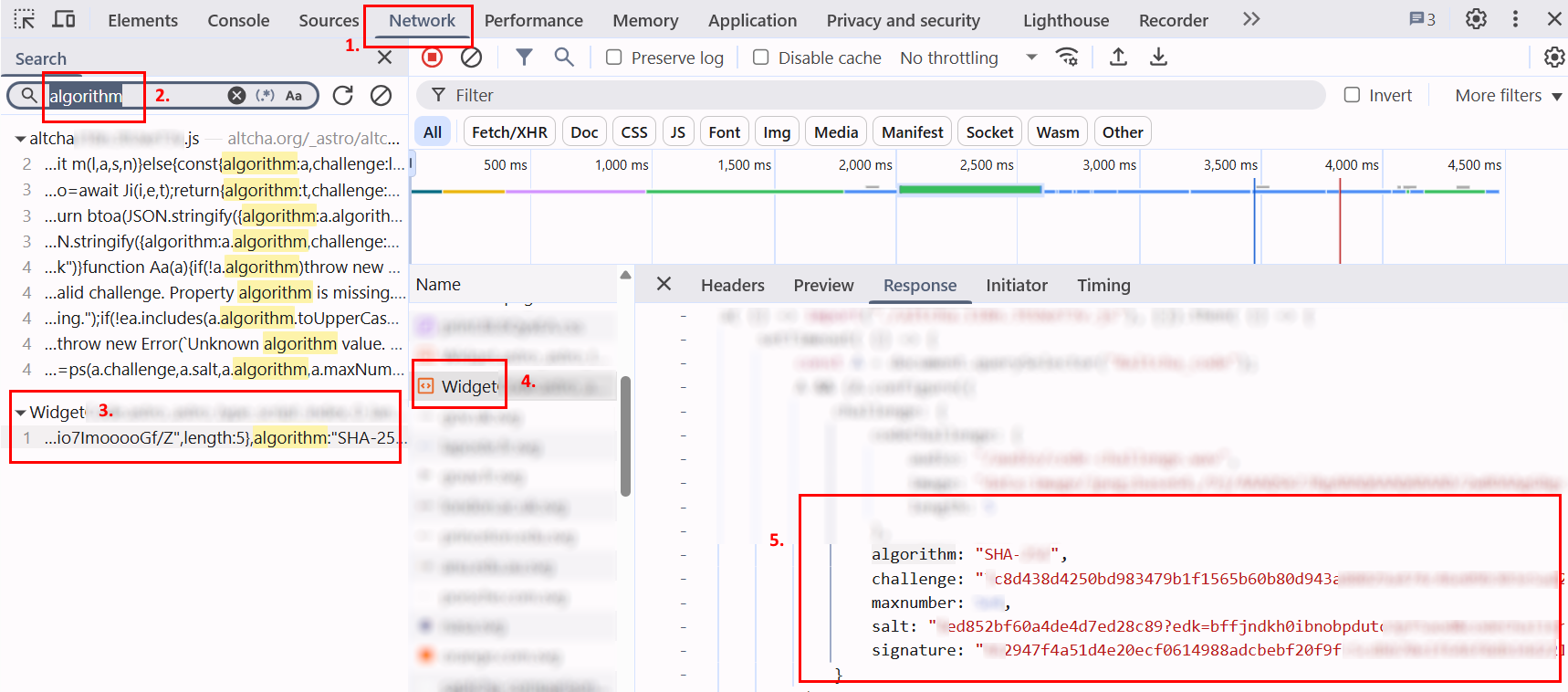
Open the Altcha page in your browser, launch DevTools (F12 or Ctrl+Shift+I), and go to the Network tab.
-
Click on the captcha checkbox and complete it manually. In the Network search field, type any parameter name (e.g., "algorithm").
-
Find the request that contains JSON with the parameters.
-
Click on the request and, if necessary, go to the Response tab to view server-returned data.
-
Copy the parameters — these values should be used to create the task in CapMonster Cloud.
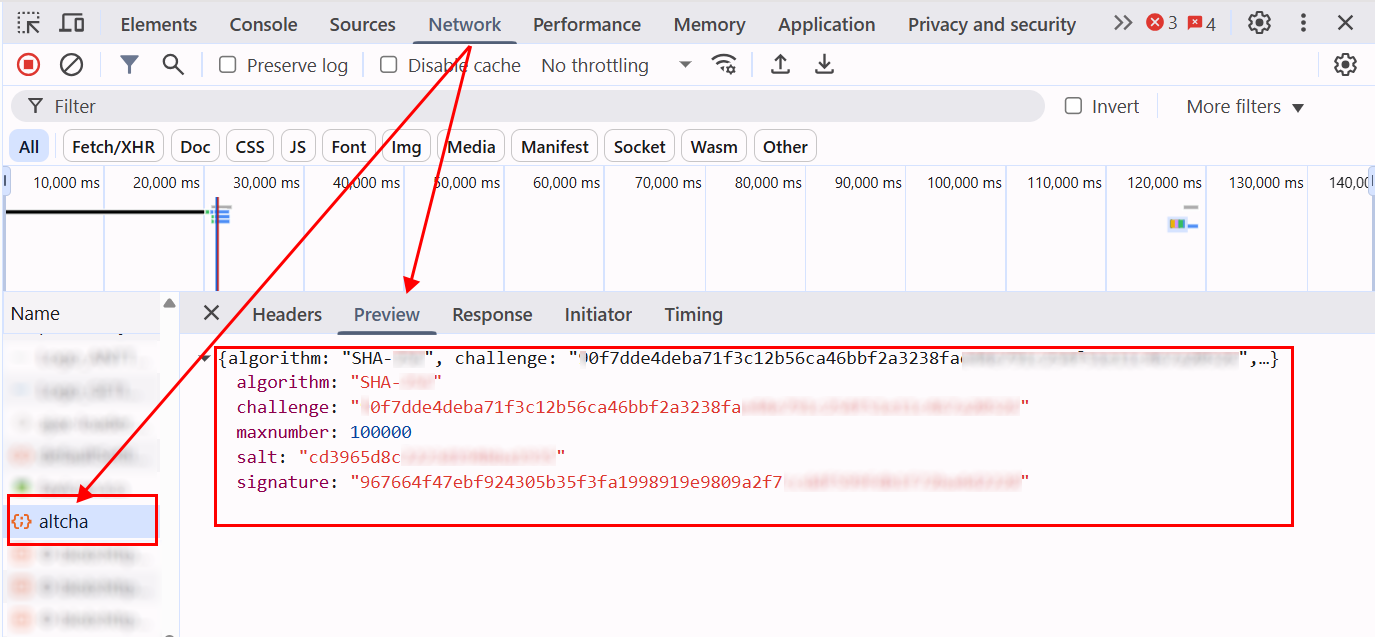
In general, after activating the captcha on the page, you need to analyze network requests and identify all interactions related to its operation. These actions are necessary to determine the parameters and understand the verification process. For example, the screenshot below shows a request named
altchacontaining all key parameters:
After obtaining the required parameters, you need to pass them into the metadata object when creating a task in CapMonster Cloud. Example structure:
metadata: {
  challenge: "<challenge value>",
  iterations: "<maxnumber value>", // must be enclosed in quotes, like all other parameters
  salt: "<salt value>",
  signature: "<signature value>",
}
You can also use the following code examples to extract all parameters:
GET Request Example
Performs an HTTP GET request to the specified URL and logs the response to the console.
const url = 'https://example-portal.mysite.rs.gov.br/Altcha/Example'; // API endpoint from which the captcha parameters are extracted

fetch(url, { method: 'GET' })
  .then(res => res.text())
  .then(data => console.log('Response:', data))
  .catch(err => console.error(err));
Parameter Interceptor
Browser script that overrides fetch and XMLHttpRequest to automatically monitor network requests and extract key Altcha captcha parameters. Paste this script into the browser console on the captcha page and activate the captcha — the required parameters will be automatically logged in the console.
(function() {
  const keywords = ['algorithm','challenge','maxnumber','salt','signature'];
  const foundParams = {};

  const intercept = (url, body, text) => {
    keywords.forEach(key => {
      if ((url && url.includes(key)) || (body && body.includes(key)) || (text && text.includes(key))) {
        foundParams[key] = foundParams[key] || [];
        if (url?.includes(key)) foundParams[key].push(url);
        if (body?.includes(key)) foundParams[key].push(body);
        if (text?.includes(key)) foundParams[key].push(text);
      }
    });
    if (Object.keys(foundParams).length) console.log('Found parameters:', foundParams);
  };

  const originalFetch = window.fetch;
  window.fetch = async (...args) => {
    const [resource, config] = args;
    const url = typeof resource === 'string' ? resource : resource.url;
    const body = config?.body;
    const response = await originalFetch.apply(this, args);
    try {
      const text = await response.clone().text();
      intercept(url, body, text);
    } catch {}
    return response;
  };

  const originalOpen = XMLHttpRequest.prototype.open;
  const originalSend = XMLHttpRequest.prototype.send;

  XMLHttpRequest.prototype.open = function(method, url, ...rest) {
    this._url = url;
    return originalOpen.call(this, method, url, ...rest);
  };

  XMLHttpRequest.prototype.send = function(body) {
    this.addEventListener('load', () => intercept(this._url, body, this.responseText));
    return originalSend.call(this, body);
  };
})();
Example of automatic Altcha solving with Node.js and Playwright
In some cases, submitting just the number parameter is enough to confirm the solution. However, sometimes the site requires all parameters, encoded in base64.
For example:
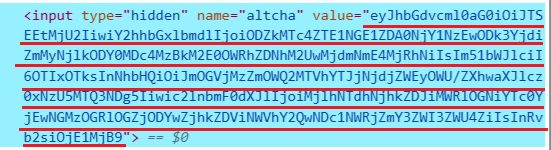
Decoding this value produces a JSON object containing the data used for captcha validation:
{
  "algorithm": "SHA-256",
  "challenge": "86d178e154a5d04665710897b7bfc269d86407830d3a49dad3a3e027f6a824a6",
  "number": 92199,
  "salt": "f8ec36f9d615aa2c67c7ea29e?expires=1759147489",
  "signature": "29a57a68dd2b1de8cba74b104c38de8fc860f8dd5b5eacd04755dcff7eb7ee8f",
  "took": 1520
}
CapMonster Cloud returns number separately as well as the full set of parameters encoded in base64 (including number).
In this example, solution confirmation is done using a token that contains the full set of parameters.
If you need to submit only the number, you must adjust the confirmation logic accordingly.
Show code example
const { chromium } = require("playwright");

// Replace the following values with your own:
// - API_KEY → your CapMonster Cloud key
// - ALTCHA_PAGE → URL of the page with Altcha
const API_KEY = "your_capmonster_cloud_api_key";
const ALTCHA_PAGE = "https://url_with_altcha";

(async () => {
  const browser = await chromium.launch({ headless: false, devtools: true });
  const context = await browser.newContext();
  const page = await context.newPage();

  await page.route("**/*", (route) => {
    const url = route.request().url();
    if (url.includes("api.capmonster.cloud")) return route.abort();
    return route.continue();
  });

  let challengeResp = null;
  page.on("response", async (response) => {
    try {
      if (response.url().includes("/Altcha/GerarDesafio")) {
        challengeResp = await response.json();
        console.log("Captured /Altcha/GerarDesafio:", challengeResp);
      }
    } catch {}
  });

  await page.goto(ALTCHA_PAGE, { waitUntil: "networkidle" });

  try {
    await page.waitForSelector("altcha-widget input[type='checkbox']", { timeout: 10000 });
    await page.click("altcha-widget input[type='checkbox']");
  } catch {
    const widgetHandle = await page.$("altcha-widget");
    if (widgetHandle) await widgetHandle.click();
  }

  const start = Date.now();
  while (!challengeResp && Date.now() - start < 30000) {
    await new Promise((r) => setTimeout(r, 300));
  }
  if (!challengeResp) {
    console.error("Failed to capture /Altcha/GerarDesafio.");
    await browser.close();
    return;
  }

  const { challenge, salt, signature, maxnumbers } = challengeResp;

  const createTaskBody = {
    clientKey: API_KEY,
    task: {
      type: "CustomTask",
      class: "altcha",
      websiteURL: ALTCHA_PAGE,
      websiteKey: "",
      userAgent:
        "userAgentPlaceholder",
      metadata: {
        challenge,
        iterations: maxnumbers,
        salt,
        signature,
      },
    },
  };

  const taskResp = await fetch("https://api.capmonster.cloud/createTask", {
    method: "POST",
    headers: { "Content-Type": "application/json" },
    body: JSON.stringify(createTaskBody),
  }).then((r) => r.json());

  console.log("CreateTask response:", taskResp);
  if (!taskResp || !taskResp.taskId) {
    console.error("CreateTask failed:", taskResp);
    await browser.close();
    return;
  }

  const taskId = taskResp.taskId;

  let fullSolution = null;
  const maxPollMs = 120000;
  const pollStart = Date.now();
  while (Date.now() - pollStart < maxPollMs) {
    const res = await fetch("https://api.capmonster.cloud/getTaskResult", {
      method: "POST",
      headers: { "Content-Type": "application/json" },
      body: JSON.stringify({ clientKey: API_KEY, taskId }),
    }).then((r) => r.json());

    if (res.status === "ready") {
      fullSolution = res.solution;
      console.log("Full solution from CapMonster:", fullSolution);
      break;
    }
    await new Promise((r) => setTimeout(r, 3000));
  }

  if (!fullSolution) {
    console.error("Solution was not received within the allocated time.");
    await browser.close();
    return;
  }

  const token =
    (fullSolution && fullSolution.data && fullSolution.data.token) ||
    fullSolution.token ||
    (fullSolution && fullSolution.data) ||
    null;

  if (!token) {
    console.error("Token not found in CapMonster response:", fullSolution);
    await browser.close();
    return;
  }

  await page.evaluate((tokenValue) => {
    const cpv = document.querySelector("#captchaParaValidar");
    if (cpv) {
      cpv.value = tokenValue;
    } else {
      const created = document.createElement("input");
      created.type = "hidden";
      created.id = "captchaParaValidar";
      created.name = "captchaParaValidar";
      created.value = tokenValue;
      (document.querySelector("form") || document.body).appendChild(created);
    }

    let alt = document.querySelector('input[name="altcha"]');
    if (alt) {
      alt.value = tokenValue;
    } else {
      const created2 = document.createElement("input");
      created2.type = "hidden";
      created2.name = "altcha";
      created2.value = tokenValue;
      (document.querySelector("form") || document.body).appendChild(created2);
    }

    const widget = document.querySelector("altcha-widget");
    if (widget) {
      widget.setAttribute("data-state", "verified");
      const checkbox = widget.querySelector("input[type='checkbox']");
      if (checkbox) {
        checkbox.checked = true;
        checkbox.dispatchEvent(new Event("change", { bubbles: true }));
      }
      const label = widget.querySelector(".altcha-label");
      if (label) label.textContent = "Verified";
    }
  }, token);

  console.log("Token injected:", token);
})();