Passing module name
In working with automatic captcha recognition, accuracy and processing speed are critical. Different services use their own unique types of captchas, and a universal solution does not always handle them equally effectively. For example, captchas from Google, SolveMedia, WhatsApp, or Yandex may have their own specifics, which can cause the standard recognition module to work more slowly or with errors.
To improve efficiency and reduce the likelihood of incorrect recognition, CapMonster Cloud allows you to specify a particular module that will process your captcha. The system will apply a specialized recognition algorithm designed for that specific service instead of using a universal captcha processing method.
How to pass module name to CapMonster Cloud, using ApiKey field only
In order to send to CapMonsterCloud information about the module that will recognize your captcha, using only the field to specify ApiKey, you can add the module name to the key in the following format: {apikey}__moduleName
For example, “00f87cb0f01330d33709ce3339ad0c8c__solvemedia” (!important, separate the API key and module name with a double underscore)
The list of available module names:
| amazon |  |
| apple |  |
| botdetect |  |
 | |
| gmx | 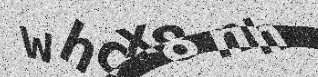 |
 | |
| hotmail |  |
| mailru |  |
| okeng |  |
| okrus |  |
| partiallyblur |  |
| ramblerrus |  |
| ramblerrusnew |  |
| solvemedia |  |
| steam |  |
| vk |  |
 | |
| wikimedia_paddle_ensemble |  |
| yandex |  |
| yandexnew (two-word captcha) |  |
| yandexwave | |
| captcha_math |  |
| sat |  |
| universal (all other text captchas) |  |
If you were unable to send a captcha to a specific module, please write to our support team, we will help you!